
Authorization
SignalWire REST APIs support two authentication methods: Basic Authentication and Bearer Authentication. Basic Authentication takes either a Project’s credentials or a Personal access token. Each endpoint specifies which method and credential it accepts.
Basic authentication
Basic Authentication is the standard method for authenticating with SignalWire REST APIs, using your Project ID and API Token.
How it works
Include an Authorization header with each request:
To build the credentials string:
- Join your Project ID and API Token with a colon:
ProjectID:APIToken - Base64 encode the result
Example
Given the Project ID a1b2c3d4-e5f6-7890-abcd-ef1234567890 and API Token swapi_0123456789ab0123456789ab0123456789ab:
API tokens created earlier begin with PT and are 50 characters long. Both formats
authenticate the same way, so treat a token as an opaque string rather than matching it
against a pattern. See API credentials for
details on token format.
Finding your credentials
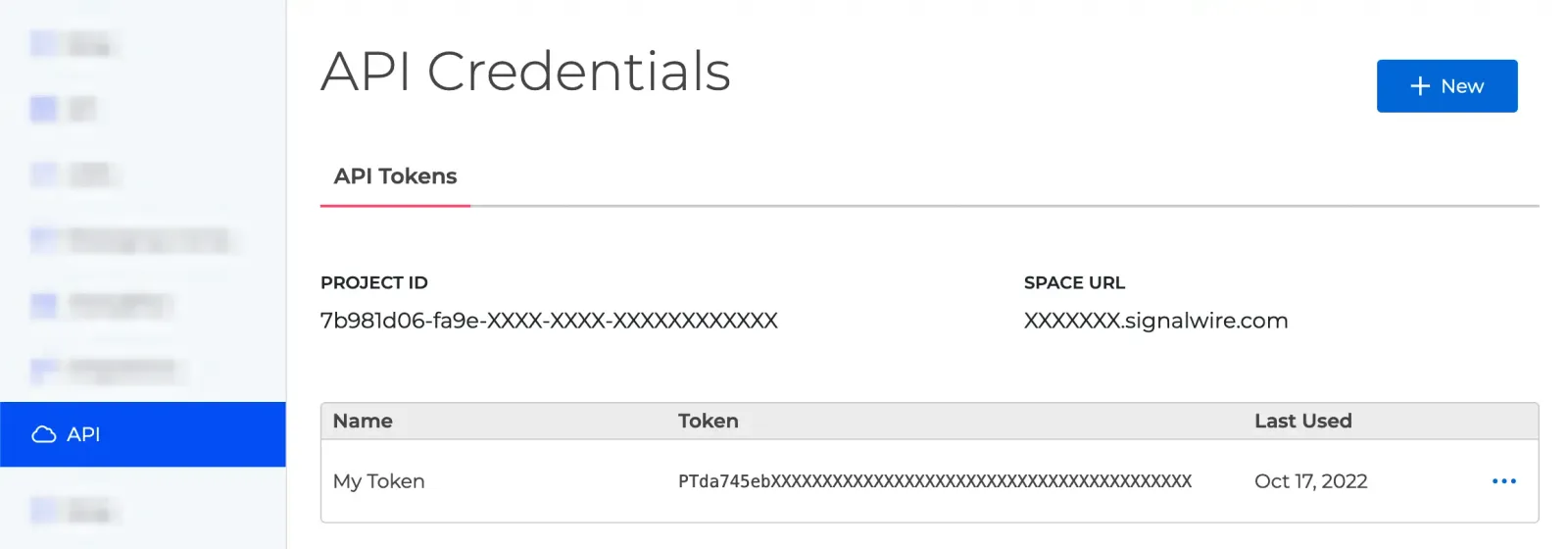
Your Project ID and API Tokens are available in the SignalWire Dashboard.
API token scopes
Tokens can be scoped to limit API access. Select scopes when creating or editing a token in the Dashboard.
Getting a 401 Unauthorized?
Check that your token has the required scope.
Manage scopes in the SignalWire Dashboard.
cURL examples
Personal access tokens
A Personal access token (PAT) authenticates you as a person rather than as a Project. It carries your role in the Space, owner or admin, instead of a Project’s scopes, so it can do what no Project API token can: administer the Space itself, and create or delete root Projects.
Create one from your user menu in the Dashboard, on the Personal Access Tokens page.
The token is prefixed pat_, has no scopes, and can’t be created through the API.
How it works
Send a Personal access token with Basic Authentication, leaving the username empty and using the token as the password:
Where it’s accepted
- The Space Administration API under
/api/spaceaccepts only a Personal access token. It manages the Space name, geographic permissions, members and their Project access, balance, billing, and payment methods. - The Projects and Project Tokens APIs accept either credential on the same path; the
pat_prefix decides which rules apply. With a Personal access token you can create and delete root Projects, and create an API token for a Project named in the request.
Scope
A Personal access token acts only on the Space whose subdomain you call. Its holder must be an owner or admin of that Space; an employee or guest membership is rejected.
On the Projects and Project Tokens APIs it reaches only the Projects its holder is enabled for, plus their Subprojects, and any other Project ID returns 404.
Authorization failures return 401 Unauthorized with the plain text body Unauthorized, not 403, so a “wrong role” and a bad token look the same.
A Space that hasn’t yet verified a phone number receives 401 with a JSON body {"message": "Please validate a phone number to access your account."} on every /api/space endpoint.
Bearer authentication
Bearer Authentication passes a token in the Authorization header. Use this for client-side calls where you can’t safely expose your API credentials.
How it works
Include the token in an Authorization header:
Bearer tokens are short-lived and scoped to specific permissions, unlike API credentials which don’t expire.
Token types
Subscriber Access Token (SAT)
SATs authenticate end users in Fabric applications, letting client apps make API calls on behalf of a subscriber.
How to obtain: Call the Create Subscriber Token endpoint using Basic Auth.
Use case: Client apps connecting to Fabric services, such as listing resource addresses.
Guest Token
Guest Tokens grant limited, temporary access without full subscriber privileges. They’re created from an existing SAT and restricted to specific Fabric addresses.
How to obtain: Call the Create Guest Embed Token endpoint using a SAT.
Use case: Click-to-call widgets, guest access, or anywhere you need temporary access.
Token lifecycle
Bearer tokens expire. Once they do, requests return 401 Unauthorized and you’ll need a fresh token.
To keep a session alive without re-authenticating, call the Refresh Subscriber Token endpoint before expiration.
cURL example
With a SAT token:
Security best practices
- Keep API credentials server-side. Use Bearer tokens for client applications. Treat a Personal access token as you would your own login: it carries your Space role, and it belongs in automation you run yourself.
- Set short token lifetimes to reduce risk if a token leaks.
- Scope tokens narrowly—only grant what’s needed.
- Always use HTTPS. Plain HTTP requests will fail.
- Rotate API tokens periodically. Regenerate API token replaces a token’s value and keeps its ID, name, and scopes.