
Projects
A Project is the container for what you build in a SignalWire Space. Phone numbers, Resources, and API credentials all belong to exactly one Project, which is how you group work by customer, by environment, or by any other classification you like.
Your Space starts with one Project, created alongside the Space itself, and you can add more at any time.
What a Project scopes
Each Project carries its own Project ID and its own API tokens, and every request you make is authenticated as one Project and acts on that Project alone.
Security settings belong to the Project too. Each Project has its own media URL protection settings for recordings, message media, and fax media, and its own choice of whether webhooks and callbacks must use HTTPS.
Not everything divides along Project lines. Voice and messaging rate limits are account-level, counted across every Project in your Space.
Work with Projects in the Dashboard
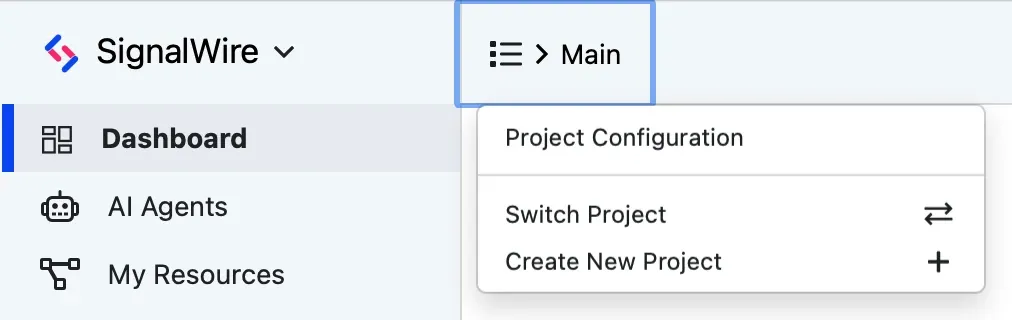
The Project name at the top of the Dashboard opens the Project menu, where every Project-level action starts:
- Project Configuration opens the active Project’s settings, including its media URL protection toggles.
- Switch Project changes which Project the Dashboard shows.
- Create New Project adds a Project to your Space.
A Project’s Project ID, Space URL, API tokens, and signing key are on its API Credentials page, which always shows the active Project — switch Projects to reach another one’s credentials.
Subprojects
A Subproject is a Project nested one level beneath a root Project. It is a full Project with its own Project ID and Resources, but a Subproject cannot contain other Subprojects.
Subprojects can be created and deleted through the API with a Project’s API token, so an application can open and retire a Project per customer, per tenant, or per environment on its own. Root Projects are created in the Dashboard, or through the same API with a Personal access token. That token carries your owner or admin role in the Space rather than a Project’s scopes, so it can create and delete root Projects too.
Create a Subproject
Authenticate as the root Project and send the Subproject’s name, along with any security settings
you want it to start with.
A Subproject cannot create another Subproject, so a request authenticated as a Subproject fails
with 422 nested_subprojects_not_allowed.
SignalWire signs every request it makes to your webhooks with the Project’s signing_key, so your
server can verify that a request really came from SignalWire.
The create response is the only place the API returns that key, so capture it here.
Afterward you can read it from the new Project’s API Credentials page in the Dashboard, or
replace it with
Rotate a project’s signing key.
To get credentials for the new Subproject, call
Create API token from the root Project with the
Subproject’s ID in subproject_id.
Delete a Subproject
With a Project’s API token, only Subprojects can be deleted; targeting the root Project returns
422 only_subprojects_can_be_deleted.
A Personal access token can delete a root Project as well, once its Subprojects are gone
(422 subprojects_must_be_removed), and the last Project in a Space can’t be deleted
(422 last_project_cannot_be_deleted).
A Project must have no phone numbers before it can be deleted, or the request returns
422 phone_numbers_must_be_removed.
Deleting a Subproject also migrates its registry brands and campaigns up to the parent Project.
Manage Projects through the API
Every Projects API request reaches only the authenticated Project and the Subprojects beneath it.
List projects returns the authenticated Project
alongside its Subprojects, and each entry reports whether it is a Subproject and which Project it
belongs to.
A Project ID outside that tree returns 404 Not Found.
With a Personal access token the tree is wider: every root Project you are enabled for, plus their
Subprojects, and you can pick which members reach which root Projects with the
Space Administration API.
Update a project changes the name and security settings of any Project in that tree, root Project included. Rotate a project’s signing key issues a new webhook-signing key for one; the old key keeps working for a minute or two.
Integrations built around Compatibility API Account SIDs see the same tree as Accounts: Create Subprojects and List accounts cover the same ground with form-encoded requests.