
Addresses
A Resource is what handles a call or message. An Address is how anyone reaches it.
Callers never dial a Resource directly: they dial a phone number, a SIP URI, or a name such as
/public/support, and SignalWire hands the call to the Resource assigned to that Address. That
assigned Resource is the Address’s handler.
Every Resource gets one Address when you create it, and most end up with several. The same
Addresses are what your own code uses to name things: the to of a REST dial, the destination
of connect in SWML, or the argument to dial() in the Browser SDK.
Address types
A few rules hold for every type. An Address points at exactly one Resource, and a Resource can
carry any number of Addresses. Alias names are unique within a context, so /public/support and
/private/support can point at different Resources. A phone number is two Addresses, one for
calling and one for messaging, each with its own handler.
Phone numbers
A phone number you’ve bought or ported is an Address in the external context.
It has two handlers, assigned independently: a call handler for inbound calls and a message
handler for inbound messages. The Dashboard shows them as Inbound Call Settings and Inbound
Message Settings on the number’s Edit Settings page. A number with no call handler rings
nobody; nothing happens on an inbound call until you assign a Resource.
Any Resource that can take a call can be a number’s call handler, such as a SWML Script, an AI Agent, a Call Flow, a Relay Application, a Subscriber, or a SIP Credential. Only messaging-capable Resources can be its message handler.
SIP Addresses
A SIP Address gives a Resource its own SIP URI so devices and systems outside SignalWire, such as a PBX or your own carrier, can send it calls. SignalWire builds the host for you:
You choose the user and the domain. The user defaults to *, which accepts any username, so
sip:anything@acme-public.dapp.signalwire.com reaches the same Resource. The domain groups
Addresses and is one of your Space’s contexts, public by default. You can also require a
password that callers supply to authenticate their calls, restrict callers to an IP allowlist, and
set the encryption, codecs, and ciphers offered on the call.
A SIP Address routes inbound SIP only. It’s different from a SIP Credential, which is a Resource your own SIP devices register to and place calls from, and from a SIP gateway, which forwards calls out to an external SIP destination. To bring calls in from your own carrier, give the handling Resource a SIP Address and point the carrier at it; the bring your own carrier guide covers the full flow.
Aliases
An alias is a name in the form /<context>/<name>. SignalWire creates one from the Resource’s
name when you create the Resource, so a Subscriber named john.doe is reachable at
/private/john-doe and an AI Agent named Support Agent at /private/support-agent. Names are
lowercase letters, numbers, underscores, and dashes.
The context of that first alias depends on the Resource type:
A new AI Agent is therefore unreachable from a public click-to-call widget until you add a
public alias for it.
Add more aliases to expose the same Resource under other names, or to shape how it’s reached. Each alias has these properties, which the REST API returns on the alias object:
- Name is the URL-safe part of the Address; Display Name is the label client applications show and defaults to the name.
- Context is
publicorprivate. See Contexts. - Channels limit an alias to
audio,video,messaging, or any combination. A messaging-only public alias gives a chat entry point to an agent that also takes voice calls through a private one. - Codecs restrict the audio and video codecs offered on calls to the alias. Empty means no restriction.
- Display As controls how the alias appears to client applications that browse the
directory: as an app, a room, a call, or a subscriber. A script that dispatches callers to
your staff can present itself as a subscriber so callers feel they’re dialing a person. The
REST API derives it from the Resource type and returns it as
display_type.
An alias can’t be moved to a different Resource in place, in the Dashboard or with the REST API.
To swap the handler behind a name, delete the alias and
create a new one with the same name and context and the new
resource_id. Nothing that dials the alias has to change.
WhatsApp numbers
The Dashboard can attach a WhatsApp business number to a Resource so it handles inbound WhatsApp calls and messages. It appears alongside the other types in the Add an Address menu. Connecting the number itself is covered in WhatsApp onboarding.
Contexts
An alias lives in a context, and the context’s access type decides who can reach it. public and
private are built in and can’t be changed:
publicAddresses are reachable by anyone, including unauthenticated callers. Use them for entry points such as a support agent behind a click-to-call button.privateAddresses are reachable only by authenticated users, which makes them the home of Subscribers and anything only your own users should dial.
A SIP Address’s domain is a context too, and phone numbers sit in the external context. Your
Space may show additional contexts in the Dashboard.
Only a call placed by an authenticated Subscriber can omit the context: a Subscriber in private
reaches /private/bob as /bob. REST dials and SWML connect need the full
/<context>/<name>.
How SignalWire resolves an Address
When a call or message arrives, SignalWire looks up the Address it was sent to, checks that the Address accepts that channel, and hands the call to the Resource assigned as the handler for that channel. The Resource type decides what happens next: a SWML Script runs its document, a Relay Application delivers the call to your connected Server SDK client, and a Subscriber rings that user’s devices.
Because the Resource is what handles the call, the same logic runs whether the caller dialed the phone number, the SIP Address, or an alias. See inbound calling for the handler code itself.
One Resource, many Addresses
Give one Resource every Address its callers need rather than duplicating the Resource per channel. A support agent might carry:
When you ship a new version of the agent, assign the phone number to the new Resource and
re-create the aliases on it. Every caller moves over, and nothing that dials /public/support
changes.
Manage Addresses
In the Dashboard
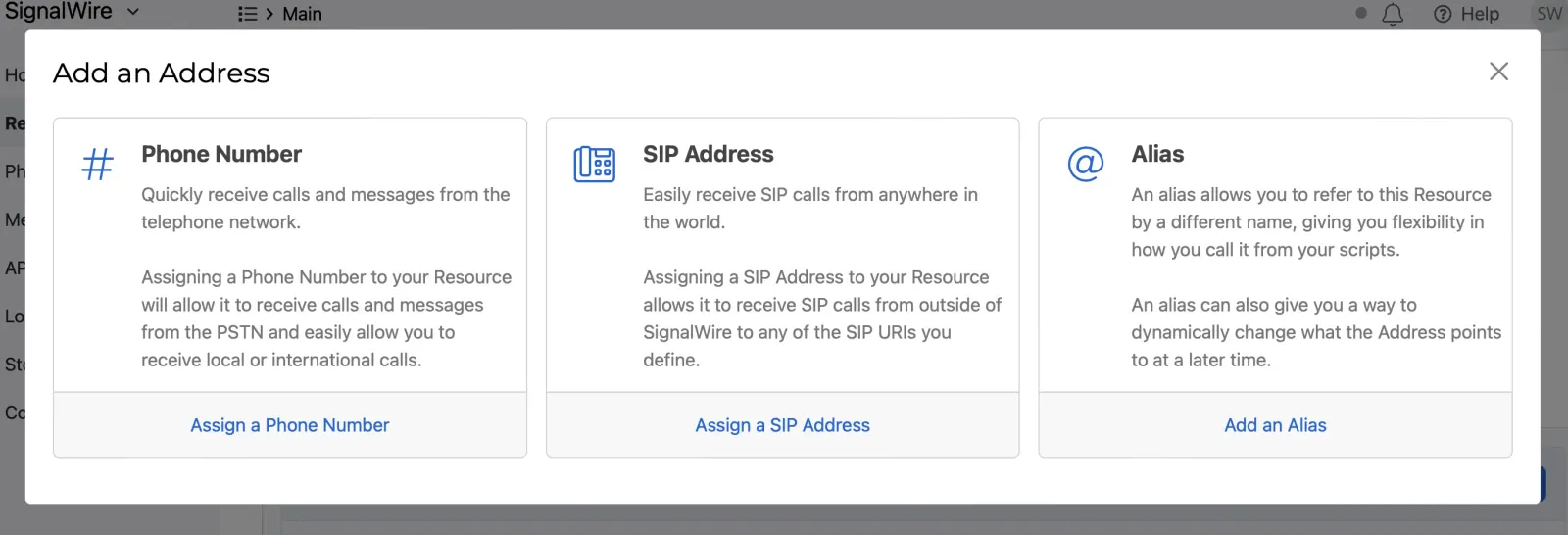
From the Resource. Open the Resource from My Resources and select its Addresses & Phone Numbers tab. It lists the Resource’s Addresses with their channels and type. Select + Add and choose Phone Number, SIP Address, or Alias. Phone Number lists the numbers you own and offers to buy one; SIP Address and Alias open the forms described above.
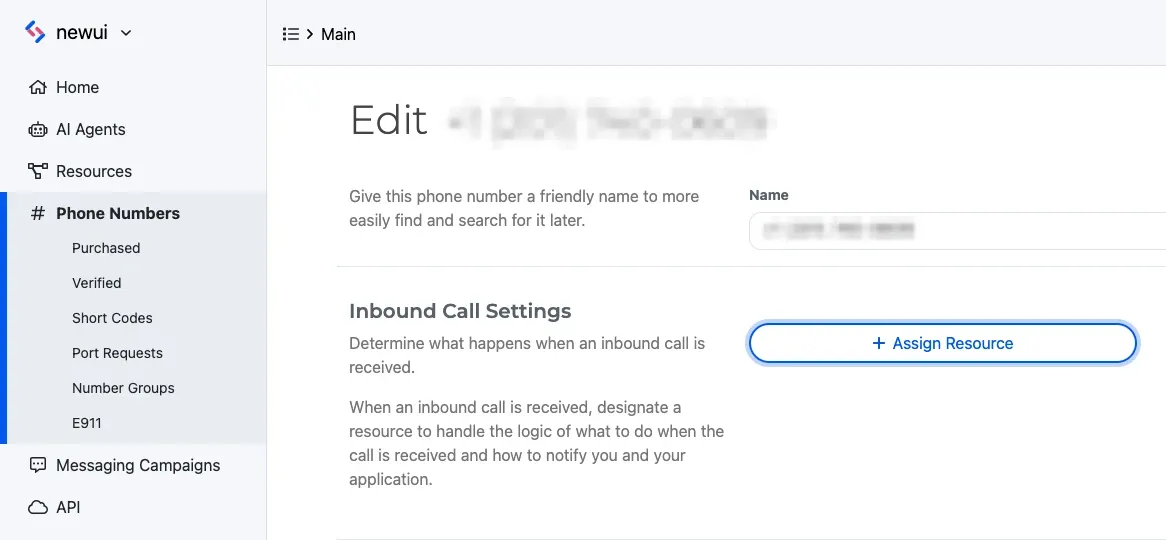
From the phone number. When you’re starting from a number rather than a Resource, assign the handler from the number’s settings.
Open Phone Numbers, select the number, and select Edit Settings. Under Inbound Call Settings, select Assign Resource, choose the Resource, and save. To assign from the Resource instead, open its Addresses & Phone Numbers tab, select + Add, then Phone Number, and pick a number you own.
Across the Space. The Addresses page in the left sidebar lists every Address in the project with its context, type, call handler, and message handler. It’s the quickest way to find a number with no handler or to see which Resource an alias points at.
Removing. Deleting an Address removes only that way in: the Resource stays, and calls already in progress continue. Removing a phone number’s handler leaves the number in your Space, unassigned, until you assign another Resource.
With the REST API
In the Browser SDK
A client authenticated with a Subscriber token sees the Addresses its user is
allowed to reach through the client.directory$ observable. Each entry exposes a ready-to-dial
URI per channel, so the client dials what the directory returns instead of building
/context/name strings by hand. See the address book guide and defaultChannel.