
Verify SWML request signatures
When you serve SWML from your own web server, anyone who learns your endpoint URL can POST to it and read back the SWML document you return. Since a SWML document can contain phone numbers, SIP credentials, and prompts, that endpoint should not answer to just anyone.
To let you check the caller, SignalWire signs every request for a SWML document with an HMAC signature derived from your project’s signing key. Verifying that signature proves the request came from SignalWire and that neither the URL nor the body was altered in transit.
For production applications it is extremely important to verify the signature, so that requests from a malicious third party are rejected instead of being served a SWML document.
Which requests are signed
Every POST SignalWire makes to fetch a SWML document from a URL you control is signed. That includes:
- The initial fetch, when a Resource or phone number is configured with an External URL rather than a hosted script, and the fetch from your fallback URL when the primary one fails.
- Every subsequent fetch caused by
executeortransferpointing at an external URL. - The same fetches on the messaging side, when a number handles inbound SMS and MMS with Messaging SWML.
Requests during a call carry two headers. Requests for a messaging document carry the SHA-1 header alone, so verify that one if your endpoint serves both.
Both are computed over the same string: the request URL concatenated directly with the raw request body, with no separator.
The url is the full URL SignalWire requested, including any query string. A call request signs
that URL without any basic auth credentials you embedded in it; a message request signs it exactly
as you configured it, credentials included. The raw_body is the JSON payload exactly as sent —
the object containing call (or message for a messaging document), vars, envs, and, when the
document was reached through execute or transfer, params.
Verify against the URL you configured in the Dashboard, not the URL your framework reconstructs from the incoming request. Proxies, load balancers, and tunnels such as ngrok routinely rewrite the host or scheme, which changes the string being hashed and makes a valid signature look invalid.
Which requests are not signed
Signatures cover requests for a SWML document. They do not cover everything a document can send to your server, so an endpoint that insists on a signature will reject traffic you meant to accept.
The POST to a SWAIG function’s web_hook_url is unsigned. Protect it with HTTP basic auth: embed
the credentials in the URL as username:password@url, or set web_hook_auth_user and
web_hook_auth_password in SWAIG.defaults or on the
individual SWAIG function. Agents built with the
Server SDKs authenticate differently again — basic auth on every request, plus per-function tokens
for sensitive operations, covered in Server SDK security.
The conversation summary an agent sends to post_prompt_url is
unsigned when you serve your own SWML. Protect that endpoint the same way, with credentials
embedded in the URL.
The request method is unsigned as well when a call runs
it. Use basic auth in its URL, or send a shared secret in a custom X- header through the method’s
headers parameter. Its messaging counterpart does carry
the SHA-1 header.
Get your signing key
Your signing key is on the API Credentials page of your Dashboard. Click Show to reveal it. Each project has its own key, so use the key belonging to the project that serves the call.
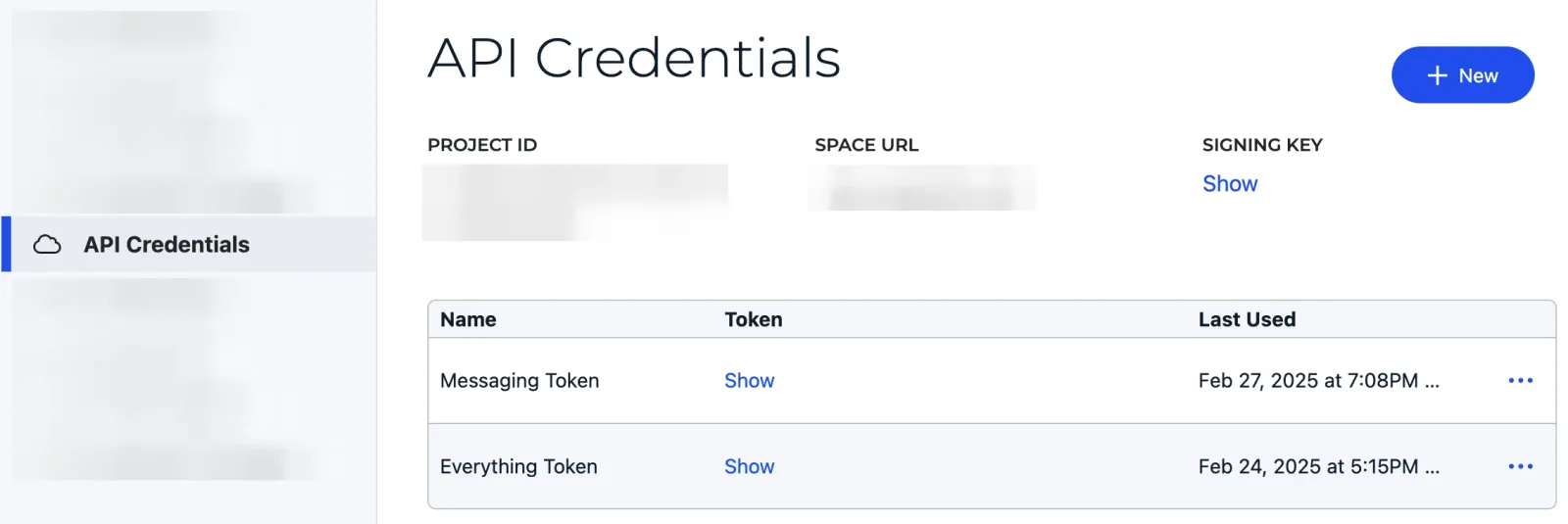
You can rotate the key with the reset button on the same page. A new key takes about a minute to become active, and the page shows it to you before you confirm the reset so you can copy it into your application first.
Treat the signing key like a password: keep it in an environment variable or a secret manager, not in the source you deploy.
Verify the signature in Node
The validateRequest helper in @signalwire/web-api implements the check for you:
validateRequest needs the raw request body, so capture it before your JSON parser consumes
it. Re-serializing the parsed object is not reliable — key order and whitespace change, and the
hash changes with them.
Verify the signature in any language
The scheme is a plain hex HMAC, so you can implement it directly wherever a helper is not available. Compare digests with a constant-time comparison rather than string equality.
To verify the stronger header on a call request, hash the same url + raw_body string with SHA-256
and compare it against X-Signalwire-SHA256-Signature.
Confirm your endpoint rejects forgeries
With the server running and reachable at the URL you configured, POST to it yourself, without a signature:
The response is 403 Forbidden, with Invalid signature as the body. Now place a call to the
number pointed at that URL: this request carries a valid signature, passes the check, and the caller
hears the prompt your document plays.
If the real call is rejected too, the WEBHOOK_URL in your code doesn’t match the URL SignalWire
requested — an ngrok URL that changed when the tunnel restarted is the common cause. The next
section covers the rest.
Troubleshoot a failing signature
A signature that never validates almost always comes down to one of these:
- The URL does not match. Scheme, host, port, path, and query string all feed the hash. Use the exact URL configured in the Dashboard, including the query string if you configured one.
- The body was re-serialized. Hash the bytes you received, not
JSON.stringifyof the parsed object. - The wrong project’s key. Signing keys are per project.
- The key was just rotated. A new key needs about a minute to become active.
- Basic auth in the URL. A call strips embedded credentials before signing, so hash the URL without them. A message signs the URL as configured, so hash it with them.
Next steps
- Handle incoming calls from code — set up the external SWML endpoint this guide protects.
- Webhooks — how webhooks and status callbacks work across the platform.