
International support
Overview
SignalWire enables users to make calls and send SMS to over 230 international area codes. Please follow the steps outlined below to acquire, activate, and begin International Outbound Dialing & SMS on your SignalWire Space!
International numbers
SignalWire officially supports acquiring numbers in the following countries:
- 🇦🇺 Australia
- 🇨🇦 Canada
- 🇮🇪 Ireland
- 🇳🇿 New Zealand
- 🇬🇧 United Kingdom
- 🇺🇸 United States
Please submit a request form to procure an International number(s).
If you have more questions about purchasing numbers in countries other than the United States or Canada:
Contact our Sales team at sales@signalwire.com
to get started!
How to request international activation
By default, SignalWire Spaces are only enabled for the US and Canada. Please submit a request form for International Services to be enabled on your Space.
A new support case will be opened and our technicians will be in contact when approved and enabled.
Please Note: Only spaces NOT in trial mode will be enabled for international services.
Enable geographic permissions
Once enabled, you will need to add the geographic permission for each country you would like to be able to dial or message. Follow the steps below to complete:
Navigation
First, navigate to your signalwire Dashboard, and click on the Space dropdown menu at top left of the page:
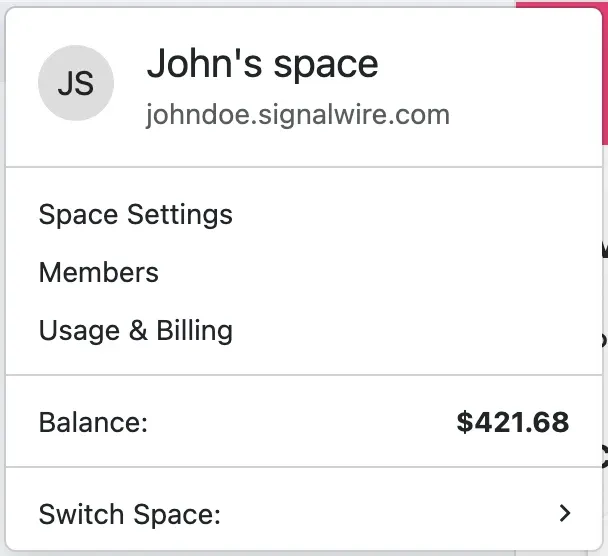
There select Space Settings. You’ll be taken to the Settings page.
Only administrators and owners have access to the Space Settings.
Select countries
Once in the Space Settings page, click on the Geographic Permissions tab.
Here you can check the box for the countries for which you would like to enable international Dialing/SMS.
Please Note: Messaging can only be sent from US and Canadian (CA) long code numbers. International SMS is not enabled for toll-free numbers.
Troubleshooting
If you attempt to call or message a destination in a country you have not enabled, the request
fails because no route to that destination is permitted by your account. REST requests return the
not_routable error code.
To resolve it, confirm International Services are active on your Space and that the destination country is checked under Geographic Permissions, following the steps above.