
For AI agents: a documentation index is available at the root level at /llms.txt and /llms-full.txt. Append /llms.txt to any URL for a page-level index, or .md for the markdown version of any page.
Log inSign up
Support
PlatformCallingAIMessagingTools
    • Overview
  • Voice
    • Overview
    • SIP
    • TTS
      • Amazon Polly
      • Azure
      • Cartesia
      • Deepgram
      • ElevenLabs
      • Google Cloud
      • OpenAI
      • The Rime TTS engine
    • Caller ID & CNAM
    • STIR/SHAKEN
    • STUN vs. TURN vs. ICE
    • WebRTC
  • Video
    • Overview
  • Fax
    • Overview
    • Common fax errors
LogoLogoSignalWire Docs
Log inSign up
Support
On this page
  • Models
  • Voices
  • Languages
  • Usage
  • Build with Rime on SignalWire
  • Next steps with SWML
VoiceTTS

The Rime TTS engine

Text-to-speech

|View as Markdown|Open in Claude|
Was this page helpful?
Edit this page
Previous

Caller ID & CNAM

Next
Built with

Rime offers uniquely realistic voices with a focus on natural expressiveness.

Models

ModelDescription
mistv2Default - Updated version of mist
arcanaExpressive model with natural intonation
mist
Deprecated
Fast, precise model for business applications
Mist v2

Mist is Rime’s fastest model, built for high-volume, business-critical applications.

Arcana

Arcana is Rime’s latest and greatest model, offering a variety of ultra-realistic voices prioritizing authenticity and character.

Voices

Mist v2 is the default Rime model on the SignalWire platform. To use this model, simply set the voice ID.

To use Arcana voices, set model to arcana with the languages SWML method:

1languages:
2- name: English
3 code: en-US
4 voice: rime.luna
5 model: arcana

Languages

As of October 29th, 2025, Rime supports the following languages:

LanguageCode
Englisheng
Spanishspa
Frenchfra
Germanger
Hindi (Arcana only)hin

Refer to the Rime docs for the most up-to-date reference to supported languages.

Usage

Format: rime.<speaker>:<model>

Examples:

rime.spore:arcana
rime.speaker1:mistv2
rime.voice123:mist

For a full demonstration and sample script, see below.

Rime dashboard

Preview Rime voices on their dashboard

Rime docs

Refer to the Rime Docs for an up-to-date list of voice IDs.


Build with Rime on SignalWire

1

Create a Space and add credit

If you don’t have one yet, you’ll need to create a SignalWire Space. Be sure to add some credit to test with.

2

Add a new Resource

Navigate to the Resources tab in your SignalWire Dashboard and click + Add New to create a new Resource.

3

Create a SWML Script

From the Resources menu, select SWML Script. Name it something fun and recognizable. Ours is titled Rime Wizard.

Next, paste the following starter script into the text box, and hit Save:
1version: 1.0.0
2sections:
3 main:
4 - ai:
5 prompt:
6 text: |
7 You're Luna, a voice from Rime's Arcana model!
8 Introduce yourself, and have a conversation about programmable unified communications on the SignalWire platform.
9 languages:
10 - name: English
11 code: en-US
12 voice: rime.luna
13 model: arcana
4

Buy and assign a phone number

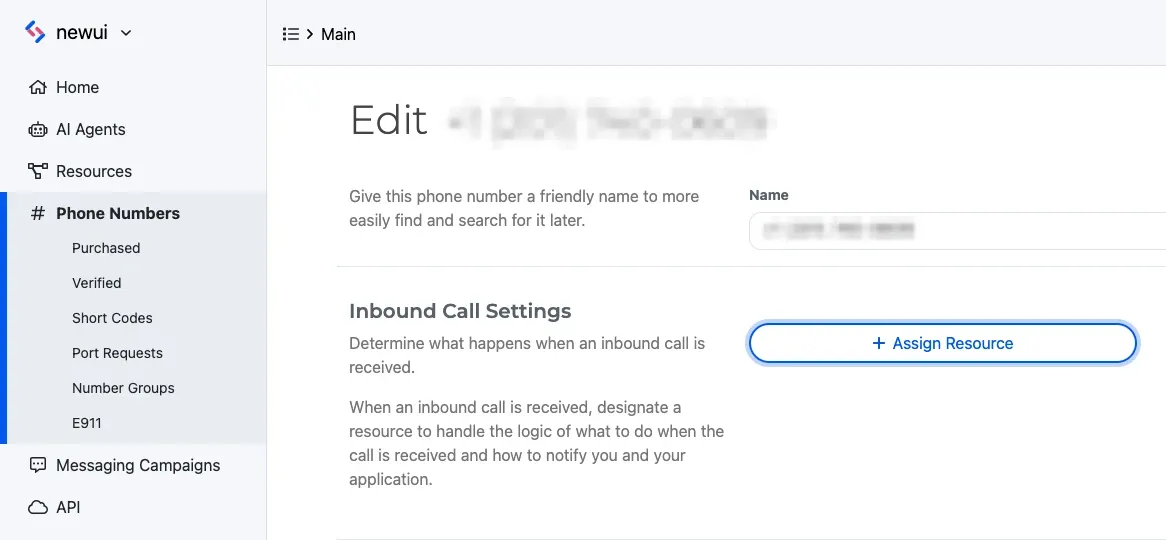
Navigate to the Phone Numbers section of the Dashboard’s left sidebar menu.

Purchase a phone number and assign it to the desired SWML script.

A purchased phone number showing assignment to a specified Resource.

Assigning a phone number to the SWML Script
5

Give it a call!

Call the number you just assigned to chat with your new AI voice application on the phone.

Next steps with SWML

Now you’ve deployed your very first SignalWire voice AI application using Rime voices. Next, dive deeper into SWML to explore its capabilities!

Methods reference

Documentation for all SWML methods

AI in SWML

Build advanced AI applications using SignalWire Markup Language

Guides

SWML guides and demo applications