
Translate calls
Live translation lets two people who speak different languages talk on one call. SignalWire recognizes what each person says, translates it, and speaks the translation to the other person in a synthesized voice. Start by translating a call to your number, with a small server that prints each translated utterance, then start translation from code, read the translated conversation on your webhook, choose voices and tone filters, get AI summaries, and stop translating.
Pick the right product for call translation
Translation is available across these products, but not every function is available on each.
- SWML is the document that describes how the call should flow. The Server SDKs’ SWML builder writes it, or you can write it by hand.
- WebSocket (Relay), a Server SDK namespace, holds a live WebSocket connection to a call in progress and controls it from code.
- The REST Calling API sends the same commands as Relay to a call in progress over HTTP, by call ID, from any process.
- The Browser SDK places and answers calls in a web page. Translation is started by the server-side products above.
- Call Flow Builder draws call flows on a canvas, with a node for each step of the call. Translation is started by the products above.
Prepare for call translation
This guide answers and forwards calls the way Make and receive calls and Forward calls do. Have these values ready:
- Your Space URL, such as
<YOUR_SPACE>.signalwire.com. - Your Project ID and an API token with the Voice permission.
- A phone number in your Space.
- Two phones you can answer: one to call your number from, and one that receives the translated call. Ask a second person to answer it, or put both phones in front of you.
- A machine that can run a small server, and a tunnel such as ngrok that gives it a public HTTPS URL.
A trial project only places calls to and receives calls from numbers you’ve purchased or verified, and can’t call internationally. Verify both phones you’ll test with, as Prepare for your first call shows.
Translation captures what people say on the call and sends the text to your webhook. Many jurisdictions require you to tell callers before you record or transcribe them. Check the rules that apply to your callers before you translate a real conversation.
If you only need the text of a call in one language, see Transcribe calls instead.
Replace these values in the samples you run:
How call translation works
The live_translate SWML method and the calling.live_translate command,
sent over Relay or REST, all take the same action: start a session, summarize
it, or stop it. start names two languages, from_lang and to_lang, and lists the sides of the
call to translate in direction:
remote-calleris the audio SignalWire receives from the call: the person who called your number, or the person your app dialed.local-calleris the audio SignalWire sends into the call, such as the other party of aconnect.
For each side you list, SignalWire mutes that person’s own voice and plays the translation in its place, so the listener hears only the translated speech. With both sides listed, each person hears only the other’s translation. A side you leave out passes through untouched.
Bayview Taxi uses this for riders who call in Spanish. Their calls are connected to Ada, a dispatcher who speaks English. Every sample in this guide starts translation with the same values:
With those values, each person speaks and hears one language:
The order of direction decides which side speaks which language. With local-caller listed
first, as here, the caller speaks from_lang and the connected party speaks to_lang. Listing
remote-caller first swaps the two, so keep this order and change the languages to fit your
callers. from_voice always speaks from_lang, and to_voice always speaks to_lang. When you
list one side only, that side speaks to_lang, and the other person hears it in from_lang.
The local-caller side carries a voice only once another party is on the call, so the samples
start translation, then connect the caller to Ada. Translation runs in the background: after
start, the call moves on to its next step at once.
When the session has a webhook, SignalWire sends it HTTP POST requests: one for each translated
utterance when live_events is true, one when you ask for a summary, and one with the whole
conversation when the session ends.
Translate a call
Every sample in this guide sends translation events to one small server that prints them. Run it first, then start translation from the product your app uses.
Translate a call via SWML
When someone calls your number, SignalWire fetches the call’s SWML from your server and runs it. The server below serves that document and receives the translation events, so one tunnel covers both.
Run the translation server
This server answers calls with a SWML document that starts translation and connects the caller to
your second phone. It prints each translated utterance that arrives at /translations. The
document is served only to requests that carry the username signalwire and the password you set.
Start a tunnel to port 8080, such as ngrok http 8080, and use its hostname as
<YOUR_PUBLIC_HOST> in the webhook URL before you start the server. Check that the document is
reachable through the tunnel:
The response is the SWML document, starting with {"version": "1.0.0". A 401 means the password
doesn’t match the one in your server.
Point your phone number at the server
Create a SWML Script that fetches the document from your server:
- Open My Resources, select + Add, then Script, then SWML Script.
- Name it Translate call and leave Used For set to Calling.
- Under Handle Calls Using, choose External URL and enter
https://signalwire:<YOUR_BASIC_AUTH_PASSWORD>@<YOUR_PUBLIC_HOST>/in Primary Script URL. - Select Create.
Then assign the script, a Resource, to your phone number:
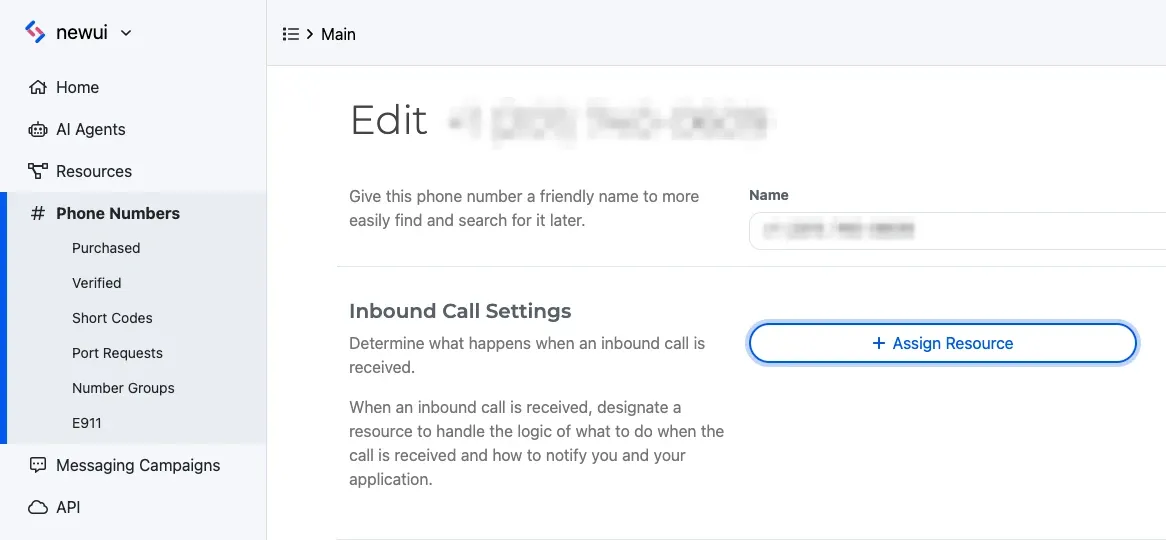
Open Phone Numbers, select the number, and select Edit Settings. Under Inbound Call Settings, select Assign Resource, choose the Resource, and save. To assign from the Resource instead, open its Addresses & Phone Numbers tab, select + Add, then Phone Number, and pick a number you own.
To do both in code, see Answer a call via SWML.
Call your number and speak Spanish
Call your SignalWire number from your first phone, and answer your second phone when it rings. Say something in Spanish on the first phone, such as “Necesito un taxi al aeropuerto.” The second phone hears it in English, in a synthesized voice, and never hears the Spanish. Answer in English on the second phone, and the first phone hears Spanish.
The server prints each utterance in both languages, with the side of the call that spoke:
Your wording and the translations will differ. When either phone hangs up, the server prints
Translation ended after with the number of utterances. If it doesn’t work, see
Troubleshoot call translation.
The same document in YAML and JSON, to paste into a hosted SWML Script instead:
Start translation on a live call via WebSocket (Relay)
Send the live translate command to an answered call, passing the same action the
SWML method takes. Translation events still go to your webhook, so keep the
translation server and its tunnel running.
This handler subscribes to the translate-calls topic. When a call arrives, it answers, starts
translation, and connects the caller to your second phone. It hangs up when the connected call
ends.
The Server SDKs send the action keys as written, so they stay in snake_case in every language.
Run the handler, then create a Relay Application with translate-calls as its Topic and assign
it to your phone number in place of the SWML Script, as
Answer a call via WebSocket (Relay) shows. Call your number and speak Spanish: the
handler prints Connect: connected when your second phone answers, and the translation server prints
each utterance as in the SWML walkthrough.
To start translation on a call your process doesn’t hold, send the calling.live_translate command
with the answered call’s ID and a start action. The call ID is the id from a dial response, or
the call_id delivered to your SWML endpoint or webhook. The Server SDKs wrap the
command:
To try it, run the program while a forwarded call from Forward calls is up and both phones are talking. The translation server starts printing utterances as soon as the command succeeds. The cURL request goes to Call commands.
Sending start again with the same languages while a session runs changes nothing. With different
languages, it restarts translation in the new ones.
Read translation events on your webhook
Each request is a JSON POST. Read channel_data.content_disposition first, then the fields for
that event:
Every event carries the conversation in both languages. The primary_ fields hold it in
from_lang, and the secondary_ fields hold it in to_lang. role says which side of the call
spoke, using the values you passed in direction. Every event also carries channel_data.call_id,
so one server can follow several calls at once.
An utterance event looks like this, shortened to the fields the translation server reads:
Each utterance can also carry confidence, the recognizer’s confidence in the text, and
filter_type and filter_value when a tone filter
rewrote it.
The event sent when the session ends carries the whole conversation in order, in each language. It
also carries translate_data, which lists each translated side with the language it was spoken in
and the language it was translated to. With ai_summary set to true, translate_data is instead a
flat object for the first-listed side only, with from_language, to_language, to_voice, role,
and position. Log entries name their language in language:
SignalWire sends this event whenever the session has a webhook, whether the session ended because
you stopped it or because the call ended. A summary you request mid-call carries
primary_conversation_summary and secondary_conversation_summary, one summary for each
conversation log.
Answer each request with a 2xx status, and do slow work after you respond. SignalWire retries an
utterance event that fails to connect or gets a 5xx status, so a slow handler can receive the same
utterance more than once. Use utterance_id to ignore repeats.
Requests carry an X-SignalWire-Signature header, so your server can confirm they came from
SignalWire, as Verify webhook signature shows. You can also put a username and
password in the webhook URL, as in https://<USERNAME>:<PASSWORD>@<YOUR_PUBLIC_HOST>/translations,
and SignalWire sends them as HTTP Basic authentication. If you reject unsigned requests, keep
live_events set to true: with it off, the end-of-session event can arrive without a signature.
Translation options: voices, tone filters, and speech detection
start takes more options alongside the languages. The same options work in SWML, Relay, and REST.
The live_translate reference lists every option.
Choose the voices for each language
from_voice speaks the from_lang translations, and to_voice speaks the to_lang
translations. Without them, both use azure.en-US-RyanMultilingualNeural. A voice is the engine
name in lowercase, a dot, and the voice ID, such as azure.es-ES-ElviraNeural or elevenlabs.josh.
The engine prefix is case-sensitive: a voice whose engine prefix SignalWire doesn’t recognize, such
as a capitalized one, falls back to the default voice. The text-to-speech voices pages
list each engine’s voices and languages, such as Azure and ElevenLabs.
Change the tone of the translation with filters
A filter rewrites the translation in a tone you choose before it’s spoken.
filter_from applies to speech in from_lang, here what the rider says, and filter_to applies to
speech in to_lang, here what Ada says. Use a preset or your own instruction:
Set from_lang and to_lang to the same language and add a filter to rewrite the tone of a call
without translating it. Without a filter, a same-language session repeats each person’s words in the
synthesized voice.
This change to the first run’s start action has the rider hear Ada
in an Azure Spanish voice and Ada hear the rider in an ElevenLabs voice, and keeps the rider’s words
polite for Ada:
Tune speech detection for your callers
speech_engine picks the speech recognizer: deepgram, the default, or
google. When the recognizer splits utterances too early or too late for your callers, tune
vad_silence_ms, the silence in milliseconds that ends an utterance, 700 by default with Deepgram
and 500 with Google. vad_thresh, 400 by default, sets how loud audio must be to count as
speech.
Get AI summaries of the translated conversation
Live translation can hand the conversation to an AI model and send you a summary of each conversation log, either once when the session ends or whenever you ask while the call is up.
Summarize the call when translation ends
Add ai_summary: true to start, and optionally ai_summary_prompt to say what the summary should
contain. The event sent when the session ends then includes primary_conversation_summary and
secondary_conversation_summary. This change to the first run’s
start action works the same way in Relay and REST:
After the call ends, the translation server prints each summary on a Summary: line.
Summarize a call in progress via WebSocket (Relay)
Send the summarize action while translation is running to get a summary of the conversation so
far, and keep translating. Its prompt and webhook are optional. An empty summarize object
sends the summary to the webhook from start and uses the default summary prompt. In the
Relay handler, add it wherever your app
needs a summary. The REST client sends the same action to a call by ID:
When the summaries arrive, the translation server prints each one on a Summary so far: line.
The cURL request goes to Call commands. A SWML document can send the same action as
a live_translate step.
Stop call translation
A session stops by itself when the call ends. Stop it earlier with the stop action, which stops
both sides at once. SignalWire then sends the
event for the end of the session with everything
translated until that point.
Stop call translation via SWML
Set action to the string stop:
Stop call translation via WebSocket (Relay)
The Relay samples send stop as a key with an empty object, and the REST samples send the string
stop. The platform accepts either form:
To translate again, send a new start action.
Troubleshoot call translation
Find the symptom you see:
- Each phone hears the other’s own voice, untranslated. Translation didn’t start. Check that
starthasfrom_lang,to_lang, anddirection. A SWML document carries on with the call whenstartis missing one of them, so the call connects without translation. - The translations make no sense, or come out in the wrong language. Each person is speaking the
other’s language. Check the order of
directionagainst How call translation works: withlocal-callerfirst, the caller speaksfrom_lang. - You hear a different voice from the one you set. SignalWire didn’t recognize the voice and used
the default. Check that the engine name is lowercase, as in
azure.es-ES-ElviraNeural. - The call connects and translates, but your server prints nothing. SignalWire couldn’t reach
your webhook. Check that the URL begins with
https://and ends with/translations, and that the tunnel is running and points at port8080. - The server prints the end of the session, but no utterances.
live_eventsisn’ttrueonstart. Without it, the conversation arrives only when the session ends. - You hear an error or silence when you call your number. SignalWire couldn’t fetch your SWML.
Rerun the
curlcheck with the exact URL in the SWML Script, and confirm that the server and the tunnel are still running. A401means the password in the URL doesn’t match the server’s. - You hear your number’s old behavior. The number still points at another Resource. Open it under Phone Numbers and check Inbound Call Settings.
- The second phone never rings. Check that
<YOUR_DESTINATION>is in E.164 format, and in a trial project, that it’s a verified number.