
Transcribe calls
Live transcription turns each side of a call into text while the call happens, and posts every utterance to a webhook you run, so your app can show a transcript, search it, or act on what the caller says. Start by transcribing a call between your phone and your number into a small server that prints each utterance, then read the events in full, tune the options, summarize the conversation with AI, stop transcribing, and transcribe a whole call after it ends.
Prepare for call transcription
This guide places and answers calls the way Make and receive calls does. Have these values ready:
- Your Space URL, such as
<YOUR_SPACE>.signalwire.com. - Your Project ID and an API token with the Voice permission.
- A phone number in your Space, and a phone you can call it from and answer.
- A machine that can run a small server, and a tunnel such as ngrok that gives it a public HTTPS URL.
A trial project only places calls to and receives calls from numbers you’ve purchased or verified, and can’t call internationally. Prepare for your first call shows how to verify the phone you’ll test with.
Transcription captures what people say on the call, and many jurisdictions require you to tell callers before you record or transcribe them. Check the rules that apply to your callers before you transcribe a real conversation.
Replace these values in the samples you run:
How live transcription works
The SWML live_transcribe method and the calling.live_transcribe
command, sent over Relay or REST, all take the same action: start a session, summarize
it, or stop it. Once a session starts, SignalWire recognizes speech on each side of the call you
list in direction and sends HTTP POST requests to the webhook URL you set on start:
- With
live_eventsset totrue, one request for each utterance as soon as it’s transcribed. - When you send
summarize, one request with an AI summary of the conversation so far. - When the session ends, because you stopped it or the call ended, one request with the whole conversation, totals for the session, and an AI summary if you asked for one.
All three requests arrive at the same URL, so your server tells them apart by
channel_data.content_disposition, as Read transcript events on your webhook
shows.
SignalWire has a second, simpler method, transcribe. It produces no text
during the call. When the call ends, it posts the whole call’s text to a status_url as a single
block. Choose by when you need the text:
The rest of this guide uses live_transcribe until
Transcribe the whole call after it ends.
Transcribe a call in real time
Every sample in this guide sends transcript events to one small server that prints them. Run it first, then start transcription from the product your app uses.
Transcribe a call in real time via SWML
When someone calls your number, SignalWire fetches the call’s SWML from your server and runs it. The server below serves that document and receives the transcript events, so one tunnel covers both.
Run the transcription server
This server answers calls with a SWML document that starts live transcription on both sides of the
call, asks the caller where they’re headed, and keeps the call open for twenty seconds while they
talk. It prints each utterance that arrives at /transcripts, and the transcript that arrives at
/transcript-status, which the post-call section uses later. The document is served only to
requests that carry the username signalwire and the password you set.
Start a tunnel to port 8080, such as ngrok http 8080, and use its hostname as
<YOUR_PUBLIC_HOST> in the webhook URL before you start the server. Check that the document is
reachable through the tunnel:
The response is the SWML document, starting with {"version": "1.0.0". A 401 means the password
doesn’t match the one in your server.
Point your phone number at the server
Create a SWML Script that fetches the document from your server:
- Open My Resources, select + Add, then Script, then SWML Script.
- Name it Transcribe call and leave Used For set to Calling.
- Under Handle Calls Using, choose External URL and enter
https://signalwire:<YOUR_BASIC_AUTH_PASSWORD>@<YOUR_PUBLIC_HOST>/in Primary Script URL. - Select Create.
Then assign the script to your phone number:
Open Phone Numbers, select the number, and select Edit Settings. Under Inbound Call Settings, select Assign Resource, choose the Resource, and save. To assign from the Resource instead, open its Addresses & Phone Numbers tab, select + Add, then Phone Number, and pick a number you own.
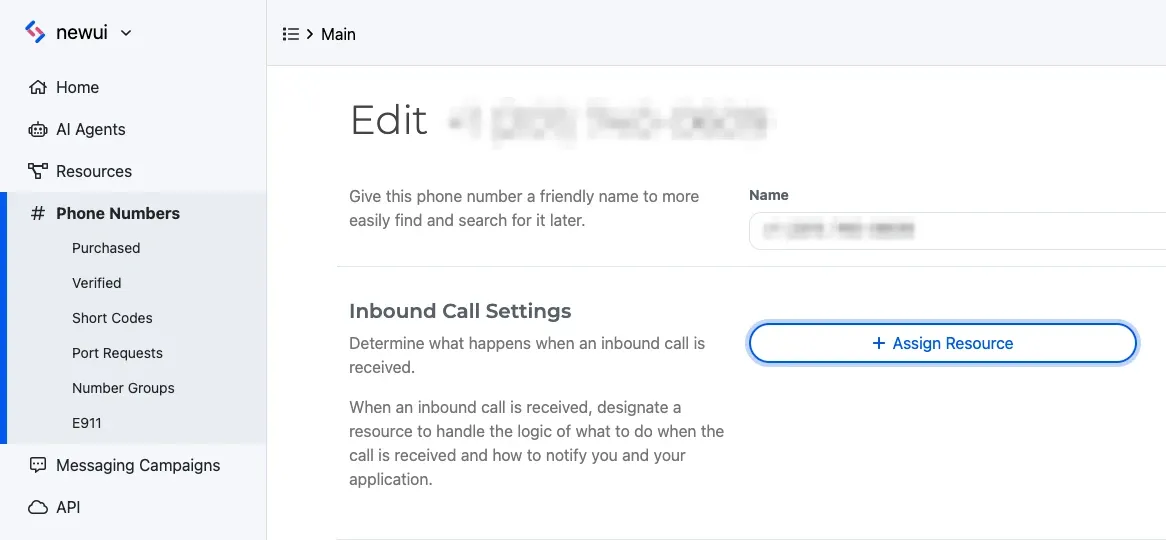
To do both in code, see Answer a call via SWML.
Call your number and speak
Call your SignalWire number from your phone and answer the question. The server prints each utterance as it’s transcribed, with the side of the call that spoke:
remote-caller is you, and local-caller is the prompt SignalWire played. After twenty seconds
you hear the goodbye, the call ends, and the server prints
Transcription ended after 3 utterances with your own count. If it doesn’t work, see
Troubleshoot call transcription.
The same document in YAML and JSON, to paste into a hosted SWML Script instead:
Transcribe a call in real time via WebSocket (Relay)
Send the live transcribe command to an answered call, passing the same action the SWML method
takes. Transcript events still go to your webhook, so keep the
transcription server and its tunnel running. Call setup follows
Place a call via WebSocket (Relay).
Run the call program
This program dials your phone, starts transcription, asks where you’re headed, and hangs up after twenty seconds.
The Server SDKs send the action keys as written, so they stay in snake_case in every language.
Answer and speak
Answer your phone and say where you’re headed. The transcription server prints a local-caller
line for the prompt and a remote-caller line for your answer. After twenty seconds you hear the
goodbye, the call ends, and the server prints Transcription ended after with the number of
utterances. If it doesn’t work, see Troubleshoot call transcription.
Start live transcription on a call in progress via REST
When a process that doesn’t hold the call needs to transcribe it, send the calling.live_transcribe
command with the answered call’s ID and a start action. The call ID is the id from the dial
response, or the call_id delivered to your SWML endpoint or webhook. The
Server SDKs wrap the command:
The cURL request sends the same command to Call commands. To try it, run the program while a call that isn’t already being transcribed is up, such as one from Make and receive calls. The transcription server starts printing utterances as soon as the command succeeds.
Read transcript events on your webhook
Each request is a JSON POST. Read channel_data.content_disposition first, then the fields for
that event:
utterance.role and each conversation_log entry’s role say which side of the call spoke, using
the values you passed in direction. Every event also carries channel_data.call_id, so one server
can follow several calls at once. Timestamps such as utterance.timestamp are Unix times in
microseconds. The top-level confidence is the speech engine’s confidence in the utterance, from
0 to 1, or null when the engine didn’t report one.
An utterance event looks like this. The Live transcription utterance webhook reference lists every field:
The event sent when the session ends carries the whole conversation in order, with totals for each
side in metrics. Its fields are in the Live transcription conversation log webhook
reference:
The summary you request mid-call has the same conversation_log and conversation_summary fields,
without metrics. See the Live transcription summary webhook reference.
Answer each request with a 2xx status within 10 seconds, and do slow work after you respond.
SignalWire retries a request that fails to connect, times out, or gets a 5xx status, so a slow
handler can receive the same utterance more than once. Use utterance.utterance_id to ignore
repeats. A 4xx status isn’t retried, and redirects aren’t followed, so that event is lost.
Requests carry an X-SignalWire-Signature header, so your server can confirm they came from
SignalWire, as Verify webhook signature shows. You can also put a username and
password in the webhook URL, as in https://<USERNAME>:<PASSWORD>@<YOUR_PUBLIC_HOST>/transcripts,
and SignalWire sends them as HTTP Basic authentication. Both work for the post-call status_url
too. If you reject unsigned requests, keep live_events set to true: with it off, the
end-of-session event can arrive without a signature.
Live transcription options: language, direction, and speech engine
start takes two required values. lang is the language to transcribe, such as en-US or
es-ES. direction lists the sides of the call to transcribe:
remote-calleris the audio SignalWire receives from the call: the person who called your number, or the person your app dialed.local-calleris the audio SignalWire sends into the call, such as prompts it plays or the other party of aconnect.
List both to get the whole conversation, or one side to transcribe only that party. Each side you list sends its own utterance events.
speech_engine picks the speech recognizer: deepgram, the default, or google. When the
recognizer splits utterances too early or too late for your callers, tune vad_silence_ms, the
silence in milliseconds that ends an utterance, and vad_thresh, how loud audio must be to count as
speech. The live_transcribe reference lists every option with its default.
The same options work in Relay and REST.
Summarize a call with AI
Live transcription can hand the conversation to an AI model and send you a summary, either once when the session ends or whenever you ask while the call is up.
Summarize the call when transcription ends
Add ai_summary: true to start, and optionally ai_summary_prompt to say what the summary should
contain. The event sent when the session ends then includes conversation_summary. Make this change
to the first run’s start action. The same keys work
in a start action sent over Relay or REST:
The transcription server prints the summary on a Summary: line after the call ends. If
conversation_summary is missing from the event, no summary could be produced for the call.
Summarize a call in progress via SWML
Send the summarize action while transcription is running to get a summary of the conversation so
far, and keep transcribing. Its prompt and webhook are optional. An empty summarize
object sends the summary to the webhook from start and uses the default summary prompt, since
ai_summary_prompt applies only to the summary sent when the session ends. In the first run’s document, add it after the
sleep, so the summary arrives before the goodbye:
The server prints a Summary so far: line when the summary arrives. If no summary could be
produced, the event still arrives, with conversation_summary set to Error creating summary. To summarize at a moment the
document doesn’t know in advance, run a section with the action through
execute, or send it from Relay or REST.
Summarize a call in progress via WebSocket (Relay)
In the Relay call program, send summarize
after the twenty-second wait. The REST client sends the same action to a call by ID:
The cURL request goes to Call commands.
Stop live transcription
A session stops by itself when the call ends. Stop it earlier, for example before the caller reads
out a card number, with the stop action. SignalWire then sends the
event for the end of the session, with everything
transcribed until that point.
Stop live transcription via SWML
Set action to the string stop:
Stop live transcription via WebSocket (Relay)
Send the stop action. SignalWire accepts it either as the string stop or as a stop key with
an empty object. The Relay clients take the object form, and the REST clients take the string:
To start transcribing again, send a new start action. A start sent while a session is running
stops that session, which sends its end-of-session event, and starts a new one.
Transcribe the whole call after it ends
When you only need the call’s text once it’s over, transcribe is simpler:
there are no options to set and no events during the call. It transcribes only U.S. English
(en-US), so use live_transcribe for any other language. SignalWire captures the call in the
background and, after the call ends, posts the text to your status_url as a
calling.transcript.completed event. Only one transcribe can run on a call at a time.
Transcribe the whole call via SWML
Add transcribe with a status_url where the transcription should start. The Server SDKs’ SWML
builder has no transcribe method, and its schema has no transcribe verb, so the builder samples
add the verb by name and turn schema validation off where the SDK would reject it:
To try it, swap these lines into the transcription server in place
of its service and live_transcribe document, and call your number again. After you hang up, the server prints
calling.transcript.completed: followed by the call’s text.
transcribe sets transcribe_result to success or failed. To end it before the call does,
add transcribe_stop. It takes no options and stops the transcription
running on the call:
Transcribe the whole call via WebSocket (Relay)
Send the transcribe command to start the transcription. It returns an action you can stop to end the transcription early. In the Relay call program, replace the live transcription lines with these:
The action completes when SignalWire finishes capturing the call’s audio. The text itself arrives
at your status_url afterward.
Over REST, send calling.transcribe with a control_id you choose, and calling.transcribe.stop
with the same control_id to end it. The REST client in the Server SDKs wraps both
commands:
client is the REST client from Start live transcription on a call in progress via REST.
To call the REST API directly, send these requests to Call commands:
Receive the call’s transcript
SignalWire posts the transcript to your status_url after the call ends. event_type is
calling.transcript.completed with the text in params.text, or calling.transcript.failed when
the call couldn’t be transcribed. params.text is omitted when nobody spoke. The
Transcript status callback reference lists every field:
Answer with a 2xx status within 5 seconds. SignalWire retries the request when your server
doesn’t, so the same transcript can arrive more than once. Use params.id to ignore repeats. The
request is signed like the live events, as
Protect your webhooks describes.
The same status_url also receives a calling.call.transcribe event when transcription starts,
with params.state set to transcribing, and another with finished when it ends. The
Transcribe state callback reference lists their fields. The sample
servers print only the calling.transcript.* events.
Watch the live transcript with an AI sidecar
To have an AI model follow the conversation as it’s transcribed and act on it, use
ai_sidecar, with or without live_transcribe. The sidecar transcribes the call
the same way, then after each turn from the customer it sends the transcript to a model with your
prompt and tools. It never speaks on the call. It posts advice, transcript updates, and tool
results to your webhook, so it suits coaching a human agent, flagging compliance issues, or pulling
data out of the call while it happens. Its callback types include the running
transcript. To build one step by step, see Coach live calls with an AI sidecar.
Alternatives: run your own speech-to-text
To use a speech recognizer of your own choice, or to process the raw audio yourself, stream the call’s audio to a WebSocket server and send it on from there. To keep the audio itself, record the call. A stereo recording keeps each side on its own channel for later processing.
Troubleshoot call transcription
Find the symptom you see:
- The call plays normally, but your server prints nothing. SignalWire couldn’t reach your
webhook. Check that the URL begins with
https://and ends with/transcripts, and that the tunnel is running and points at port8080. - The server prints the end of the session, but no utterances.
live_eventsisn’ttrueonstart. Without it, the transcript arrives only when the session ends. - You see utterances from only one side.
directionlists one side. Addremote-callerandlocal-callerto transcribe both. - You hear an error or silence when you call your number. SignalWire couldn’t fetch your SWML.
Rerun the
curlcheck with the exact URL in the SWML Script, and confirm that the server and the tunnel are still running. A401means the password in the URL doesn’t match the server’s. - You hear your number’s old behavior. The number still points at another Resource. Open it under Phone Numbers and check Inbound Call Settings.
- A Relay or REST
startcommand is rejected. Check thatstarthas bothlanganddirection. - No
calling.transcript.completedevent arrives. The event comes after the call ends, not during it. Check thatstatus_urlends with/transcript-status, and that no othertranscribewas already running on the call.