***
id: a3dbb231-d452-48ca-ba30-acd8ec499349
title: The Rime TTS engine
subtitle: Text-to-speech
slug: /voice/tts/rime
description: >-
Learn how to use Rime's Arcana and Mist v2 TTS models with SignalWire AI Voice
applications.
-------------
Rime offers uniquely realistic voices with a focus on natural expressiveness.
## Models
| Model | Description |
| ------------------------------------------------------------ | --------------------------------------------------------------------------------- |
| `mistv2` | **Default** - Updated version of mist |
| `arcana` | Expressive model with natural intonation |
| `mist`
Deprecated | Fast, precise model for business applications |
Mist is Rime's fastest model, built for high-volume, business-critical applications.
Arcana is Rime's latest and greatest model, offering a variety of ultra-realistic voices
prioritizing authenticity and character.
## Voices
Mist v2 is the default Rime model on the SignalWire platform.
To use this model, simply set the voice ID.
To use Arcana voices, set `model` to `arcana` with the
[**`languages`**](/docs/swml/reference/ai/languages#use-voice-strings)
SWML method:
```yaml
languages:
- name: English
code: en-US
voice: rime.luna
model: arcana
```
## Languages
As of October 29th, 2025, Rime supports the following languages:
| Language | Code |
| :------------------ | :---- |
| English | `eng` |
| Spanish | `spa` |
| French | `fra` |
| German | `ger` |
| Hindi (Arcana only) | `hin` |
Refer to the
[Rime docs](https://docs.rime.ai/api-reference/voices)
for the most up-to-date reference to supported languages.
## Usage
**Format**: `rime.:`
**Examples**:
```
rime.spore:arcana
rime.speaker1:mistv2
rime.voice123:mist
```
For a full demonstration and sample script, see below.
Preview Rime voices on their dashboard
Refer to the Rime Docs for an up-to-date list of voice IDs.
***
## Build with Rime on SignalWire
### Create a Space and add credit
If you don't have one yet, you'll need to
[create a SignalWire Space](/docs/platform/signing-up-for-a-space).
Be sure to add some credit to test with.
### Add a new Resource
{/* Shared component: Add Resource instructions */}
Navigate to the **Resources** tab in your [SignalWire Dashboard](https://my.signalwire.com) and click **+ Add New** to create a new Resource.
### Create a SWML Script
From the Resources menu, select **SWML Script**.
Name it something fun and recognizable.
Ours is titled Rime Wizard.
Next, paste the following starter script into the text box, and hit Save:
```yaml
version: 1.0.0
sections:
main:
- ai:
prompt:
text: |
You're Luna, a voice from Rime's Arcana model!
Introduce yourself, and have a conversation about programmable unified communications on the SignalWire platform.
languages:
- name: English
code: en-US
voice: rime.luna
model: arcana
```
{/*
```
params:
rime_model: arcana
```
This simple YAML file is actually a complete application that SignalWire hosts and deploys the moment you hit save.
The hard telecom and LLM integration happen behind the scenes,
so all you have to worry about is calling the ai method, giving it a prompt, and assigning a TTS voice.
In this case, we're using Rime's Celeste voice.
SWML is compact but mighty.
This same SWML script can be expanded to do almost anything -
call external APIs,
use defined "tools" or functions,
retrieve structured information from SignalWire's
[Datasphere](https://signalwire.com/blogs/developers/signalwire-datasphere-build-specialized-ai) RAG stack,
switch voices and contexts,
programmatically modify its own source with the
[Prompt Object Model](/docs/ai/pom/),
and transfer to other [Resources](/docs/platform/resources) on SignalWire's Call Fabric platform.
*/}
### Buy and assign a phone number
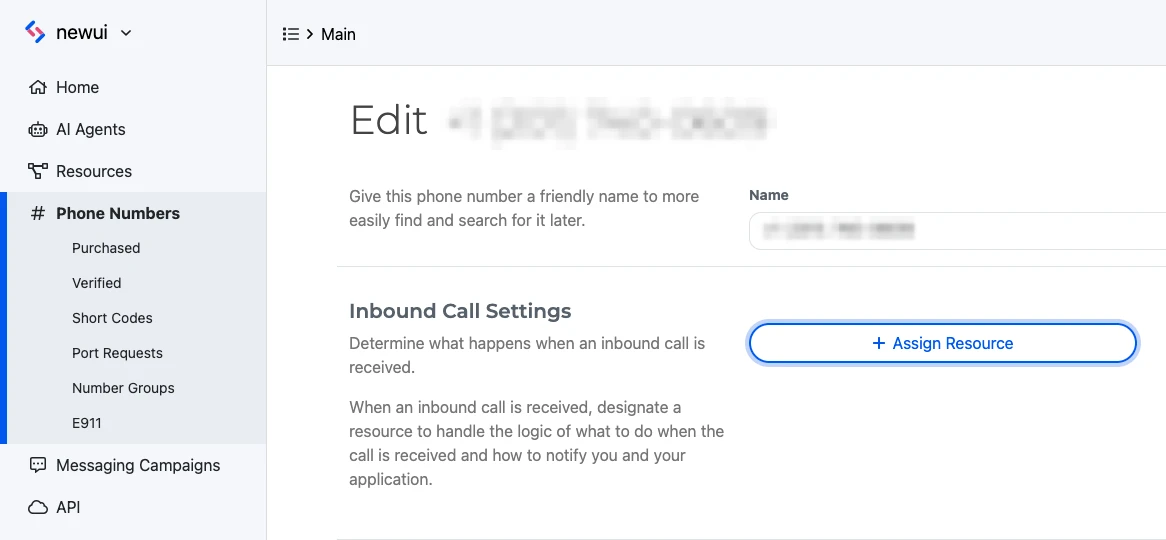
Navigate to the **Phone Numbers** section of the Dashboard's left sidebar menu.
Purchase a phone number and assign it to the desired SWML script.
### Give it a call!
Call the number you just assigned to chat with your new AI voice application on the phone.
## Next steps with SWML
Now you've deployed your very first SignalWire voice AI application using Rime voices.
Next, dive deeper into SWML to explore its capabilities!
Documentation for all SWML methods
Build advanced AI applications using SignalWire Markup Language
SWML guides and demo applications