
Forward calls
Call forwarding sends calls to your SignalWire number on to another phone, so a caller reaches a person wherever they are. Each section below forwards a call to your number to a second phone, and plays a message to the caller when nobody answers.
Choose an approach
SWML and Relay each forward calls to your number with their own code and their own kind of Resource on the number, so pick one and follow only its section. REST works on any live call, however it was answered. All three dial the destination and connect it to the caller the same way, so the timeout and caller ID rules on this page apply to each.
- SWML: answer calls to your number with a document that SignalWire runs, served from
your server or hosted in SignalWire.
connectforwards the call, and the next instructions in the document run if nobody answers. - WebSocket (Relay): answer calls with the Server SDKs in code that holds a connection to SignalWire, and forward them with a connect command. Forwarding events arrive in your code, so no webhook is needed.
- REST: forward a call that’s already in progress, such as one an AI agent is handling, by call ID from any process.
To forward calls without code, use the Forward to Phone node in Call Flow Builder.
Prepare for call forwarding
Start with working call setup from Make and receive calls. Have these values ready:
- Your Space URL, such as
<YOUR_SPACE>.signalwire.com. - Your Project ID and an API token with the Voice permission.
- A phone number in your Space.
- Two phones you can answer: one to call your number from, and one that receives the forwarded call.
A trial project only places calls to and receives calls from numbers you’ve purchased or verified, and can’t call internationally. Verify both phones you’ll test with, as Prepare for your first call shows.
Replace these values in the samples you run:
How call forwarding works
A forwarded call is two calls joined together. The caller’s call to your number is the first. SignalWire then places a second call to the destination, and when the destination answers, bridges the two so the caller and the destination hear each other. The forward ends when either side hangs up. If the destination doesn’t answer, is busy, or declines, the forward fails, and your code decides what the caller hears next.
Two settings shape every forward:
- Timeout. How long the destination rings before the forward fails. A voicemail system that answers counts as an answer, so keep the timeout shorter than the time the destination’s phone takes to send calls to its own voicemail if you want your own message to play instead.
- Caller ID. The number the destination’s phone shows. Show the caller’s number so the person answering knows who’s calling, or show your SignalWire number so they know the call came through your business line.
A destination can be a phone number or a SIP URI such as sip:ada@example.com. SWML, and so REST,
can also forward to a Resource Address such as /public/support. The samples on this
page forward to a phone number.
Forwarding keeps SignalWire in the call for as long as it lasts. To hand a SIP call back to your PBX or SIP device instead, see Transfer calls with SIP REFER.
Forward calls via SWML
connect places the call to the destination and bridges it to the caller. The
document waits at connect until the forward ends, then moves on to the next instruction.
Forward an incoming call via SWML
Bayview Taxi forwards calls to its business number to Ada, its dispatcher. This walkthrough forwards a call to your number to your second phone.
Build the forwarding document
The document rings the destination for up to twenty seconds with connect. It sets from to
${call.from}, the number of the person calling you, so the forwarded call shows who’s calling. If
nobody answers, the document continues and plays a message.
The Server SDKs build the document and serve it from your server. Run the server,
give it a public URL, and create a SWML Script with
External URL set to https://signalwire:<YOUR_BASIC_AUTH_PASSWORD>@<YOUR_PUBLIC_HOST>/swml, as
Answer a call via SWML shows. To skip the server, create a SWML Script with
Hosted Script and paste the YAML or JSON into Primary Script instead.
To show your SignalWire number instead of the caller’s, set from to <YOUR_CALLER_ID>. The message also plays if the destination hangs up before the caller does; to play it
only when nobody answers, branch on the connect_result variable, which connect sets to
connected or failed.
Assign the script to your phone number
Open Phone Numbers, select the number, and select Edit Settings. Under Inbound Call Settings, select Assign Resource, choose the Resource, and save. To assign from the Resource instead, open its Addresses & Phone Numbers tab, select + Add, then Phone Number, and pick a number you own.
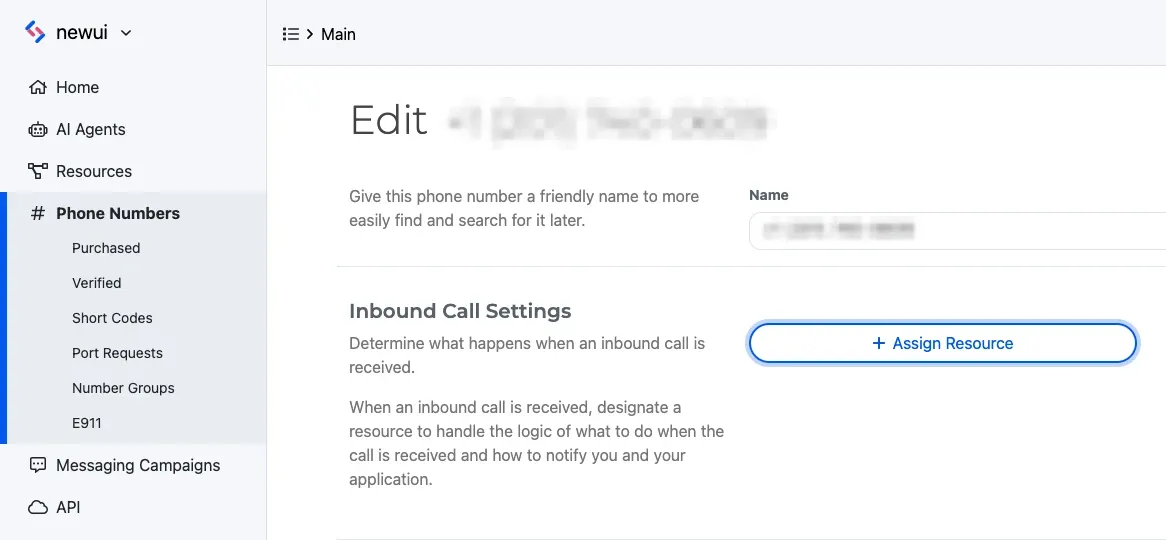
To assign it in code, see Answer a call via SWML.
Call your number
Call your SignalWire number from your first phone. You hear ringing while your second phone rings, and the second phone shows your first phone’s number. Answer it and talk: each phone hears the other. Hang up either phone to end the call.
Call again and let the second phone ring without answering. After twenty seconds you hear the message, then the call ends.
If it doesn’t work, check the symptom:
- The call ends right away, or you hear an error. SignalWire couldn’t run the document. If your server serves it, check that the server and tunnel are running and that the URL’s password matches the server’s.
- You hear your number’s old behavior. The number still points at another Resource. Open it under Phone Numbers and check Inbound Call Settings.
- The second phone never rings, and the call ends after the timeout. Check that
<YOUR_DESTINATION>is in E.164 format, and in a trial project, that it’s a verified number.
Forward calls via WebSocket (Relay)
Answer the call, then send a connect command with the destination to dial. The command returns as
soon as SignalWire accepts it, so the program follows the forward through
calling.call.connect events: connecting, then connected while the two phones talk and
disconnected when one hangs up, or failed if nobody answers.
Forward an incoming call via WebSocket (Relay)
This walkthrough forwards a call to your number to your second phone, showing the caller’s number.
Run the forwarding handler
Run the handler and leave it running while you test. It subscribes to the forward-calls
topic. When a call arrives, it answers, plays a ringtone to the caller, and rings your second phone
for up to twenty seconds. If nobody answers, it plays a message, then hangs up; when the forward
ends, it hangs up.
The handler sets the forwarded call’s caller ID to the caller’s number, read from the incoming call.
To show your SignalWire number instead, use <YOUR_CALLER_ID>. The Server SDKs
document every connect option.
Assign the topic to your phone number
Create a Relay Application for the topic:
- Open My Resources, select + Add, then Relay Application.
- Name it Forward calls and enter
forward-callsas the Topic. It must match thecontextsvalue in your code. - Select Create.
Open Phone Numbers, select the number, and select Edit Settings. Under Inbound Call Settings, select Assign Resource, choose the Resource, and save. To assign from the Resource instead, open its Addresses & Phone Numbers tab, select + Add, then Phone Number, and pick a number you own.
To assign it in code, see Answer a call via WebSocket (Relay).
Call your number
Call your SignalWire number from your first phone. You hear a ringtone while your second phone
rings, and the handler prints Forward: connecting. Answer the second phone: it shows your first
phone’s number, the handler prints Forward: connected, and each phone hears the other. Hang up
either phone; the handler prints Forward: disconnected and ends the call.
Call again and let the second phone ring without answering. After twenty seconds the handler prints
Forward: failed, you hear the message, and the call ends.
If it doesn’t work, check the symptom:
- The call never reaches your handler. Check that the handler is still running, that its
contextsvalue matches the Relay Application’s Topic exactly, and that the number’s Inbound Call Settings point at that Relay Application. - The handler prints
Forward: failedright away, and the second phone never rings. Check that<YOUR_DESTINATION>is in E.164 format, and in a trial project, that it’s a verified number.
Forward a call already in progress via REST
When a process that doesn’t hold the call needs to forward it, such as a dashboard where a
dispatcher reroutes a caller, send the calling.transfer command with the call’s ID and a SWML
document that uses connect. Whatever the call is doing stops, and the document takes over: the
destination rings, and when it answers, the caller is connected to it. If nobody answers, the
caller hears the message. The call ID is the id from
a dial response, or the call_id that SignalWire sends your SWML server or status webhook.
The Server SDKs wrap the command:
The cURL example calls Call commands. The command returns as soon as SignalWire
accepts it, and the call keeps the same ID. dest also takes the URL of a SWML document your server
serves.