
Coach live calls with an AI sidecar
An AI sidecar listens to a live call between a customer and your agent, and after each customer turn it sends your server one short tip for the agent. It never speaks on the call, so the customer hears only your agent. Start by coaching a call between two phones you own, then ask the sidecar a question mid-call, prompt it for a tip right away, and stop it while the call carries on.
Pick the right product for AI sidecar
You can run a sidecar with SWML or the REST Calling API, but not every function is available on each.
- SWML: the call’s document attaches the sidecar with
ai_sidecar, then bridges the customer to your agent. Use it when every call to a number should be coached from the start. - REST Calling API: commands sent to a live call by its ID, from any process. Use it to coach a call that’s already connected, such as one your agent picked up from a queue, and to talk to or stop a sidecar however it was attached.
Both send their tips to the same server, and you can mix them on one call: attach the sidecar with SWML, then ask it questions and stop it over REST.
Prepare for AI sidecar
Start with working call setup from Make and receive calls. To test a sidecar you need two phones: one to call in as the customer, and one to answer as the agent. You also need a machine that can run a small server, and a tunnel such as ngrok that gives it a public HTTPS URL.
A trial project only places calls to and receives calls from numbers you’ve purchased or verified. Prepare for your first call shows how to verify the phones you’ll test with.
Replace these values in the samples you run:
The REST requests on this page go to https://<YOUR_SPACE>.signalwire.com/api/calling/calls and
authenticate with basic auth, using your Project ID as the username and your API token as the
password. Each request names its call in id, so replace the example ID with <YOUR_CALL_ID>.
How the AI sidecar works
A sidecar runs alongside the call without taking part in it:
- The sidecar attaches to the call. It hears both sides, and the call carries on as normal. A call runs one sidecar at a time.
- The customer finishes a turn. The sidecar sends the conversation so far to an AI model,
together with your prompt. The model writes one tip for the agent, or calls the built-in
sidecar_skiptool to stay quiet when no tip is needed. - SignalWire posts each step to your server. Tips, skips, answers to your questions, and the sidecar’s other steps each arrive as a callback at the URL you set.
- The sidecar stops. It stops when the call ends or when you stop it, and sends a last callback with a record of the session.
Run the sidecar server
Every task in this guide uses one server, which answers the sidecar’s tool calls at /swaig and
prints its callbacks as they arrive at /events.
The Server SDKs handle both with SWMLService:
Start a tunnel to port 8080, such as ngrok http 8080, so SignalWire can reach the server.
Each callback carries its event under a sidecar_event key, with a type that says what happened.
The same URL also receives transcription events that have no sidecar_event key, so the server
skips those. The main types are:
For a full list of callback types, see the callback catalog.
Attach a sidecar to a call
A sidecar can join a call as it starts, from the call’s SWML, or join a call that’s already connected, from the REST Calling API. Either way it reports to the server you just started.
Attach a sidecar via SWML
ai_sidecar attaches the sidecar and the document moves straight on, here to a
connect that bridges the customer to the agent.
Create a SWML Script that holds this document, so SignalWire runs it for calls to your number. The sales agent is being coached from the moment the call is answered:
Create a SWML Script
Open My Resources, select + Add, then Script, then SWML Script. Name it AI sidecar and leave Used For set to Calling.
lang is the only required setting. Place ai_sidecar before connect so the sidecar hears the
whole conversation. hints help speech recognition catch the company and product names the customer
is likely to say. The SWAIG setting gives the sidecar a lookup_account tool:
when the customer gives their customer ID, the model calls the tool, SignalWire posts the request to
your server’s /swaig route, and the account record shapes the sidecar’s tip.
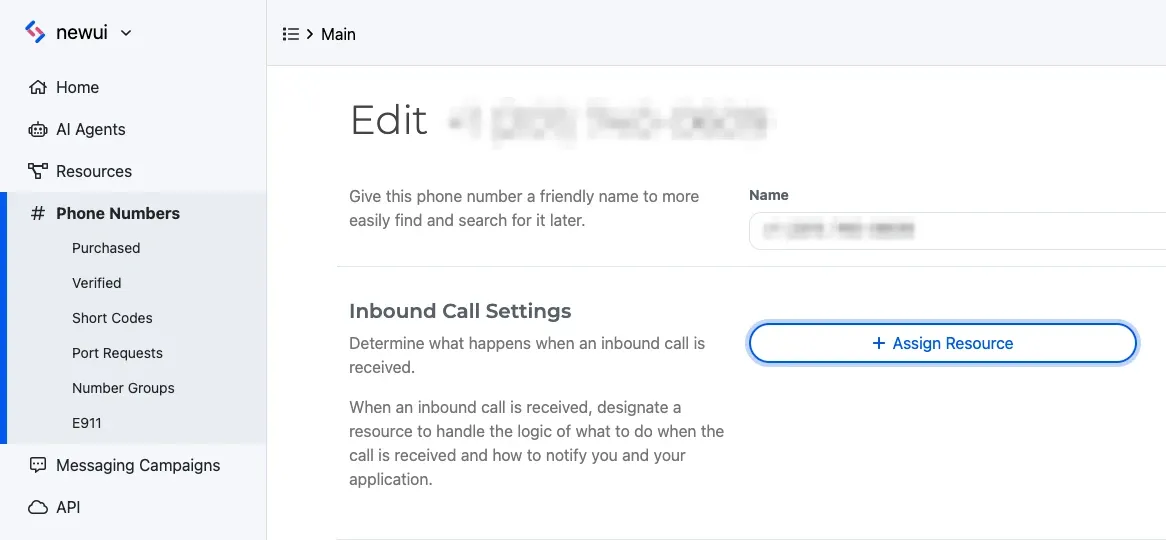
Then assign the script to your phone number:
Open Phone Numbers, select the number, and select Edit Settings. Under Inbound Call Settings, select Assign Resource, choose the Resource, and save. To assign from the Resource instead, open its Addresses & Phone Numbers tab, select + Add, then Phone Number, and pick a number you own.
To do both in code, see Answer a call via SWML.
Call your number from the customer phone, and answer on the agent phone. As the customer, say “Hi, this is Globex, customer ID 4417. We’re also looking at ACME.” and pause. The server prints the call’s ID, the tool call, and the sidecar’s tip:
When you hang up, the server prints Sidecar finished: transcribe_close.
If the call connects but the server prints nothing, the sidecar didn’t attach. The call connects
either way, without an error, so check the document in the script, that the tunnel is running, and
the password in url. If Sidecar started appears but no Tool call follows, SignalWire can’t
reach your server’s /swaig route: check the host and password in web_hook_url.
Attach a sidecar via REST
Send calling.ai_sidecar with the call’s ID to attach a sidecar to a call that’s already connected.
params takes the same settings as the SWML method. This request copies prompt, lang, url,
hints, and SWAIG from the document in Attach a sidecar via SWML,
so the sidecar reports to your server and can call your tool.
A call runs one sidecar at a time, and the request fails while another sidecar is attached. A call from the previous section already has one, so to try this request on it, stop that sidecar first, then send the request with the same call ID:
For every setting the command takes, see Call commands.
The server prints Sidecar started with the call’s ID, and tips follow after the customer’s next
turn.
Ask the sidecar a question during the call
An agent who wants a direct answer, rather than waiting for the next tip, can ask the sidecar a question. The sidecar answers from what it has heard so far and can call your tools to do it. The question doesn’t become part of the sidecar’s conversation, so later tips aren’t affected.
Ask the sidecar a question via REST
Send calling.ai_sidecar.ask with the call’s ID and the question in text:
The request returns as soon as the question is queued, and the answer arrives at your server as an
ask_answer callback, which the server prints after Answer:. Every callback for one question
carries the same ask_id, so you can match an answer to the question you sent. Answers reach your
server at the url the sidecar was started with, so attach the sidecar with one.
Prompt the sidecar for a tip right away
When something happens that the sidecar can’t hear, such as a note from a supervisor or a change in your CRM, you can tell the sidecar about it and have it respond immediately instead of waiting for the customer’s next turn.
Prompt the sidecar for a tip via REST
Send calling.ai_sidecar.poke with the call’s ID and a message in text:
The sidecar responds the way it does after a customer turn: the server prints a new Tip:, or
receives a skip callback when the model decides no tip is needed. The message stays in the
sidecar’s conversation, so its later tips take it into account.
Stop the sidecar while the call continues
Stopping a sidecar ends the coaching but leaves the customer and the agent connected. It works on any sidecar, including one attached with SWML.
Stop a sidecar via REST
Send calling.ai_sidecar.stop with the ID the server printed when the sidecar started:
The server prints Sidecar finished: api_stop, and the call stays connected.