Forward to Phone
This node will allow you to forward the incoming call to another phone or SIP endpoint.
Output Node Connectors
Success
Call is forwarded successfully. The connector will be triggered when the call is successfully forwarded to the phone number.
No Answer
Call is not answered. The connector will be triggered when the call is not answered by the phone number.
Busy
Call is busy. The connector will be triggered when the call is busy.
Decline
Call is declined. The connector will be triggered when the call is declined.
Error
An error occurred. The connector will be triggered when an error occurs while forwarding the call.
Node Settings
Default From
The default phone number to use as the caller ID when forwarding the call.
Default Timeout
The time in seconds to wait for the call to be answered before timing-out and either disconnecting the call or attempting a new number.
Default Value: 45 seconds.
Call State URL
A webhook URL that will receive a POST request containing call details each time a Call State Event is triggered. You will need to choose which events you want listen for in the next field. If no events are chosen, the URL will receive no requests.
Call State Events
The events that will trigger a POST request to the Call State URL.
Possible Values: created, ringing, answered, ended
Call Numbers
Only shows when multiple numbers are added.
A toggle option to change the behavior of the forwarding of the call. If set to Sequential, the call will be forwarded to the next number in the list if the previous number is busy, declined, or not answered. If set to Simultaneously, the call will be forwarded to all numbers in the list at the same time.
Possible Values: Sequential, Simultaneously
Phone Number Configuration
One or more phone numbers can be added to the node.
Additional phone numbers can be added by clicking the Add Phone Number button.
Depending on the Call Numbers property, the call will be forwarded to the next number in the list (Sequential)
or to all numbers in the list at the same time (Simultaneously).
To
The phone number or SIP endpoint to forward the call to.
From
The phone number to use as the caller ID when forwarding the call. If not set, Default From will be used.
Timeout
The time in seconds to wait for the call to be answered before timing out and either disconnecting the call or attempting a new number. If not set, Default Timeout will be used.
Enable Whisper
Examples
Preserve Original Caller ID When Forwarding
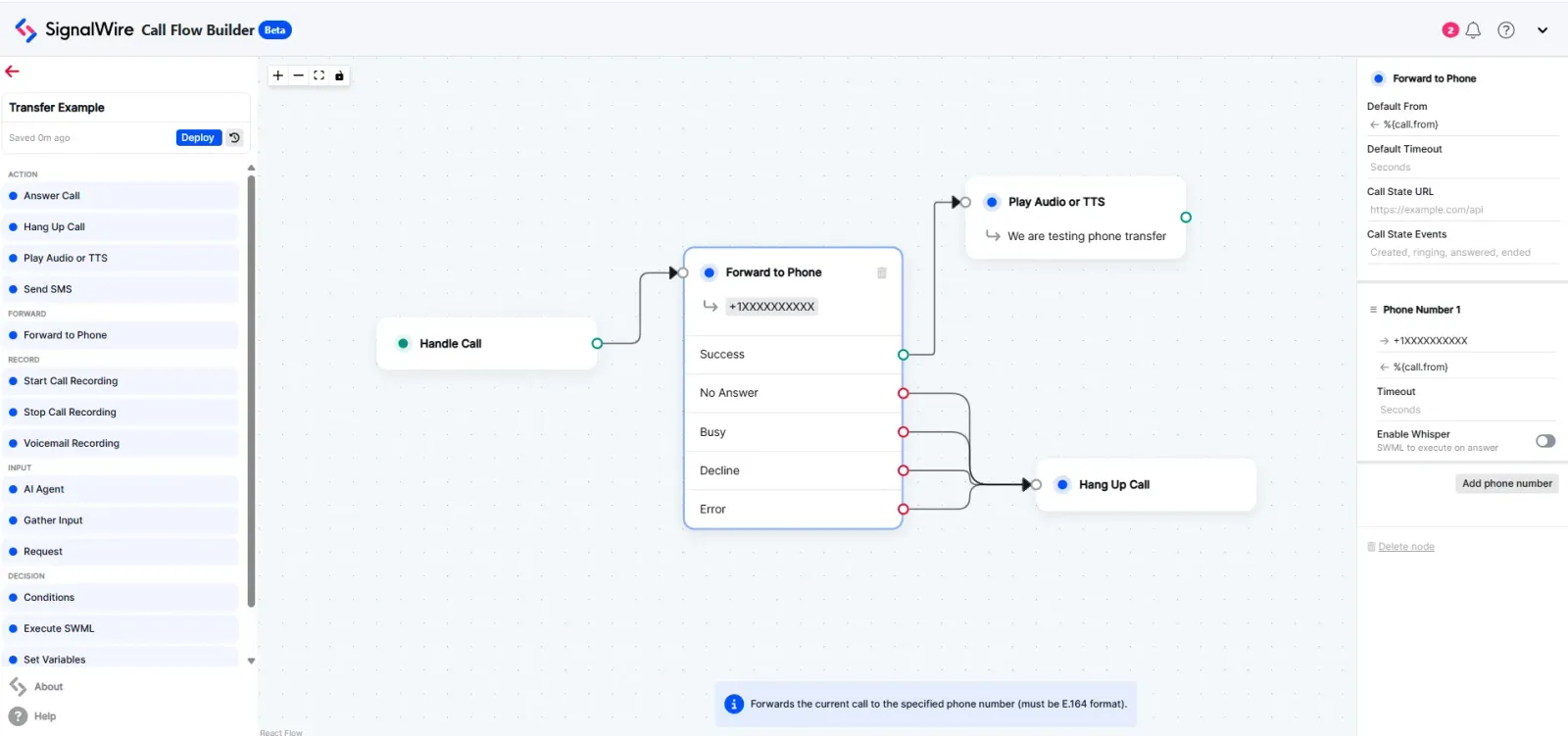
This example shows how to forward calls while preserving the original caller’s phone number as the caller ID. This is useful when you want the person receiving the forwarded call to see who originally called, rather than your SignalWire number.
In this flow, the Handle Call node receives the incoming call and passes it to the Forward to Phone node,
which forwards the call to the destination number. The key configuration is setting the From field to %{call.from} - this variable contains the original caller’s
phone number, ensuring that the person receiving the forwarded call will see the original caller’s number on their caller ID rather than your SignalWire number.
If the forward is successful, the call connects directly. If the call fails for any reason (no answer, busy, declined, or error), the flow routes to Hang Up Call. This approach is particularly useful for business scenarios where you want to maintain transparency about who is calling.
Forward to SIP
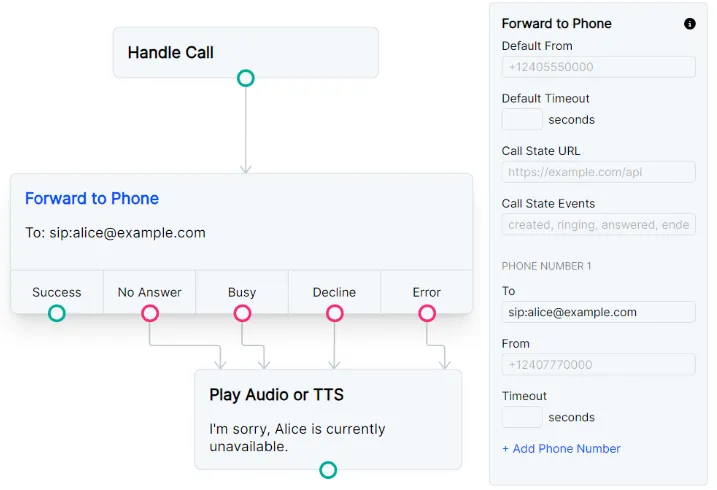
In order to dial a SIP endpoint, format the To field with with “sip:” followed by the endpoint’s address. For example:
To: sip:alice@example.com
If the endpoint is unavailable, the flow will follow one of the four failed routes depending on the SIP signaling that is received. You can give individual actions for each signal, or route them all back into the same node.
Forward to multiple SIP endpoints and phone
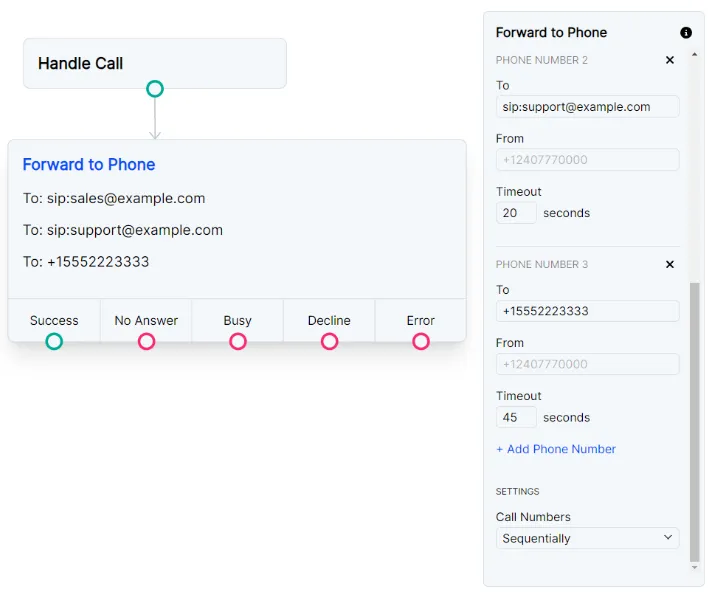
You can combine SIP dialing and Phone number dialing in the same node.
The example below is set to Sequential dialing, so the sales endpoint will first ring for 20 seconds.
After that, the call will ring the support endpoint for 20 more seconds before finally dialing out to +15552223333.