Send SMS
The Send SMS node is used to send an SMS to a phone number.
Node Settings
To Phone Number
The phone number to which the SMS will be sent.
From Phone Number
The phone number from which the SMS will be sent.
SMS Text
The text of the SMS that will be sent.
Example
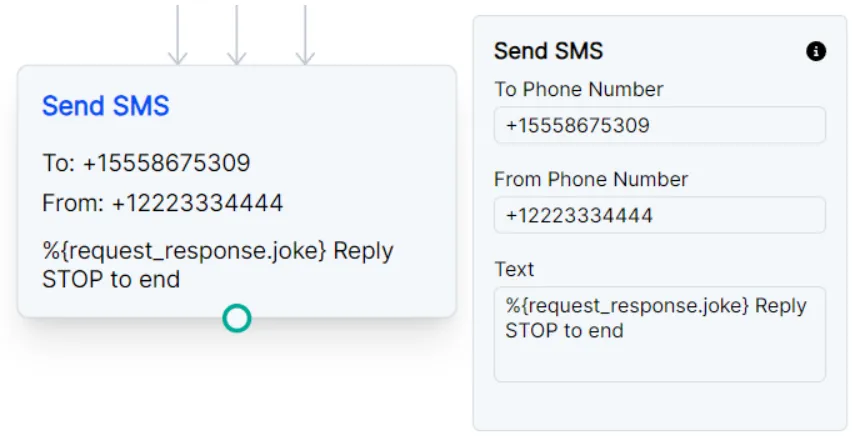
Send SMS with variable
The example below is connected with a Request node that sends a request to a joke API.
Knowing the parameters of the API response, the node can pull the request’s response with %{request_response.joke}.
This example also includes messaging opt-out verbiage since this is important to avoid SMS spam blocks.
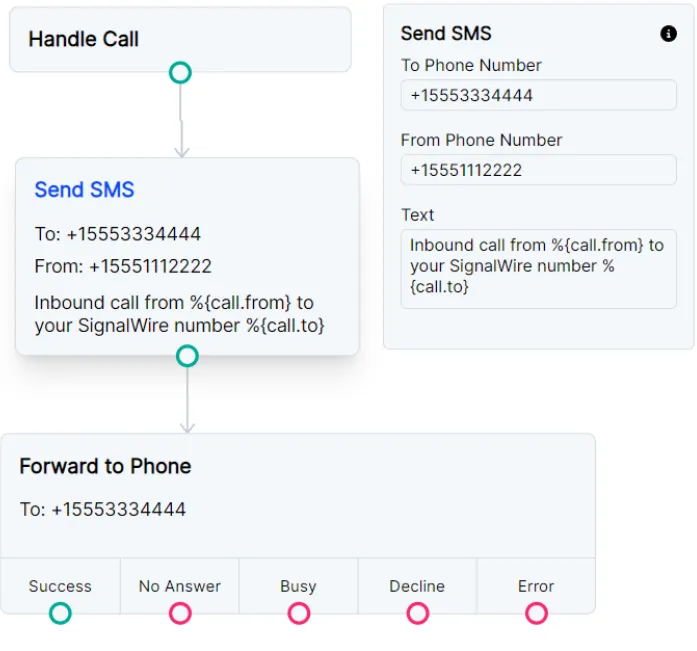
Send SMS notification as Call Whisper
You might be using Call Flow Builder to forward calls to a personal cell phone. The example below will send an SMS to the specified phone number just before forwarding a call to that same number. This way you’ll receive a text letting you know this is a forwarded call from SignalWire and which original SignalWire number your caller dialed.