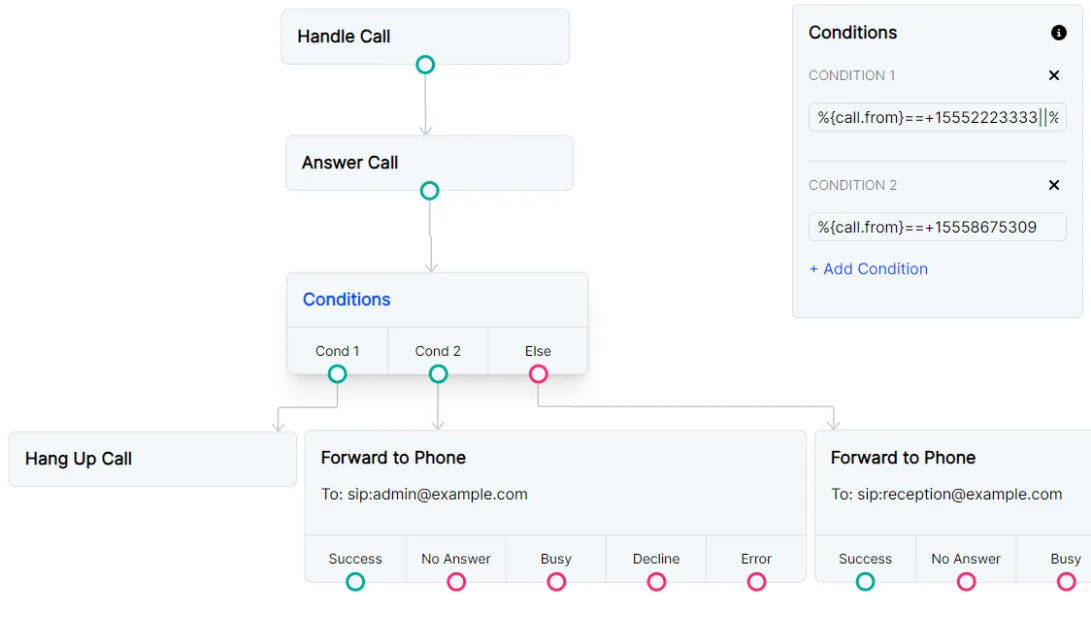
Conditions
A Conditions node works like a JavaScript if statement.
A condition field can reference variables that have been set in the flow with %{Key},
Request node responses accessed with %{request_response.<object_field>},
or call parameters such as %{call.from}.
Add additional conditions to create else if conditions.
The Cond # path will be executed for a truthy condition. The Else path will be executed for a falsy condition.
Output Node Connectors
Condition
The condition that is evaluated to determine which path to take. Additional conditions can be added by clicking the Add condition button. Additional conditions will act as JavaScript else-if statements.
Else
The path to take if none of the conditions are met.
Node Settings
Conditions
The conditions that are evaluated to determine which path to take. Additional conditions can be added by clicking the Add condition button. Additional conditions will act as JavaScript else-if statements.
Example
Use conditions to create a block list
In this example, we immediately hang up calls from specific numbers on our block list and forward call from a VIP directly to our administration number. All other calls will connect to the main reception number.