
For AI agents: a documentation index is available at the root level at /llms.txt and /llms-full.txt. Append /llms.txt to any URL for a page-level index, or .md for the markdown version of any page.
Log inSign up
Support
  • Core
    • Overview
    • Variables
    • Versioning
  • Nodes
    • Overview
    • AI Agent
    • Answer Call
    • Conditions
    • Execute SWML
    • Forward to Phone
    • Gather Input
    • Handle Call
    • Hang Up Call
    • Play Audio or TTS
    • Request
    • Send SMS
    • Set Variables
    • Start Call Recording
    • Stop Call Recording
    • Unset Variables
    • Voicemail Recording
LogoLogoSignalWire Docs
Log inSign up
Support
On this page
  • Node Settings
  • Example
Nodes

Handle Call

|View as Markdown|Open in Claude|
Was this page helpful?
Edit this page
Previous

Hang Up Call

Next
Built with

The Handle Call node is used to handle an incoming call. It is the first node in the call flow, does not have an input connector and is mandatory in every call flow. The Handle Call node cannot be deleted from the call flow and an additional Handle Call node cannot be added to the call flow. The first node connected to the Handle Call node is the starting point of the call flow.

Node Settings

None


Example

In the example below, the Handle Call node is connected to the Answer Call node, which is the starting point of the call flow. After the call is answered, the call flow continues with the Play Audio or TTS node to play a TTS message to the caller.
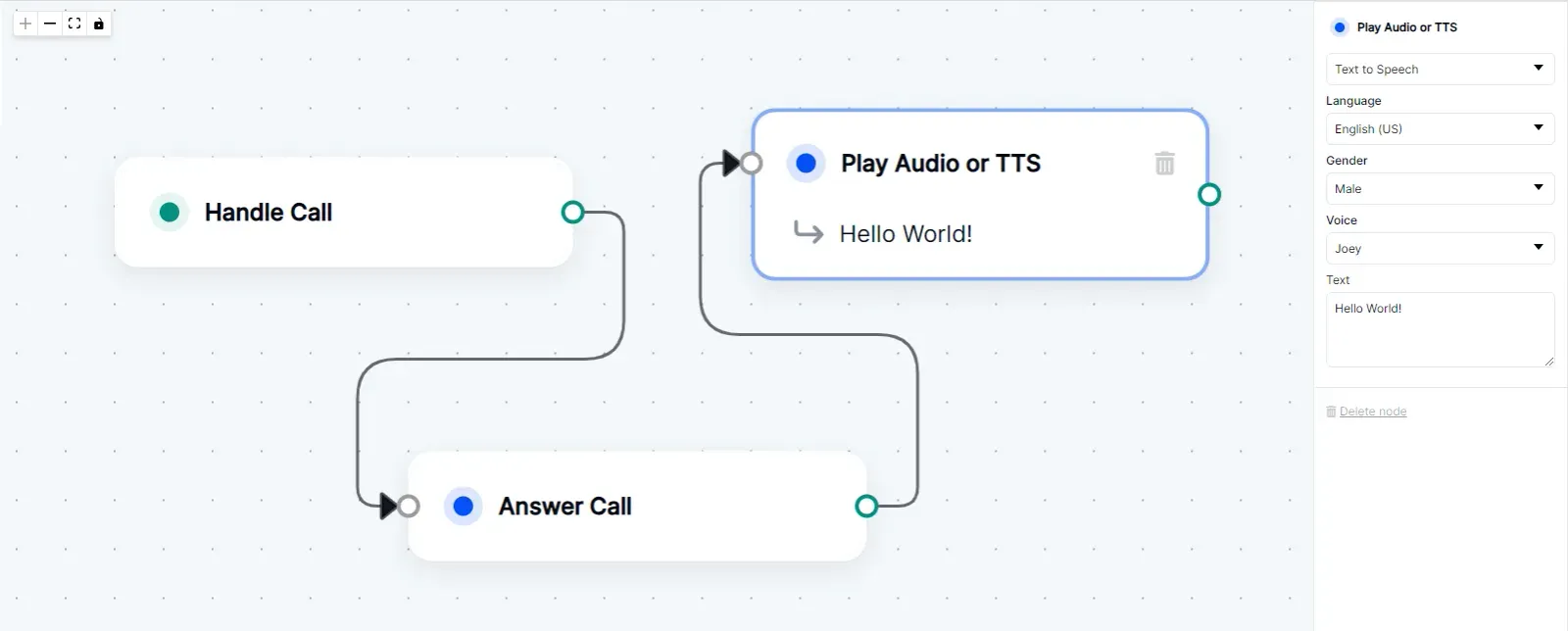
Handle Call Node being used in a Call Flow.

Handle Call Node being used in a Call Flow