
Execute SWML
Execute a remote SWML document and return to the current document.
Use %{return_value.['object_field']} to reference the return values from the external SWML.
Output Node Connectors
Condition
The condition that is evaluated to determine which path to take. Additional conditions can be added by clicking the Add condition button. Additional conditions will act as JavaScript else-if statements.
Else
The path to take if none of the conditions are met.
Node Settings
URL
The URL of the SWML document to execute. The URL must return swml in valid JSON or YAML format.
Params
The parameters to pass to the SWML document.
Meta
The metadata to pass to the SWML document. A JSON object to serialize.
Conditions
The conditions that are evaluated to determine which path to take. Additional conditions can be added by clicking the Add condition button. Additional conditions will act as JavaScript else-if statements.
Example
In this example, we will execute a SWML script that is hosted on a remote server.
When making a request to the server, we will pass the User and Token parameters.
The SWML document will return a JSON object with a play method field.
This play field will be used for TTS (Text-to-Speech) in the current document
and will welcome the user with the User parameter and say the Token parameter.
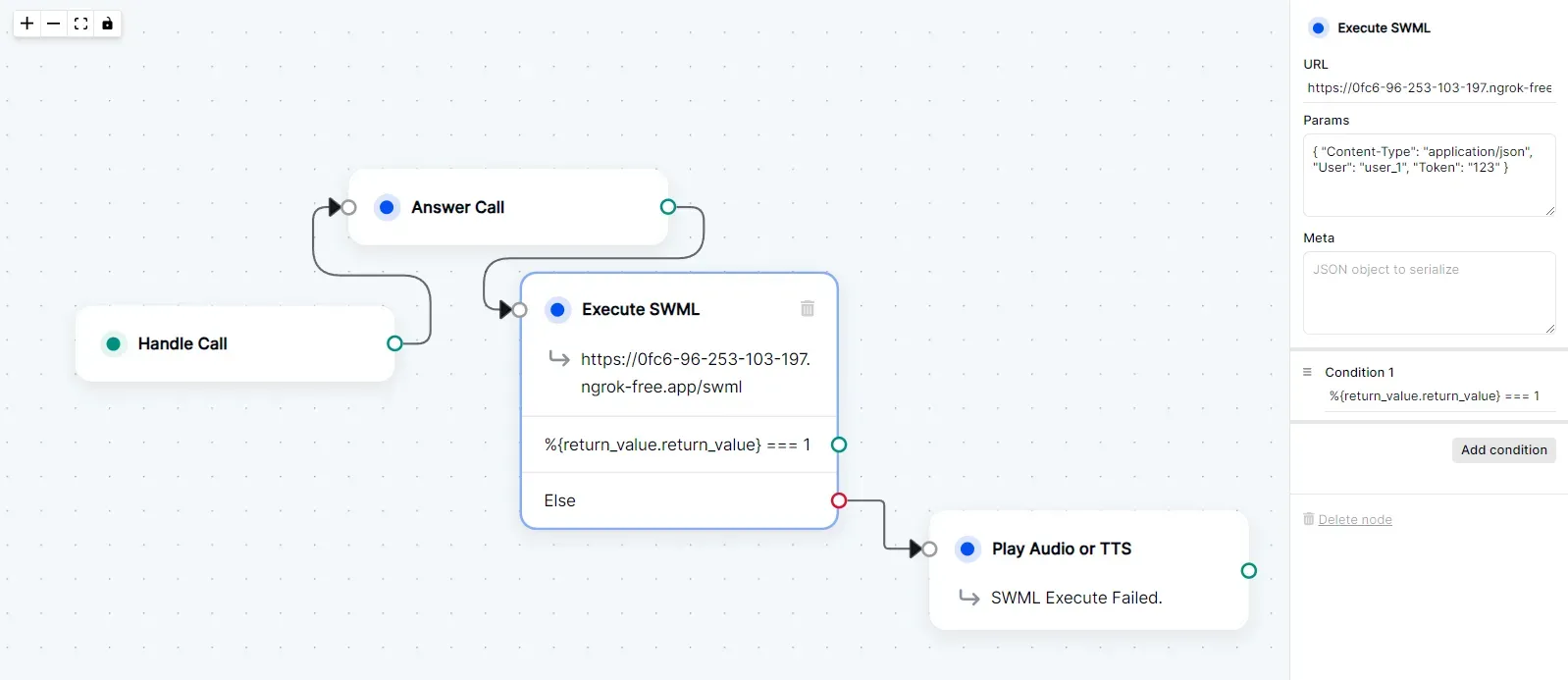
Execute SWML Node Settings
- URL: Self-hosted ngrok URL.
- Params:
{ "Content-Type": "application/json", "User": "user_1", "Token": "123" } - Meta: None
- Condition:
%{return_value.return_value} === 1
SWML Document
Below is the SWML document that will be executed.
Server Code
Below is the server code that will return the SWML document.