Set Variables
Use this node to set variables that can be accessed from other nodes in the Call Flow.
The value can be a static value set as a string ("value"),
a variable from another node such as a request response ( %{request_response.<object_field>} ),
or a call parameter ( %{call.from} ).
Access these variables in other blocks with %{<Key>} and unset variables with the Unset Variables node.
Node Settings
Key
The name of the variable to set.
Value
The value to set the variable to. This can be a static value, a variable from another node, or a call parameter.
Example
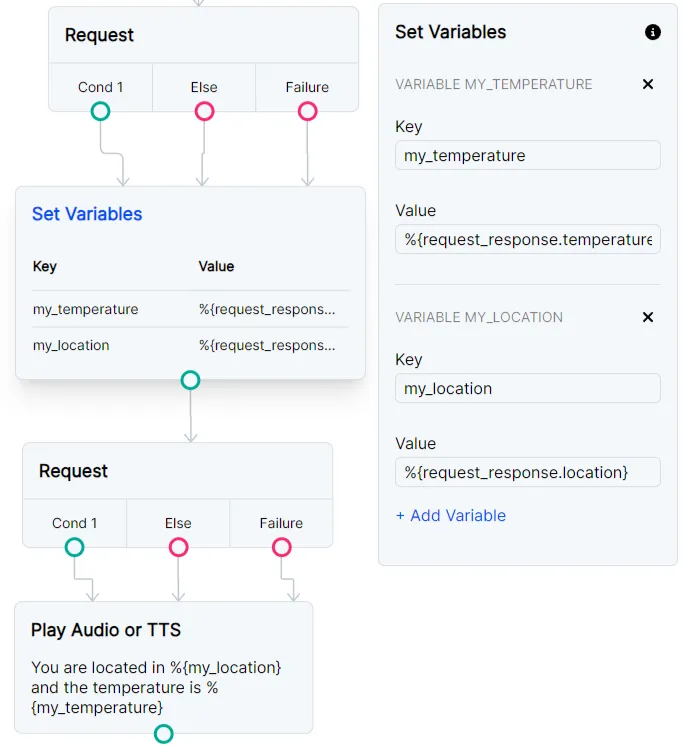
Use Set Variables if you plan to use multiple Request nodes in the same Flow and you need the variables to carry across the entire Flow.
This example makes a request to an API for temperature and location.
The request’s response is saved in variables called my_temperature and my_location.
In order to make a new request to a new webhook, the Set Variables node is essential because
the second Request node will overwrite the request_response.
Your first variables will remain accessible using %{vars.my_temperature} and %{vars.my_location}.