
Variables
Introduction
Variables allow you to create a dynamic Call Flow that responds to user input and other outside information.
While the Set Variables node allows you to manually create your own variables at any time,
you can also use variables from Request nodes or even get variables from the inbound call.
All variables must be in the following format to signal to the Call Flow Builder that it should process a variable: %{<variable>}.
Inbound Call Variables
The following variables exist for all inbound calls. At this time, the direction is always inbound, but the other values are very useful and can be referenced throughout the whole Flow.
%{call.from}
The phone number of the caller.
%{call.to}
The phone number the call was made to.
%{call.direction}
The direction of the call.
%{call.call_id}
The unique identifier for the call.
%{call.state}
The state of the call.
%{call.type}
The type of call.
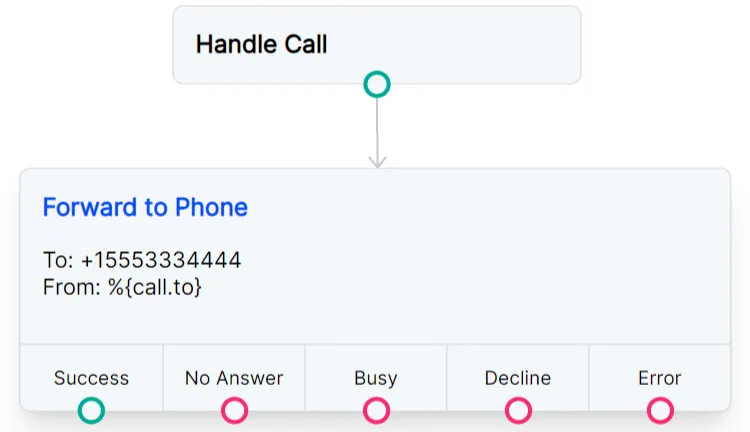
Variable Example
Request Variables
Variables that you get from a Request node can be accessed using %{request_response.<object_field>}.
For example, if we send a GET request to timeapi.io, the response we’ll receive will look like this:
To reference the hour, date, and dayOfWeek from this response as variables in the Call Flow, we would format the variables like this:
%{request_response.hour}
%{request_response.date}
%{request_response.dayOfWeek}
Please note that response values that are strings will need special formatting to be used with conditional expressions or JavaScript operators.
Use the format %{vars.request_response.<object_field>'} to use the value of the string.
In the example above, the response parameter dayOfWeek has a string value of Thursday.
The following condition will only be met when the day of the week is Thursday:
%{vars.request_response.dayOfWeek == 'Thursday'}
You can also use slice() to remove everything from the string after the third character to give you a shortened day of the week (Fri, Sat, Mon):
Key: short_day
Value: %{vars.request_response.dayOfWeek.slice(0,3)}
Variables with JavaScript Operators
You can use variables along with standard Javascript operators. This can be useful if you need to alter a variable or pass a condition that matches an expression.
For example, you can use the slice() method
to remove everything from the %{call.from} variable except for the area code of an inbound caller.
Within a Set Variables node, you can set the following:
Key: area_code
Value: %{call.from.slice(2,5)}
You can even combine this with a Conditions node as in the example below. Condition 1 uses the OR operator to check if the area code is 321 or 407.
If either of those is true, the call is forwarded to +15552223333. A second condition in the same node checks for a 419 area code and forwards the call to +15553334444.
Condition 1: %{area_code}==321||%{area_code}==407
Condition 2: %{area_code}==419
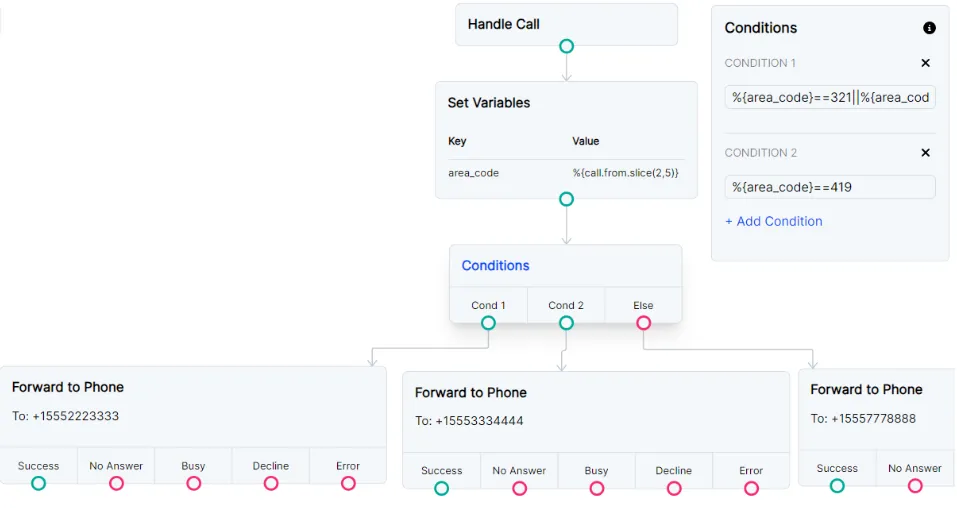
Use the slice() method to alter a variable.