***
id: 205aae9e-d6d0-432b-a716-8fd22c8386c7
title: Execute SWML
description: >-
Call Flow Builder node to execute a remote SWML document and return to the
current document.
slug: /reference/execute-swml
max-toc-depth: 3
----------------
Execute a remote [SWML](/docs/swml) document and return to the current document.
Use `%{return_value.['object_field']}` to reference the return values from the external SWML.
## **Output Node Connectors**
The condition that is evaluated to determine which path to take. Additional conditions can be added by clicking the `Add condition` button. Additional conditions will act as JavaScript `else-if` statements.
The path to take if none of the conditions are met.
## **Node Settings**
The URL of the SWML document to execute. The URL **must** return swml in valid `JSON` or `YAML` format.
The parameters to pass to the SWML document.
The metadata to pass to the SWML document. A JSON object to serialize.
The conditions that are evaluated to determine which path to take. Additional conditions can be added by clicking the `Add condition` button. Additional conditions will act as JavaScript `else-if` statements.
## **Example**
In this example, we will execute a SWML script that is hosted on a remote server.
When making a request to the server, we will pass the `User` and `Token` parameters.
The SWML document will return a JSON object with a [play](/docs/swml/reference/play) method field.
This play field will be used for TTS (Text-to-Speech) in the current document
and will welcome the user with the `User` parameter and say the `Token` parameter.
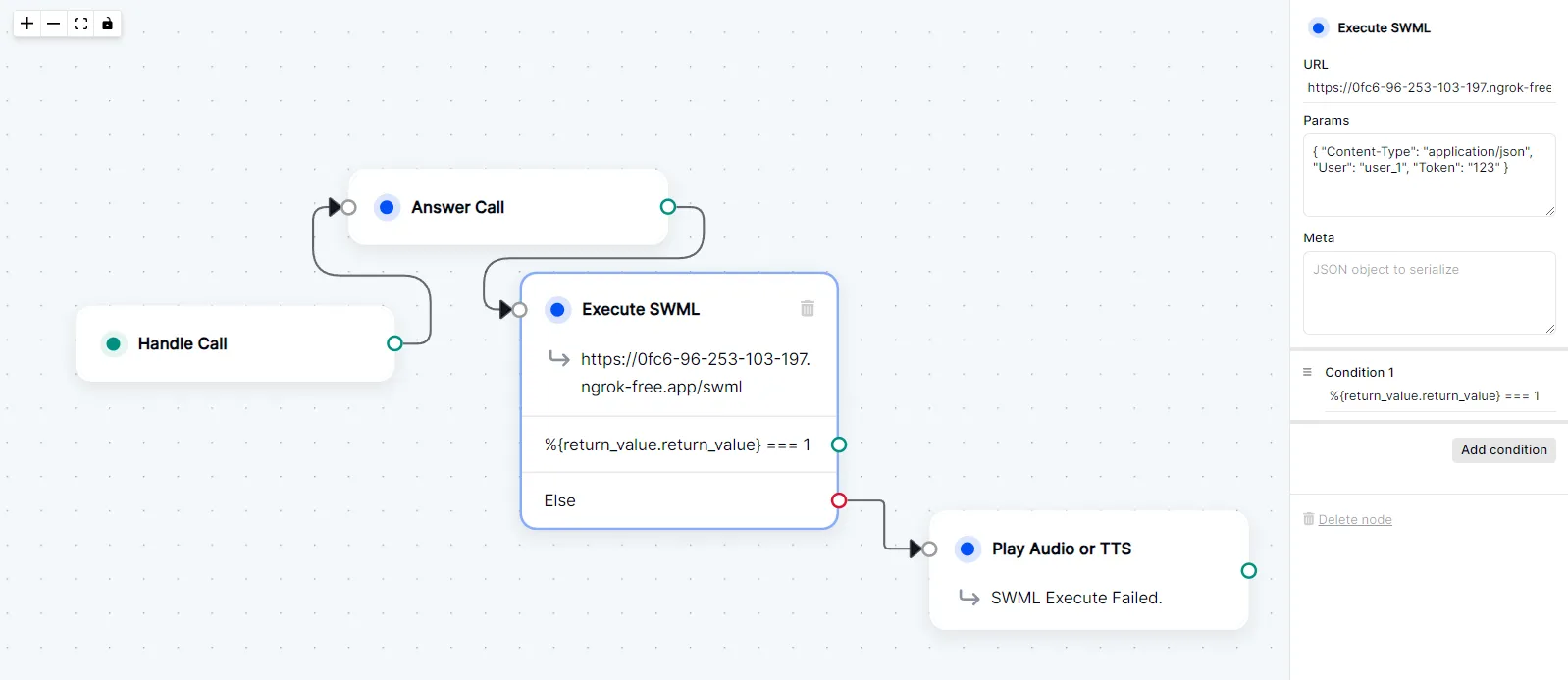
### Execute SWML Node Settings
* **URL**: Self-hosted [ngrok](https://ngrok.com/) URL.
* **Params**: `{ "Content-Type": "application/json", "User": "user_1", "Token": "123" }`
* **Meta**: None
* **Condition**: `%{return_value.return_value} === 1`
***
### SWML Document
Below is the SWML document that will be executed.
```yaml andJSON
sections:
main:
- play: 'say: Hello , welcome to the SWML demo! Your token is !'
```
***
### Server Code
Below is the server code that will return the SWML document.
#### Pre-requisites
* [ExpressJs](https://expressjs.com/) installed in your environment.
* [ngrok](https://www.npmjs.com/package/ngrok) installed in your environment.
```js
const express = require('express');
const ngrok = require('ngrok');
const app = express();
// Body parser middleware to handle JSON payloads
app.use(express.json());
// Define the route
app.post('/swml', (req, res) => {
let reqBody = req.body;
console.log(reqBody);
let user = reqBody.params.User;
let token = reqBody.params.Token;
const swml = {
"sections": {
"main": [
{
"play": `say: Hello ${user}, welcome to the SWML demo! Your token is ${token}!`
}
]
}
};
res.json(swml);
});
// Start the server and use ngrok to expose it
const port = 5000;
app.listen(port, async () => {
const url = await ngrok.connect(port);
console.log(`Server running on ${url}`);
});
```
#### Pre-requisites
* [Flask](https://flask.palletsprojects.com/en/3.0.x/installation/#install-flask) installed in your environment.
* [Pyngrok](https://pypi.org/project/pyngrok/) installed in your environment.
```python
from flask import Flask, request
from pyngrok import ngrok
app = Flask(__name__)
@app.route('/swml', methods=['POST'])
def swml_route():
# Extracting data from request JSON
req_data = request.json
print(req_data)
user = req_data['params']['User']
token = req_data['params']['Token']
swml = {
"sections": {
"main": [
{
"play": f"say: Hello {user}, welcome to the SWML demo! Your token is {token}!"
}
]
}
}
return swml
if __name__ == "__main__":
port = 5000
public_url = ngrok.connect(port).public_url
print(f" * Running on {public_url}")
app.run(port=port)
```