
For AI agents: a documentation index is available at the root level at /llms.txt and /llms-full.txt. Append /llms.txt to any URL for a page-level index, or .md for the markdown version of any page.
Log inSign up
Support
cXMLREST API
cXMLREST API
  • Core
    • Overview
    • Authorization
    • Error codes
    • Paging
    • REST client SDKs
  • Compatibility REST API
LogoLogoSignalWire Docs
Log inSign up
Support
On this page
  • Basic authentication
  • How it works
  • Example
  • Finding your credentials
  • API token scopes
  • cURL examples
  • Security best practices
Core

Authorization

|View as Markdown|Open in Claude|
Was this page helpful?
Edit this page
Previous

Error codes

Next
Built with

SignalWire REST APIs support two authentication methods: Basic Authentication and Bearer Authentication. Each endpoint specifies which method it accepts.

Basic authentication

Basic Authentication is the standard method for authenticating with SignalWire REST APIs, using your Project ID and API Token.

How it works

Include an Authorization header with each request:

Authorization: Basic <credentials>

To build the credentials string:

  1. Join your Project ID and API Token with a colon: ProjectID:APIToken
  2. Base64 encode the result

Example

Given the Project ID a1b2c3d4-e5f6-7890-abcd-ef1234567890 and API Token 4tjCGnmAeQ0hwFmFDhwfgww880X2lsnuR60VMyasGR3hFpSyvu:

$# In the format username:password
$a1b2c3d4-e5f6-7890-abcd-ef1234567890:4tjCGnmAeQ0hwFmFDhwfgww880X2lsnuR60VMyasGR3hFpSyvu
$
$# Base64 encoded:
$YTFiMmMzZDQtZTVmNi03ODkwLWFiY2QtZWYxMjM0NTY3ODkwOjR0akNHbm1BZVEwaHdGbUZEaHdmZ3d3ODgwWDJsc251UjYwVk15YXNHUjNoRnBTeXZ1
$
$# Full header:
$Authorization: Basic YTFiMmMzZDQtZTVmNi03ODkwLWFiY2QtZWYxMjM0NTY3ODkwOjR0akNHbm1BZVEwaHdGbUZEaHdmZ3d3ODgwWDJsc251UjYwVk15YXNHUjNoRnBTeXZ1

Finding your credentials

Your Project ID and API Tokens are available in the SignalWire Dashboard.
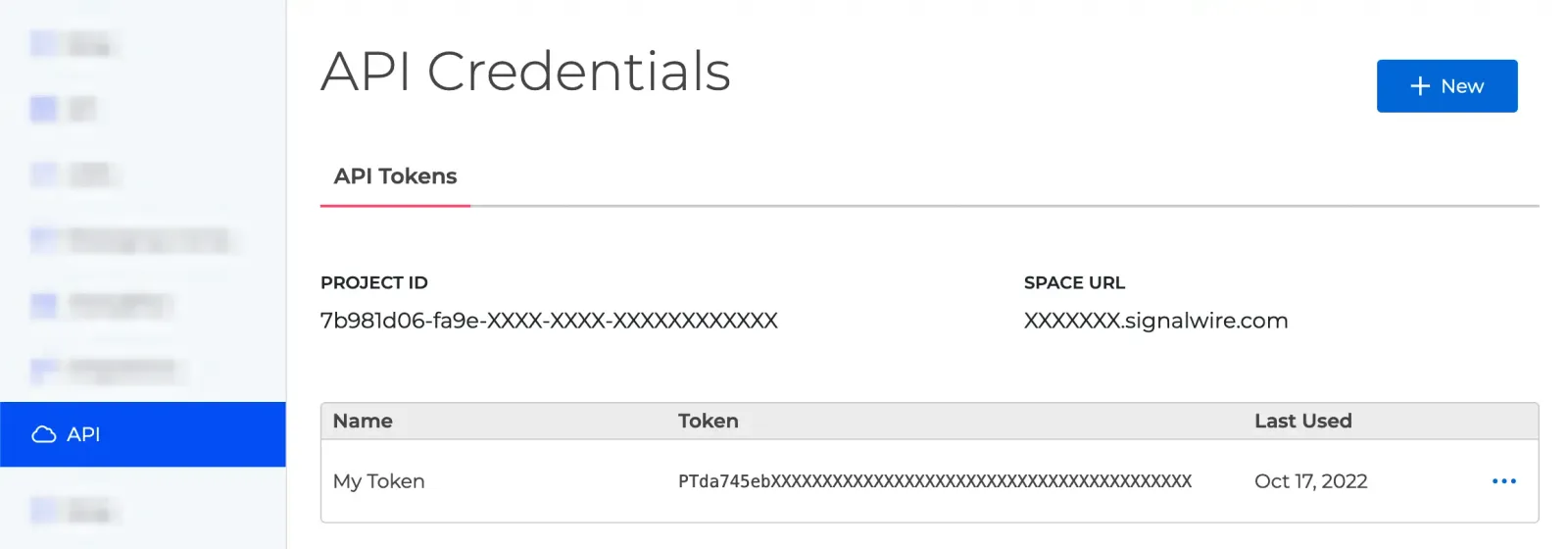
API credentials in the Dashboard.

API token scopes

Tokens can be scoped to limit API access. Select scopes when creating or editing a token in the Dashboard.

Getting a 401 Unauthorized? Check that your token has the required scope. Manage scopes in the SignalWire Dashboard.

cURL examples

cURL
$# With base64-encoded credentials
$curl https://{Your_Space_Name}.signalwire.com/api/laml/2010-04-01/Accounts/{YourProjectId}/Calls \
> -H 'Authorization: Basic YTFiMmMzZDQtZTVmNi03ODkwLWFiY2QtZWYxMjM0NTY3ODkwOlBUOWE4YjdjNmQ1ZTRmM2EyYjFj'
$
$# Encoded inline using the Bash pipe operator
$curl https://{Your_Space_Name}.signalwire.com/api/laml/2010-04-01/Accounts/{YourProjectId}/Calls \
> -H "Authorization: Basic $(echo -n "YourProjectId:YourApiToken" | base64)"
$
$# Encoded inline with cURL's -u flag
>curl https://{Your_Space_Name}.signalwire.com/api/laml/2010-04-01/Accounts/{YourProjectId}/Calls \
> -u YourProjectId:YourApiToken

Security best practices

  1. Keep API credentials server-side. Use Bearer tokens for client applications.
  2. Set short token lifetimes to reduce risk if a token leaks.
  3. Scope tokens narrowly—only grant what’s needed.
  4. Always use HTTPS. Plain HTTP requests will fail.
  5. Rotate API tokens periodically from your Dashboard.