
Forwarding calls
Use a hosted SWML Script to forward incoming calls to another number. Start with the inbound calling guide to create the script and assign it to your SignalWire number, then replace its greeting with forwarding instructions.
SWML for call forwarding
We are going to define the forwarding instructions in a SWML Script hosted on SignalWire. To create a new SWML Script, navigate to the Resources section from your sidebar. There, create a new Script, and select the SWML Script option.
Creating your call forwarding Script
Once you are in the menu for creating a SWML Script, copy and paste the following Script:
This Script will handle the call by making an outbound dial, setting the from address to be the address which created the initial call,
and then forwarding that call to the number specified in the to field.
You should replace +15551234567 with a real phone number, for example your personal one.
We used the connect method to call the number you would like the call to be forwarded to.
Notice how we used its from parameter to ensure that the number of the original caller
(stored in the call.from variable)
is maintained as caller ID for the forwarded call.
Assigning the Script to a SignalWire phone number
The final step is to configure one of your SignalWire phone numbers to answer calls using the SWML Script we just created. You can do that from the Phone Numbers section:
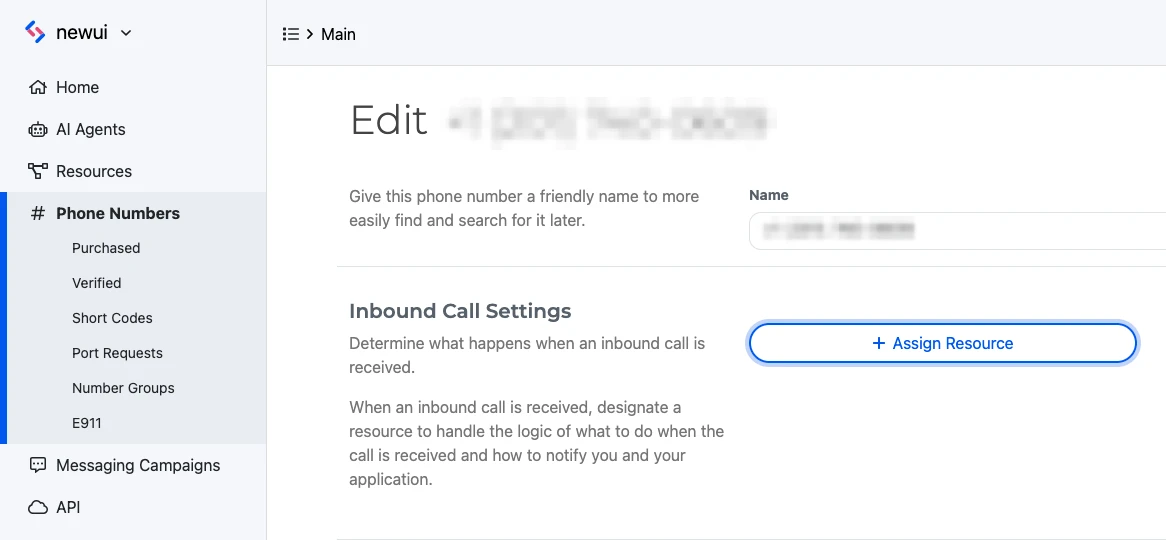
After clicking on the Phone Numbers section, click on the phone number that you’d like to assign, then click edit settings. From there, click Assign Resource and assign the newly created SWML Script. Now any calls that are routed to that number will be forwarded, with the caller ID being the original number that called in.
Conclusion
You are now ready to test call forwarding.
SWML Scripts offer a quick and easy way to get started with common use cases. If you need more flexibility and real-time control on your calls, check out the SDKs for programmatic call handling.