
Callback for inbound fax
Overview
The SignalWire Fax API allows you to have full event monitoring through the usage of status callbacks. The below example will demonstrate how to configure your SIgnalWire phone number through XML bins to receive a fax and alert your own server of fax events that are occurring in your SignalWire Space.
How To Run the Application
Configuring Your Number
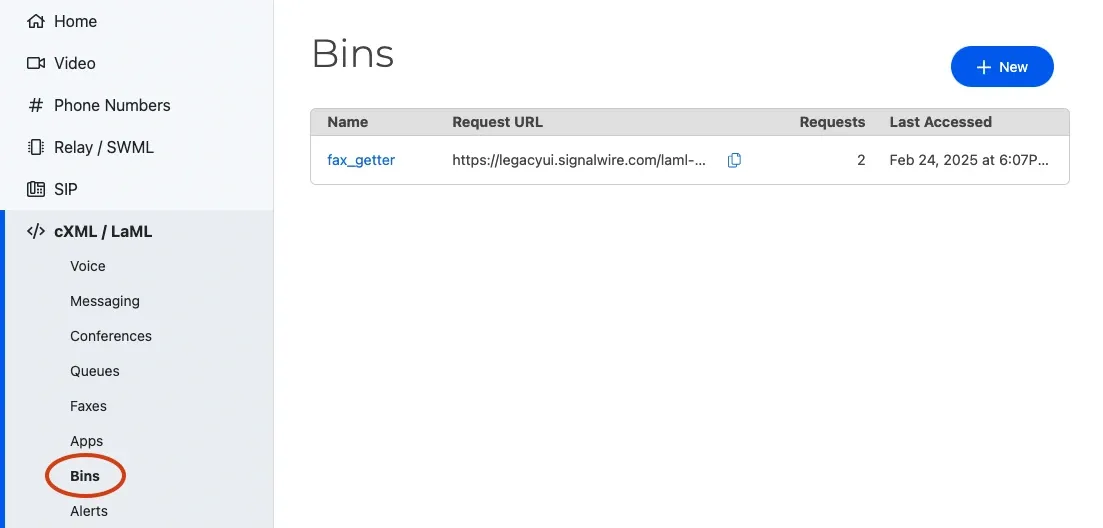
In order to achieve this via XML, you will have to navigate to the cXML/LaML section on the left side of your SignalWire Dashboard and under Bins select + New to create a new LaML Bin.
We then need to enter in the XML language for receiving a fax into our LaML Bin. The below code is taken from the Receive a Fax in Compatibility XML example.
Enter in the above XML in a new cXML bin.
Lastly, we must associate a phone number to the webhook created via a LaML bin. To do this, we must navigate to Phone Numbers on the left side of your SIgnalWire Dashboard. Click on a number and select Edit Settings.
Note that we set ‘Accept Incoming Calls As:’ Fax, We ‘Handle Faxes Using:’ LaML Webhooks, and then paste in our LaML Bin URL.
Ensure that “Accept Incoming Calls As” is set to “Fax” when working with faxes.
Testing your Configured Fax Number
Congratulations, your phone number is now configured! It is time to test your phone number by Sending a Fax to your fax-receiving phone number.
Once your fax has been received, you should receive a payload to your actionURL that looks similar to the one below. Feel free to read up more on Request Parameters and Additional Callback Parameters for more information on the data being sent.
Additional Information on Callback Authentication
When using SignalWire for Inbound Fax, the callback can be made secure. Unfortunately, there is no set list of IP addresses that SignalWire can provide as they change frequently. That being said, there are a couple of ways to work around this.
As an alternative method, callbacks support basic authentication as well, for example, https://user:pass@callback-url.com.
You can also view and allow SignalWire IPs in real-time by running a specific script.
However, as stated before, they change frequently, so keep your eye on them.
Wrap Up
This mini-guide walked through how you can configure your SignalWire phone number to receive incoming faxes, and also opened the door to a variety of other monitoring methods through status callbacks. Each significant event that occurs will be relayed back to your actionURL so that you can keep an eye on your traffic without having to keep an eye on your SignalWire Dashboard.
Additional Resources:
Sign Up Here
If you would like to test this example out, create a SignalWire account and Space.
Please feel free to reach out to us on our Community Discord or create a Support ticket if you need guidance!