SignalWire Datasphere is a Retrieval-Augmented Generation (RAG) API for building AI voice agents that can answer from your own documents instead of guessing. This post introduces the new Datasphere user interface (UI) in the SignalWire dashboard, including uploading and organizing documents, tagging for filtering and search, and setting chunking strategies that split content by page, paragraph, or line to fit your AI application. It also explains how the grid view shows document metadata like file type, size, upload status, and chunking strategy so teams can manage knowledge bases without working directly in the API.
What is SignalWire Datasphere?
SignalWire Datasphere is a Retrieval-Augmented Generation (RAG) API for creating AI voice agents that are experts on specific topics. By uploading structured documents like PDFs, developers can create their own knowledge bases to build specialized AI applications and prevent AI hallucinations.
At SignalWire, we’re constantly looking for ways to simplify the communication tools you use to build and innovate. That’s why we’re excited to introduce the new Datasphere UI—an intuitive web interface that allows you to manage documents and data in one place. With this new UI, you can now upload, organize, and manage your documents directly from the SignalWire dashboard.
A better way to manage your data
The Datasphere UI offers a clean and accessible interface designed to save time and improve your workflows. Whether you’re working with a handful of documents or managing large-scale data, the UI is built to adapt to your needs.
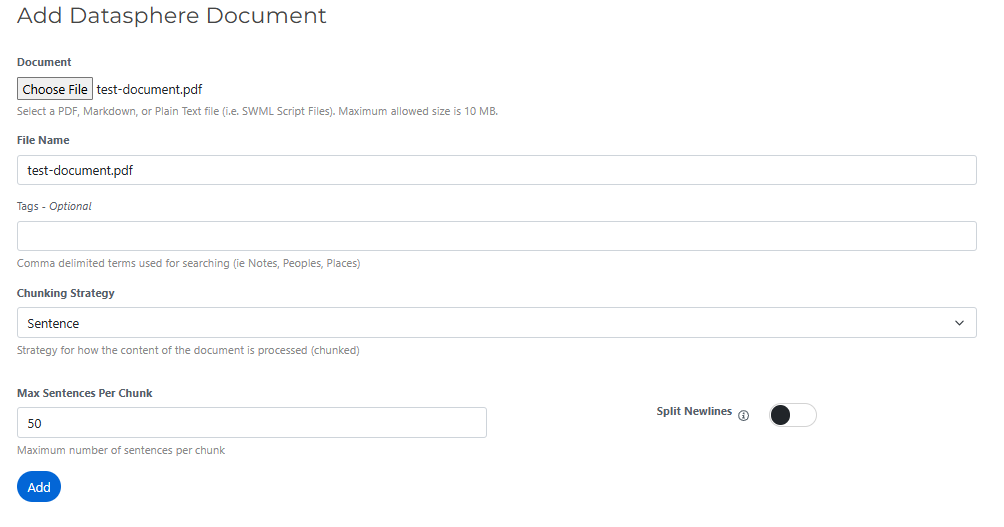
With the Datasphere UI, you can add one or more files in supported formats, set custom chunking strategies, and tag documents for easier search and filtering. Chunking strategies allow you to divide documents into manageable pieces—by page, paragraph, or line—based on what works best for your AI applications.
Once uploaded, your documents are displayed in a grid view with rich metadata. This view provides details at a glance, including the document’s name, type, size, upload date, upload status, and chunking strategy. You can even edit names directly within the table, ensuring that your files are organized exactly how you want them.

Built for efficiency and easy organization
Keeping your data organized is essential for efficient workflows, and the Datasphere UI makes this process much simpler. Tags let you group related documents for quick access, while the search functionality allows you to filter files by name, date, type, or tags.
By combining features like bulk uploads, tagging, and customizable chunking strategies, the Datasphere UI lets you prepare your data for AI in less time. The user experience is designed to offer a centralized method for data handling without having to use the API, whether you’re just getting started with AI or scaling up your existing applications.
Try building with SignalWire Datasphere today
SignalWire’s mission is to simplify the complex parts of development and allow you to focus on building custom communications solutions. The new Datasphere UI is just one of the ways we’re making building AI applications more accessible.
The Datasphere UI is now live in your SignalWire dashboard! Log in to explore its features.
If you have any questions or need assistance, our team is ready to help. You can join the conversation in our community Discord or open a support ticket in your dashboard at any time.
Frequently asked questions
What is SignalWire Datasphere used for?
SignalWire Datasphere is a Retrieval-Augmented Generation (RAG) API that lets you upload documents and use them as a knowledge base for AI applications, including AI voice agents that need to answer from specific sources.
What does the Datasphere user interface (UI) let you do?
The Datasphere UI lets you upload, organize, and manage documents from the SignalWire dashboard, including adding tags, selecting chunking strategies, and viewing document metadata in a grid view.
What is chunking, and why does it matter for Retrieval-Augmented Generation (RAG)?
Chunking is how a document is divided into smaller pieces for indexing and retrieval. The post describes chunking by page, paragraph, or line so you can choose what best fits how your AI application searches and answers from documents.
How do tags and search help when managing a Datasphere knowledge base?
Tags help group related documents, and search and filtering can narrow results by attributes like name, date, type, or tags, making it easier to manage larger sets of files.
What metadata can you see for uploaded documents in Datasphere?
The grid view shows details like document name, type, size, upload date, upload status, and the selected chunking strategy, and it supports editing names directly in the table.