An AI calendar assistant lets callers schedule meetings by phone by translating natural language into calendar actions. This guide walks through building a voice-based scheduling agent with SignalWire AI Agent and the Google Calendar API, including OAuth 2.0 authentication, functions that check availability and create events, and a SignalWire Markup Language (SWML) webhook that connects an AI-enabled phone number to your application so the agent can book meetings during a live call.
Streamlining Calendar Management with AI
The AI Agent is one of many powerful resources in SignalWire’s Call Fabric. Call Fabric allows developers of all skill levels to create integrations with remote systems, harness the functionality of the SignalWire platform, and deploy digital employees that can perform interactive tasks.
In this post, we'll explore the capabilities of SignalWire AI Agent by using it to facilitate calendar management over the phone. This step-by-step guide will demonstrate how to build your own AI-powered calendar management system. This means that when a user calls in, they can schedule a meeting with you simply by speaking to your virtual AI assistant.
You can deploy virtual agents to manage your calls for many different use cases. We’ve created a Github repo that contains many examples of various digital employees you can build using the AI agent.
In this example, you can create your own AI agent for appointment scheduling through an AI-enabled phone number. This functionality allows callers to create Google Calendar events over the phone.
By dialing into the designated AI-enabled number, users can speak with the AI agent, which leverages advanced natural language processing (NLP) capabilities to understand caller intent and execute tasks accordingly. Callers can check calendar availability and schedule events by speaking to this AI-powered voice assistant.
These functions allow users to contact you through your AI assistant and set up a meeting with you without ever having to speak directly to you.
How it works
The Aical demo is built on an integration with the Google Calendar API and OAuth2 authentication. Structured around the PSGI specification, the application uses Plack::Builder to route HTTP requests, enabling basic authentication and managing user sessions and database connections.
The AI agent provides natural and engaging conversation for callers, allowing them to schedule meetings with you over the phone quickly and easily. Aical achieves this by defining functions to check calendar availability (freebusy) and schedule events (events).
Building your own AI calendar management agent
To implement your own AI-powered calendar management system, follow the steps outlined in this post; we’ve already done most of the work for you.
Clone the repository to your local machine.
Navigate to the appropriate directory for your preferred programming language (Perl or Node.js).
Set up your environment variables by creating a .env file and adding the required configurations, referencing the provided .env.example file.
Run the application using the specified command (e.g., node app.js for the Node.js version).
Access the application through your web browser.
Configuration
To configure the application for use with your Google Calendar, acquire your Google API client ID and OAuth configuration (and if you haven't already, sign up for a SignalWire space).
Log in to your Google account via http://localhost:3000/login and update Google OAuth tokens in the database.
Obtain the Ngrok URL from the console.
Navigate to your chosen phone number for this project (or purchase a new phone number if you need one).
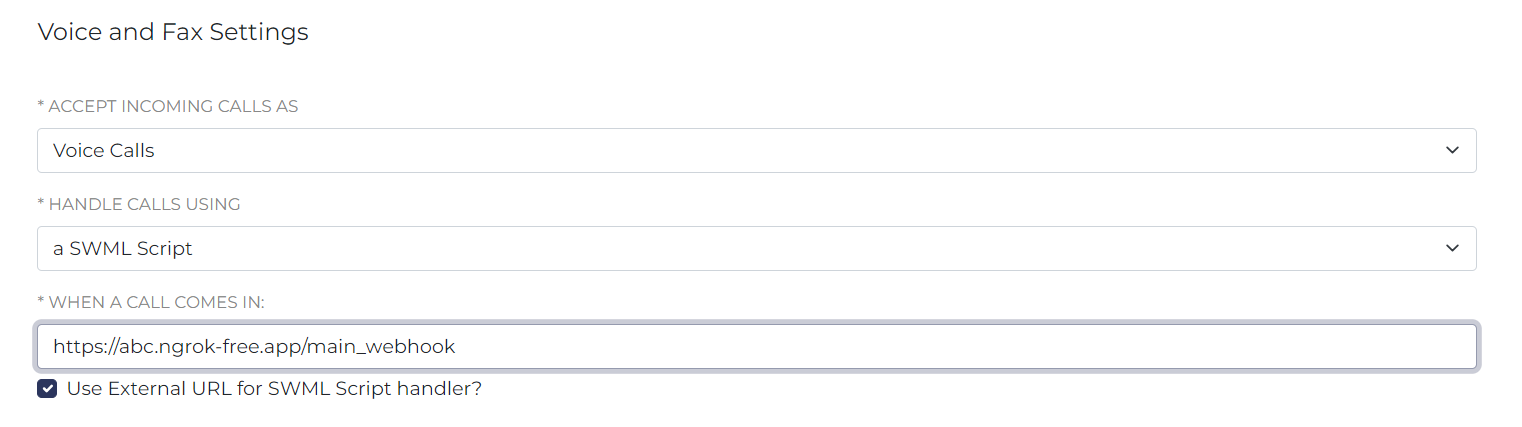
Configure the SWML script URL for incoming calls to your SignalWire number. Accept incoming calls as voice calls, and handle calls using a SWML script. Use your Ngrok URL along with a path like
https://abc.ngrok-free.app/main_webhook
5. Make a call to this SignalWire number to create a Google Calendar event.
We recommend that you test your AI agent extensively to ensure functionality and accuracy. Gather feedback from users and iterate on the design to enhance performance and user satisfaction.
Now you have your own virtual assistant who can handle your Google Calendar events for you!
Whether you’re simplifying calendar management or using AI to handle customer inquiries, the potential applications of AI in customer service are vast. With the right approach, you can unlock new levels of efficiency and effectiveness in your organization. If you have questions as you build your own AI voice agent, bring them to our community Discord!
Frequently asked questions
What is an AI calendar assistant?
An AI calendar assistant is a voice or chat agent that can interpret scheduling requests in natural language and perform calendar actions such as checking availability and creating events.
What do you need to connect a voice agent to Google Calendar?
You typically need a Google Cloud project with Google Calendar API access, OAuth 2.0 client credentials, and an application that can store and use tokens to call the calendar endpoints on behalf of a user.
How does a voice agent check availability and schedule an event?
A common pattern is to implement functions for availability lookup and event creation, then have the agent call those functions when it extracts details like date, time window, and attendees from the conversation.
What is SignalWire Markup Language (SWML) used for in a voice AI integration?
SignalWire Markup Language (SWML) is used to route an incoming call to a webhook or script so call handling stays programmable, and the agent can run the correct logic for that phone number during the call.
What should you test before using a scheduling agent in production?
Test real call scenarios such as ambiguous time requests, rescheduling, overlapping meetings, time zone conflicts, and error handling for invalid credentials or calendar failures so the agent stays reliable when the conversation changes mid-call.