The Compatibility API provides the simplest way to implement text-to-speech (TTS) in your SignalWire voice applications, enabling a synthesized voice to read supplied text in automated call flows using the <Say> verb. This article walks through how to configure a cXML script, associate it with a phone number webhook, and customize language and voice attributes so developers can quickly add TTS to IVRs, chatbots, and other automated voice experiences.
Whether you’re a seasoned telecom developer or a programming novice, SignalWire’s elastic cloud infrastructure, robust voice APIs, and intuitive SDKs will help you build an innovative voice application that interfaces with PSTN numbers and SIP endpoints.
Our programmable voice API includes many essential functions that are simple to use. Text-to-speech equips your customer service operations with voice communications that are more engaging and easily customizable - whether you’re building an IVR, chatbot, or any kind of automated voice response.
In this post, we’ll go over how to easily implement text-to-speech using our Compatibility XML API.
The SignalWire Compatibility XML Voice API
SignalWire’s Compatibility XML API is the quickest and simplest way to begin working with text-to-speech. A synthesized voice can read supplied text back to the caller using the <Say> verb in a low-code XML bin (referred to in your SignalWire Space as a LaML bin).
A simple message to be read
To start, make sure that your SignalWire phone number is properly configured to handle inbound voice calls using LaML webhooks. A webhook is an HTTPS request sent to your web application when a key event has occurred. Creating a LaML bin will generate an accompanying URL endpoint that you’ll later associate with the field labeled When A Call Comes In.
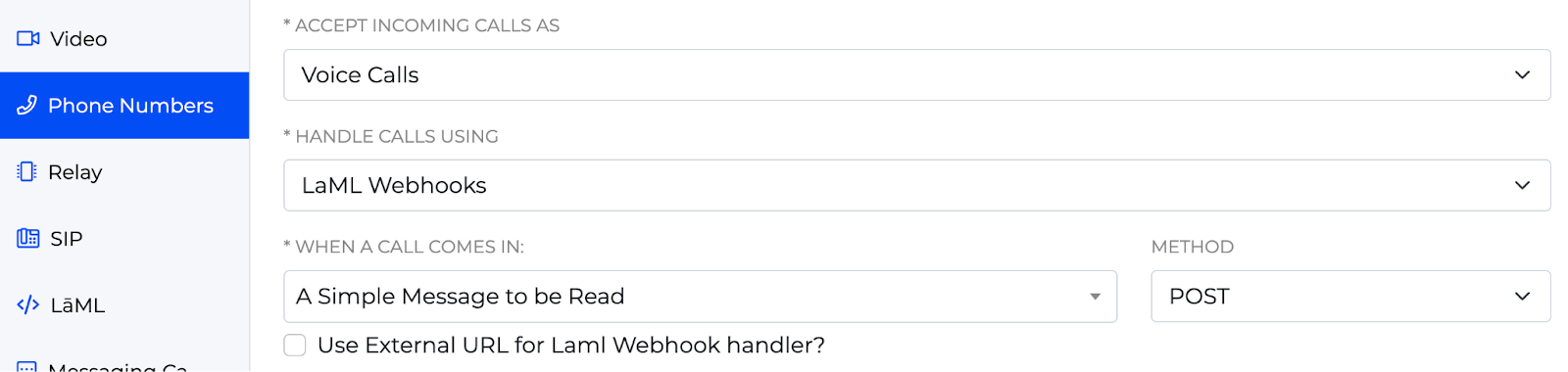
Next, navigate to the LaML section of your space. There you can create the bin that will house the logic for your text-to-speech. In this scenario, the text written between the <Say> tags will be read aloud to the inbound caller.
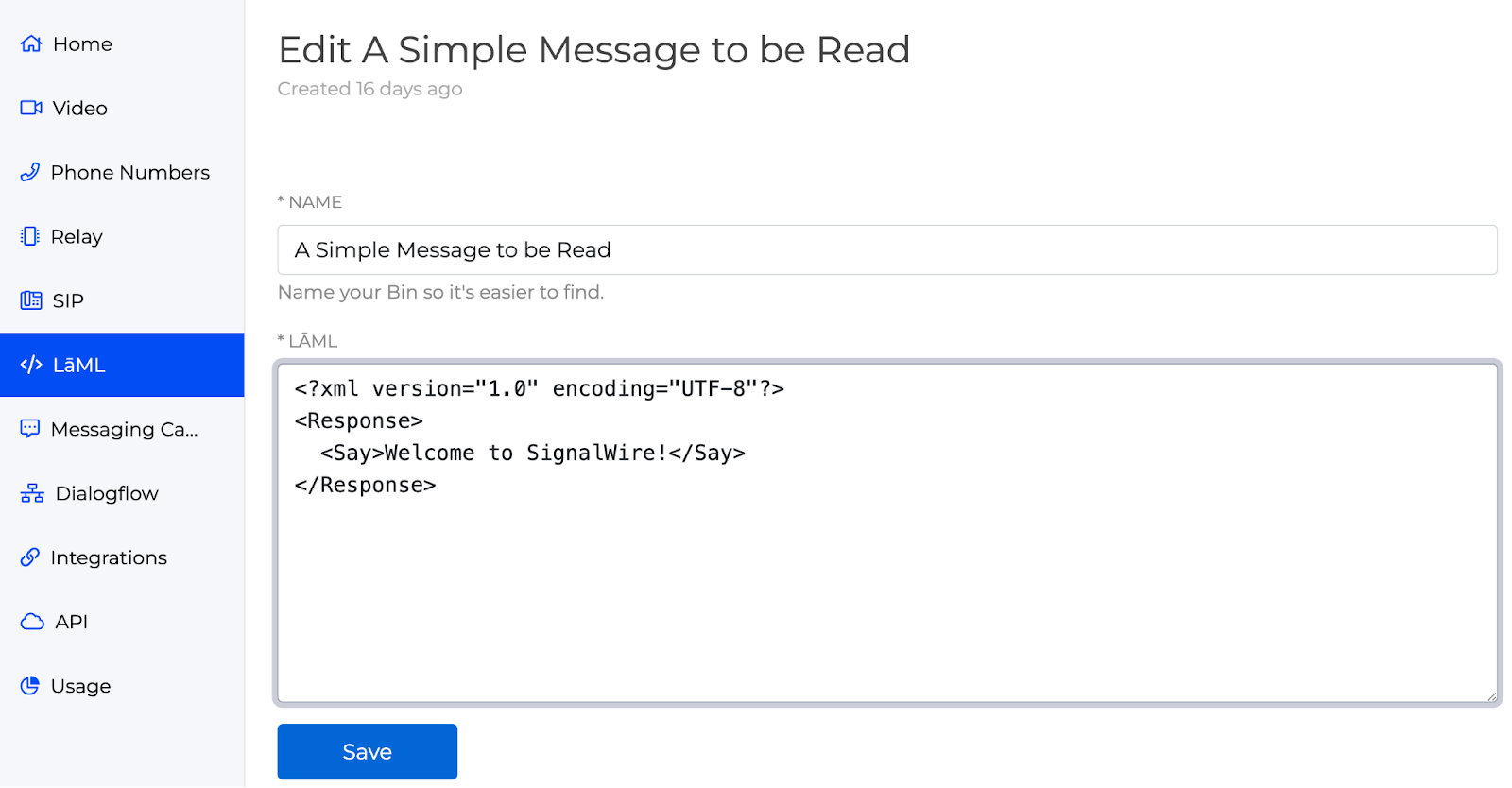
Once you’ve written a short greeting and saved your bin, return to your phone number settings and select the bin from the dropdown menu associated with When A Call Comes In. Save your phone number settings and try dialing your configured phone number. You should now hear a synthesized voice respond with something like, “Welcome to SignalWire!”
What languages are available with the Compatibility API?
Our synthesized voice defaults to the English language with an American accent. In an effort to reach a more diverse audience, you can augment your <Say> verb with the voice and language attributes.
SignalWire supports synthesized voices provided by both Amazon Polly and Google Cloud, allowing developers to access a variety of voices for text-to-speech. The below code allows you to tailor your greeting to European Portuguese using an Amazon Polly voice.
<?xml version="1.0" encoding="UTF-8">

<Response>

 <Say voice="Polly.Cristiano" language="pt-PT">Boa tarde, hoje está um dia tão bonito!

 </Say>

</Response>
Speech Synthesis Markup Language (SSML)
For further text-to-speech personalization, SignalWire takes advantage of SSML. The Speech Synthesis Markup Language uses a variety of XML-based tags, empowering developers with granular control over how a synthesized voice is presented to the caller.
The code snippet below illustrates a classic juxtaposition between the varying pronunciations of “tomato.” Try it for yourself to see how SSML enables a synthesized voice to take on a character of its own.
<?xml version="1.0" encoding="UTF-8">

<Response>

 <Say>

 You say, <phoneme alphabet="ipa" ph="təˈmeɪtoʊ">tomato</phoneme>.

 I say, <phoneme alphabet="ipa" ph="təˈmɑːtəʊ">tomato</phoneme>.

 </Say>

</Response>
What character will SignalWire’s Compatibility XML API inspire you to develop?
We want to see what you build with SignalWire! If you have any questions while getting started with our Voice API, stop by our Community Discord or our Forum to connect with our team.
Frequently asked questions
What is the Compatibility XML API for text-to-speech?
It is SignalWire’s XML-based voice API that lets developers use the <Say> verb to have a synthesized voice read text to callers, configured through LaML bin webhooks.
How do I start using text-to-speech with SignalWire?
Create a LaML bin with the <Say> instructions, set that bin as the webhook for “When a Call Comes In” on your phone number, and test calls to hear the synthesized output.
Can I customize voice language and attributes?
Yes. The <Say> verb supports language and voice attributes that let you select different voices and languages, including external services like Amazon Polly or Google Cloud.