WebRTC video quality and scalability depend heavily on the architecture you choose, and there is no one-size-fits-all option for every meeting size or use case. This article explains the differences between Peer-to-Peer (P2P), Selective Forwarding Unit (SFU), and Multipoint Control Unit (MCU) architectures, including how each handles media streams, how bandwidth scales as participants join, and which approach tends to fit 1:1 calls, small group meetings, or large webinars and live events.
Video communication has become an essential part of our daily lives, from remote work, to virtual events, and even to online education. However, the technology behind video communication can be complex, with a variety of different architectures all introducing their own advantages and limitations. Knowing how to choose one that’s best for your needs will drastically improve the quality of your video calls.
In this post, we will explore three different WebRTC (Web Real-Time Communication) architectures commonly used for video conferencing: Peer-to-Peer (P2P), Selective Forwarding Unit (SFU), and Multipoint Control Unit (MCU). We will discuss the key differences between these architectures and help you understand which one might be the best fit for your live streaming or video communication application.
Peer-to-Peer (P2P)
WebRTC started out with Peer-to-Peer (P2P) usage in mind, where each participant is connected to every other participant. This means each participant sends their audio and video to everyone else in a meeting, and receives everyone's audio and video as well.
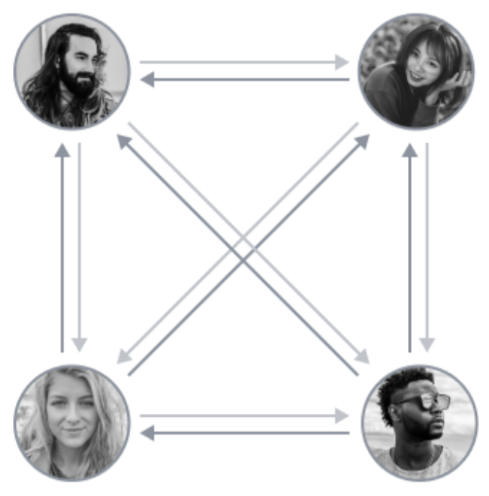
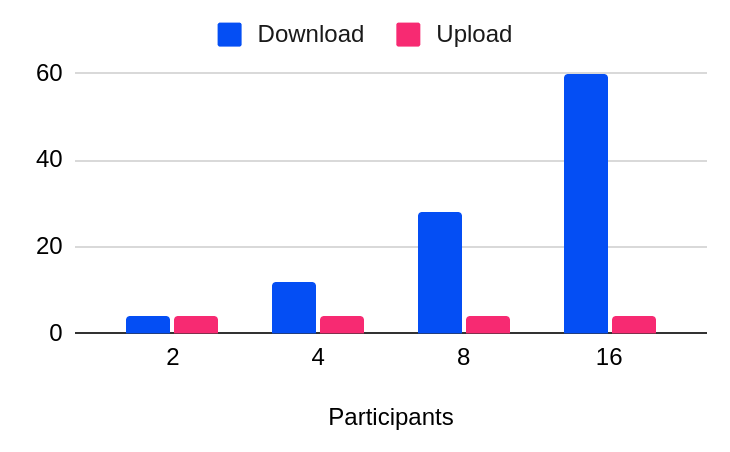
As you might expect, P2P video conferencing works well when there are only a few people in the meeting. However, as more people join in, each participant has to support the increased upload and download bandwidth. Unfortunately, many participants may not have the necessary bandwidth to handle the increased load.
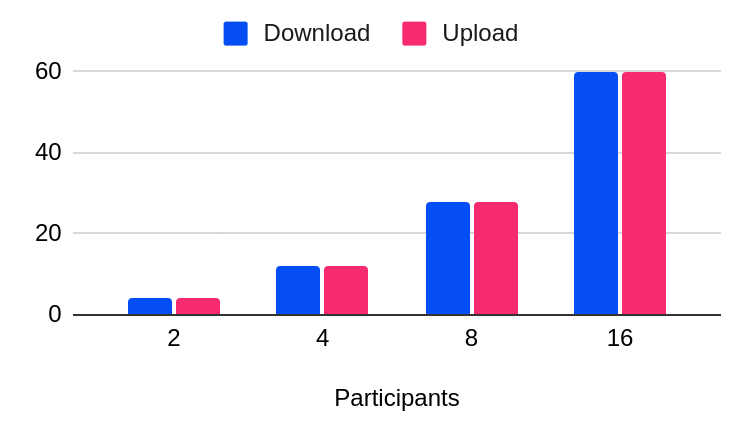
There is no central server overseeing the operation of the network, which is beneficial for privacy as well as cost, but as a tradeoff there is no control over the individual experience.
What if we were to add a server as an intermediary? With that, we’ve arrived at the SFU architecture.
Selective Forwarding Unit (SFU)
A Selective Forwarding Unit (SFU) works in much the same way as P2P, but with a server in the middle of all the participants’ audio and video. While each participant continues receiving everyone's video and audio separately, they will only need to upload their video and audio once to the server.
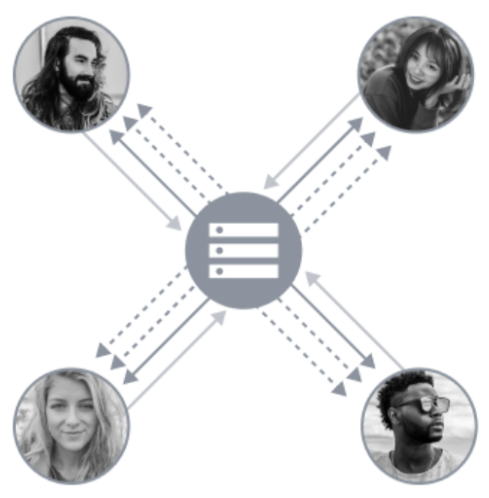
The biggest benefit of using SFU is that even though there is a server at the center, it still sends separate streams for each participant, so each individual device can manipulate those streams to better fit their screen real estate. This is particularly relevant when you know you will have a combination of users on laptops and users on smartphones, for example.
Since most people are limited by upload bandwidth more than download, SFU architecture tends to be better than P2P when meeting participants don't have the best internet connection.

If you've ever used popular conferencing applications and the video got extremely blurry for everyone, that's because bandwidth constraints became a problem.
What if you wanted to prioritize video and audio quality? Cue the MCU architecture!
Multipoint Control Unit (MCU)
With a Multipoint Control Unit (MCU), you still have a server in the middle of all participants functioning as a central gateway that is combining everyone's video and audio feeds. In this architecture, the server only distributes a single stream back to every participant, regardless of how many people are in the conference call.
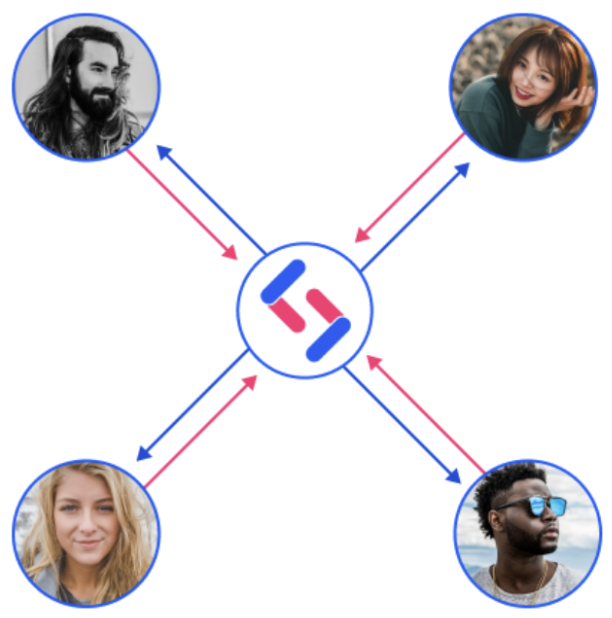
This approach ensures the lowest possible use of bandwidth, and as a result, the most consistent video and audio quality over time. The audio fidelity is high, more natural, and doesn't cut between participants; it overlaps as if you are having an in-person conversation. For example, all participants can sing ‘Happy Birthday’ without a disaster audio experience.
Given the server is composing all video and audio streams, the end result is a single stream that is broadcast in a natural and unified experience for everyone. Additionally, with less video feeds being sent to each participant's device, battery life consumption, network bandwidth, and CPU usage is greatly reduced.
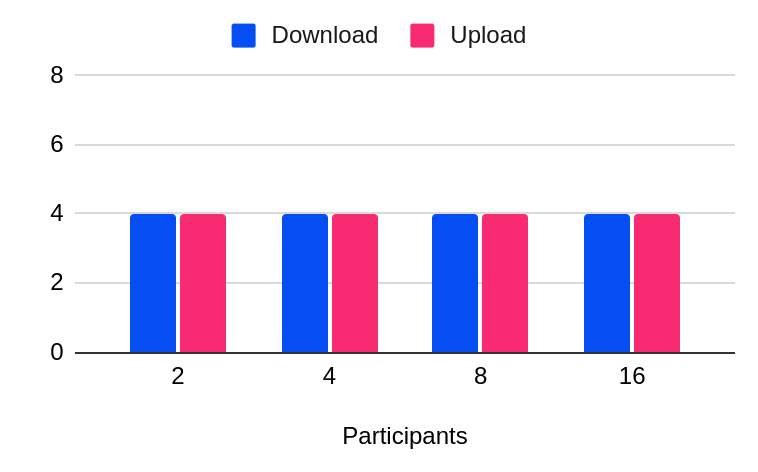
MCU's bandwidth usage will stay consistent regardless of the amount of participants in a meeting. As a result, even with varying network bandwidth constraints, MCU accommodates a much larger number of participants, making it perfect for all-hands meetings, podcasts, concerts, quizzes, or sports events!
SignalWire's Video offerings are built around MCU, and include no code, pre-built video rooms that you can configure and embed on any website or application in just a few minutes. These rooms can be further extended with custom code, giving you access to feature-rich building blocks you can use to customize your video application to meet your needs.
Conclusion
As a rule of thumb, depending on the number of participants you anticipate joining meetings, you will have a better experience with certain architectures:
1:1 conferencing, such as during a personal call
Peer-to-Peer (Personal Video conference on a website/mobile device) is most likely going to be sufficient and can even be free depending on the service you choose to go with.
Up to 10 participants, such as a department meeting
SFU is going to work well for this scenario as long as the number of participants stays low. As more people join the meeting, and depending on everyone's internet connection, the experience will most likely deteriorate very quickly.
10+ participants, such as a webinar
MCU is the best solution for as the number of participants increases because the video and audio quality does not degrade regardless of people joining the meeting.
No architecture is a perfect fit for all use cases. By understanding the specific benefits and limitations of each architecture, you can select the solution that’s best for you.
If you have any questions as you continue to learn about video conferencing, stop by our Community Discord to connect with our team.
Frequently asked questions
What is P2P WebRTC?
P2P WebRTC is a peer-to-peer topology where each participant sends audio and video directly to every other participant, which can work well for small calls but scales poorly as the number of participants grows.
What is an SFU in WebRTC?
A Selective Forwarding Unit (SFU) is a server that receives each participant’s stream once, then forwards streams to other participants, which reduces upload burden compared with P2P while still delivering separate streams for each participant.
What is an MCU in WebRTC?
A Multipoint Control Unit (MCU) is a server that mixes or composes participant audio and video into a single stream and sends that unified stream back to participants, which keeps bandwidth use consistent as participant counts increase.
Which WebRTC architecture is best for 1:1 calls?
P2P is often sufficient for 1:1 calls because there are only two endpoints exchanging media, so bandwidth requirements are manageable.
Which WebRTC architecture is best for large meetings or webinars?
MCU is commonly a better fit as participant counts rise because each participant receives a single composed stream rather than many individual streams, which helps keep quality more consistent.