Poorly designed Interactive Voice Response (IVR) phone trees create avoidable customer frustration, increase abandonment, and damage brand trust, even when the underlying support team is strong. This guide explains the most common failure patterns, including long menus, dead ends, robotic prompts, and slow paths to a human, and it outlines practical fixes such as simplifying routing options, reducing steps to reach an agent, and building clearer call paths with tools like SignalWire Call Flow Builder.
The Consequences of Poorly Designed Phone Trees
We've all experienced the frustration of navigating an inefficient Interactive Voice Response (IVR) system, desperately trying to reach a real person for help. When poorly designed, IVRs can be more than just a nuisance – they can have negative consequences for both customers and businesses alike.
The emotional toll of a bad IVR is undeniable, leading to customer frustration, anger, and a potential exodus to competitors. Long, unwieldy menus with an endless list of options can immediately turn a caller off. If forced to sit through a long list of options that might not even include the reason they’re calling, customers could feel that your business has wasted their time.
Luckily, at SignalWire, we’re experts on voice applications, so we’re well-equipped to help you avoid building a frustrating IVR. In this post, we’ll discuss the negative consequences of bad IVRs, and provide some solutions to make sure your business doesn’t drive away your callers.
The consequences
Customer frustration or anger
A bad IVR experience can trigger intense negative emotions, turning what should be a straightforward interaction into a frustrating ordeal. A poorly designed phone tree with a seemingly endless maze of menu options can test the patience of even the calmest individuals. This emotional turmoil can immediately impact customer satisfaction and loyalty.
Customer alienation
Customers feel alienated by impersonal systems that fail to recognize their individual needs. When IVRs play robotic voice recordings that lack a personal touch, callers can feel like cogs in a machine rather than valued individuals.
This impersonality can lead to an immediate sense of alienation when callers are forced to sit through a long list of menu options that are irrelevant to what they’re calling about, or when they have difficulty reaching a live agent.
Negative brand perception and damaged reputation
A frustrating IVR can tarnish a customer's perception of a brand. In an age where customer experience is everything, one negative interaction can cast a long shadow, influencing opinions about the brand as a whole. If a caller is unable to easily reach a live agent or find a solution to their problem, your business could gain a reputation of having inferior customer service.
Negative experiences spread rapidly through word of mouth and online reviews. A poorly designed IVR can become a focal point for customer complaints, damaging the business's reputation and dissuading potential customers.
Lost business opportunities and reduced customer loyalty
It may not matter if you offer a better product than your competitor if your customer service doesn’t match up. If a potential customer calls to inquire about your services, only to be deterred by a convoluted IVR system, they could flee to the competition.
Existing customers who feel their time is undervalued may seek alternatives, even if they were initially satisfied with the product. Retaining customer loyalty becomes increasingly challenging when poor customer experience becomes synonymous with your brand.
Meanwhile, if your competitors offer a tailored experience with relevant menu options and easy-to-access customer support, you risk losing business opportunities as callers opt for the easier alternative.
Solution one: Build your IVR with SignalWire Call Flow Builder
One trick you can use to avoid presenting an inefficient IVR as the face of your brand is to use a visual builder that requires minimal development time and skills – something like SignalWire Call Flow Builder.
If you’re using complex code to engineer your IVR, it can be difficult to troubleshoot bugs and errors, or make it inconvenient to update the information as needed. In Call Flow Builder’s intuitive visual interface, you can quickly and easily update text-to-speech prompts with holiday business hours, or route calls to a new employee’s line within the drag-and-drop UI.

Not only is it simple to change individual functions, but you can update phone numbers associated with the IVR or switch the order of your call flow with just a few clicks.
Solution two: Implement AI into your call flows with SignalWire AI Agent
You can also extend your call flows with AI using SignalWire AI Agent, which allows you to intuitively build your own AI-powered voice applications. When an AI Agent takes over a call flow, it can engage with callers beyond what text-to-speech prompts can accomplish.
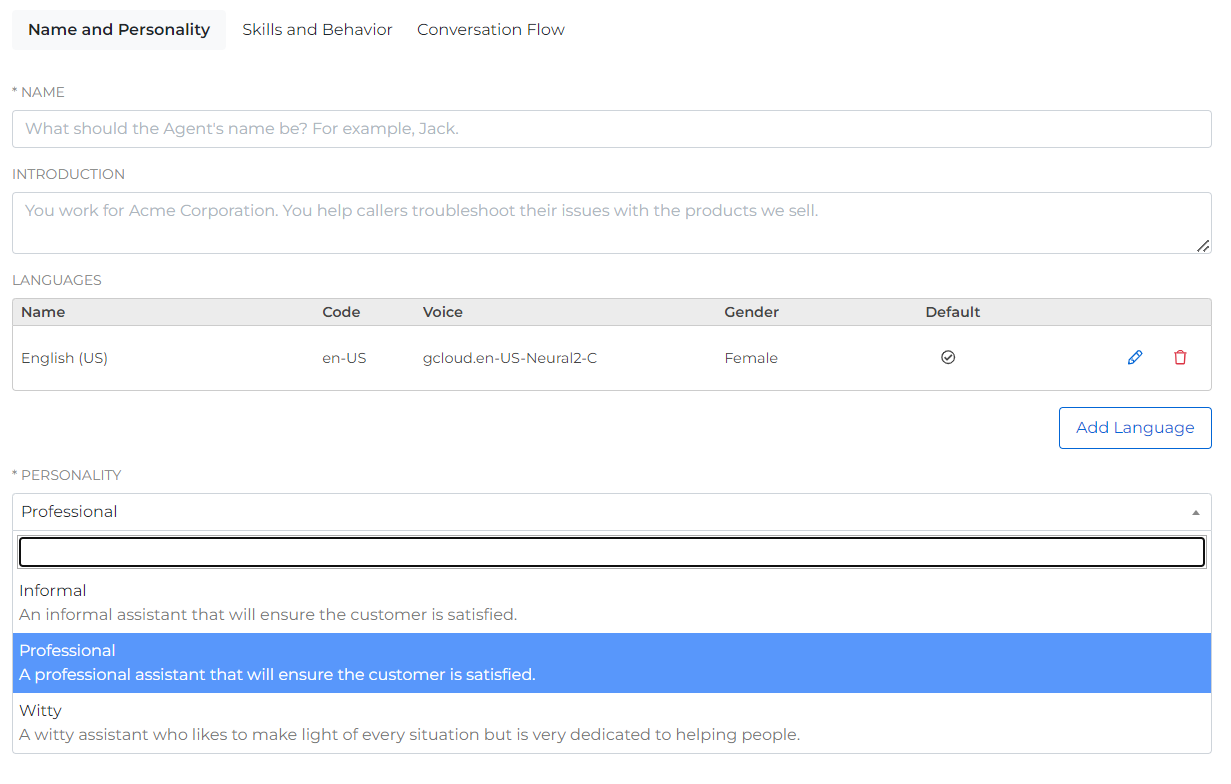
The power of AI allows for natural and engaging conversations with callers. Instead of having a neverending list of departments that callers have to press one, two, or three to access, an AI agent will quickly greet the caller and ask what they need.
Depending on the caller’s inquiry, the AI agent may be able to troubleshoot and solve the issue, answer basic FAQs, or provide product recommendations. Alternatively, the caller can simply ask to be transferred to a live agent or a specific department, and the AI will understand exactly what they want, without having to hit certain digits or keywords.
Poorly designed Intelligent Virtual Assistants (IVAs) create the same frustration
A bad Interactive Voice Response (IVR) menu wastes a caller’s time. A bad Intelligent Virtual Assistant (IVA) can waste a caller’s time and their patience, because it sounds helpful while failing to move the call forward.
The most common IVA failure is not speech recognition, it is orchestration. The caller explains the problem, the IVA confirms it, then the workflow transfers, escalates, or switches channels, and the context disappears. The caller repeats themselves to a new agent, or repeats themselves again after another transfer.
These “start over” moments happen when call control and customer context are split across systems, such as one vendor handling the call, another handling automation, and another handling Customer Relationship Management (CRM) data. Under load, ordering gets messy, events arrive out of sequence, and the system cannot reliably keep a single, authoritative view of what the customer already said and what should happen next.
SignalWire is built around a control plane model for orchestration, so call state, real-time events, routing, and AI decisions execute together, rather than being reconstructed after the fact from scattered webhooks. That is how you stop the repeat-yourself loop, keep transfers honest, and make handoffs between AI and humans feel like one continuous conversation.
Start rebuilding your IVR or IVA today, and test out both SignalWire AI Agent and Call Flow Builder by signing up for a SignalWire Space!
Frequently asked questions
What is an Interactive Voice Response (IVR) system?
Interactive Voice Response (IVR) is an automated phone system that routes callers using menu options, keypad input, or speech input, often before connecting to a live agent.
Why do bad IVRs increase call abandonment?
Callers drop when menus are long, options do not match their intent, and the path to resolution feels slow or impossible, especially when reaching a live agent is unclear.
What are the most common IVR design mistakes?
Common mistakes include too many menu layers, vague option wording, forcing callers to listen to irrelevant options, limited escalation paths, and prompts that sound impersonal or unhelpful.
How do bad IVRs impact customer loyalty and revenue?
A frustrating phone tree can drive potential customers to competitors and push existing customers away by making support feel difficult or disrespectful of their time.
How can you make an IVR easier to navigate?
Keep menus short, use clear option labels, prioritize the top reasons people call, offer a fast route to an agent, and avoid dead ends by always giving callers a next step.
When should an IVR route to a live agent?
Route to an agent when the caller asks for a person, when the request is high-stakes or account-specific, when intent is unclear after a small number of attempts, or when the caller shows repeated failure signals such as looping menus.