SignalWire AI Agent functions let a voice agent call HTTP endpoints to fetch data or perform actions during a live call. This tutorial explains how to add functions like get_user and get_latest_ticket, then use toggle_functions to control when each function is active so the agent only gains access to sensitive or costly actions at the right moment in the flow. It also shows the practical pattern of starting with a safe identity lookup, then enabling deeper ticket retrieval only after the caller context is established, which keeps conversations predictable and reduces unintended function calls.
What is SignalWire AI Agent?
SignalWire AI Agent allows you to build smarter voice applications using the power of conversational AI. By using an AI agent to replace phone trees or creating a virtual receptionist, live agents can be better prepared for calls and have more time to work on complex tasks.
AI Agents are adept at handling customer support tasks, such as opening tickets and basic troubleshooting. In this post, we’ll explore toggling functions that allow the AI to retrieve user and ticket information from backend systems.
Expanding the functionality of an AI Agent
Previously in SignalWire in Seconds, we looked at the basics of how to define a conversation flow for an AI voice agent. Now we’ll explore how to enhance an AI agent with functions.
Functions allow you to extend the capabilities of your AI agent with HTTP requests to perform actions or fetch extra data. For this example, the AI agent is focused on retrieving user and ticket information - even before greeting the caller. By leveraging this functionality, the AI agent can greet the caller by name and have their ticket information prepared when the call begins.
The video above walks you through the process of creating an AI agent, configuring the essential functions get_user and get_latest_ticket, and running make.com workflows to retrieve data from Zendesk during the call. This allows the AI agent to adapt and respond contextually.
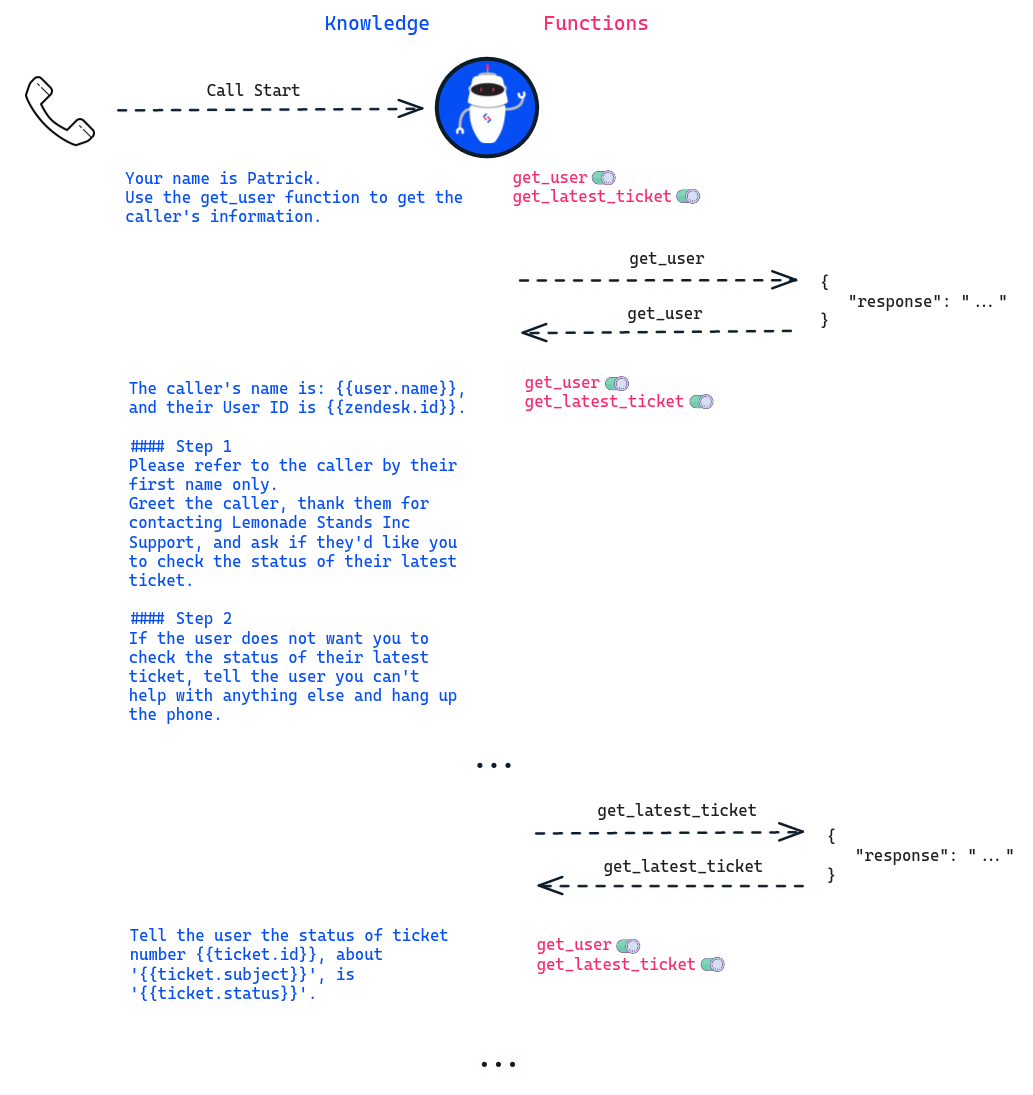
Here is the call flow we arrived at by the end of the video:
Although the video provides a completely no-code example, you can host your own HTTP server if you prefer. At the end of the day, all the AI agent cares about when it calls a function is that it receives a valid response:
AI agents are powered by SignalWire Markup Language (SWML). Looking under the hood at the resulting SWML from this AI agent, we see the following information:
Both functions are extremely simple. While powerful and extensible, they are enabled the entire time during the call. To address this, let's dive deeper into the capabilities of function toggling.
Understanding toggle_functions
Controlling when certain functions are available creates safer, more intelligent, and predictable conversations. The toggle_functions option allows you to control when specific functions are active. This becomes especially useful when you want certain functionalities to be available only under specific conditions.
Protecting get_latest_ticket
Let's illustrate this with a practical example involving the get_latest_ticket function:
By adding
```yaml
active: "false"
```
to this function, we ensure that until instructed otherwise, the agent will never be able to call get_latest_ticket.
Now let's assume we only want get_latest_ticket to be active after fetching the caller's information. In the above video, we had our webhook return the following JSON:
Instead of only returning a response, in order to enable the get_latest_ticket function, we need to return action as well:
Making the response:
This way, when a user requests to get an update on their latest ticket, the AI agent can fulfill the request because the get_latest_ticket function is active.
Toggling functions results in more control over what your AI agent can and can't do, making the call flow something like this (notice each function's status):
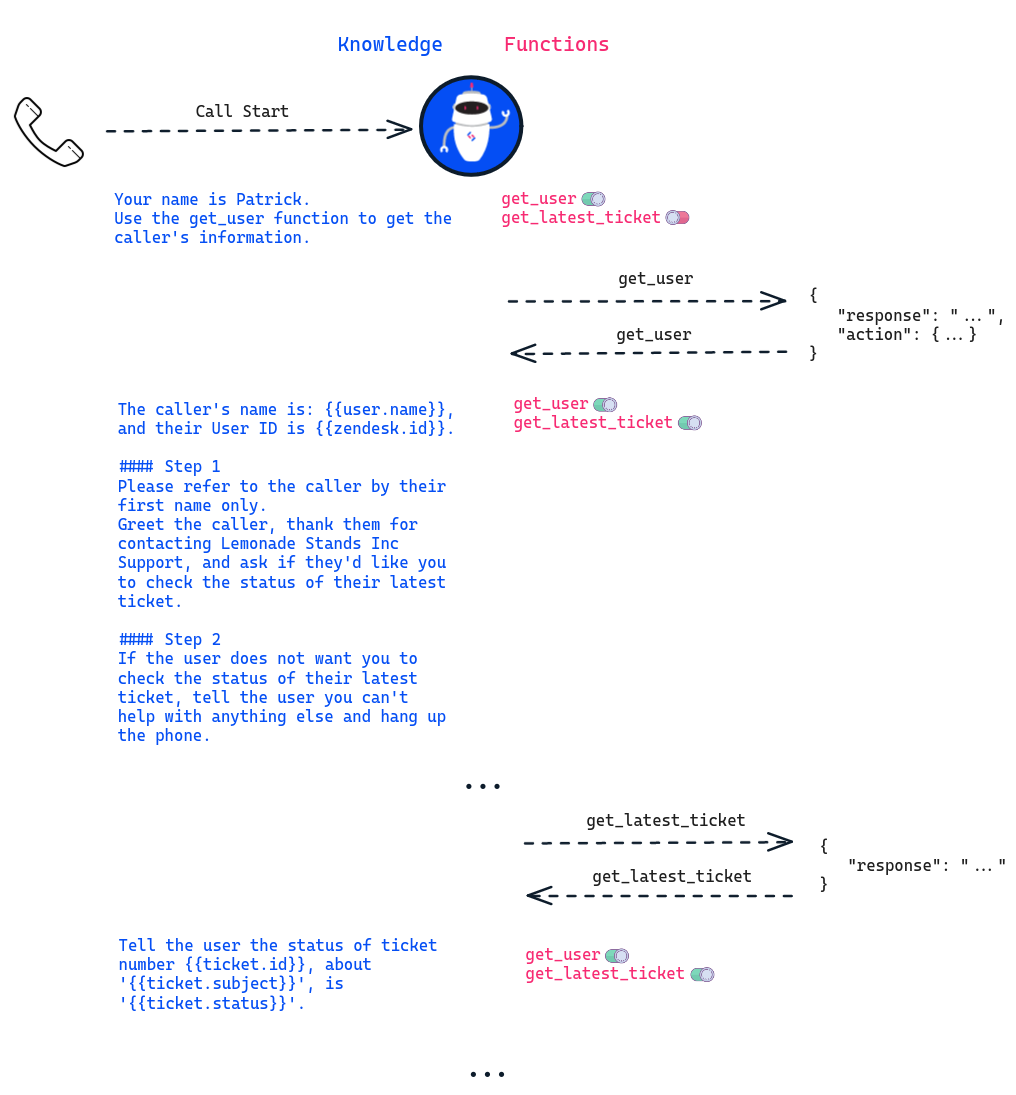
By mastering the art of toggling functions, you can create AI agents that adapt intelligently to user interactions, making your conversational applications more dynamic and user-friendly. If you don't already have a SignalWire Space, sign up today for a free trial and experiment with our AI Agent!
As you learn more about SignalWire's capabilities, visit our developer documentation, and join the vibrant SignalWire community on Discord to bring questions to the team and share your projects!
Frequently asked questions
What are AI Agent functions, and why use them?
AI Agent functions let an agent call your HTTP endpoints to retrieve data or trigger actions during a conversation. They are the bridge between a natural language interaction and real systems like ticketing, customer records, and workflow automation.
What is toggle_functions in SignalWire AI Agent?
toggle_functions is an option that lets you control when specific functions are available to the agent. It helps you keep certain capabilities disabled by default, then enable them only when the call reaches the right step.
Why would you disable a function by default?
Disabling a function by default reduces accidental calls, limits exposure of sensitive actions, and makes the conversation more deterministic. A common pattern is keeping ticket lookup disabled until after you have confirmed the caller identity.
How do you enable a function at the right time in the call?
You enable functions by returning an action along with your function response, so the agent can activate a previously disabled function once a prerequisite step is complete, such as enabling get_latest_ticket after get_user succeeds.
What is a good function design pattern for support agents that use Zendesk or similar systems?
Start with a low-risk lookup, such as finding a user record for personalization, then gate higher-impact actions behind explicit intent and verified identity. Keep function responses structured and minimal so the agent can respond quickly and accurately.
How do function toggles improve security and reliability for voice agents?
They reduce the surface area of what the agent can do at any given moment. That makes it easier to reason about behavior, prevents premature access to sensitive operations, and keeps the agent from attempting actions before the required context exists.