A voice SurveyBot can call a user and ask a sequence of questions, then store their answers for reporting or follow-up. This guide shows how to build a database-backed SurveyBot using SignalWire AI Agent, where questions are pulled from a SQLite database one at a time to keep prompts small and predictable, and responses are written back to the database. It also covers how to run the example locally with a Python web server, expose it with ngrok, serve SignalWire Markup Language (SWML), and point a SignalWire phone number at the SWML webhook so the bot can conduct surveys over a live call.
Create an AI SurveyBot
SignalWire AI Agent allows you to program an IVR or voice assistant in plain text language. However, if you’re a developer, you can use a little bit of extra code to build something more complex.
We’ve already created a SurveyBot script for you. In this post, you’ll find a working example of how to use an AI voice agent to connect to a database, retrieve a series of questions to ask the user, and then store the user’s responses to create your own SurveyBot.
The survey questions are retrieved from the database one at a time. This helps to limit the amount of data being given to the initial AI prompt, which means that it can be more direct in its instructions, and not get overwhelmed by large amounts of information.
Additionally, each subsequent prompt will be much smaller, and therefore less resource-intensive (meaning each call will cost less money)!
SurveyBot use cases
Use cases for the AI Agent are limitless. SurveyBot specifically can be used for simple questions, asking users what their favorite color, snack, and season are, which is what we will do in this example. However, the AI bot can ask whatever questions you need.
The bot can be used to ask callers financial questions to pre-approve a mortgage, credit card, or other personal loan. Or, it could be used to save time before a medical appointment by performing a basic health screening - asking the caller if they are having any symptoms, have any allergies to medications, and the reason for their call.
Election season is also just around the corner in the United States. Instead of relying solely on traditional phone polling, interviewers can deploy AI SurveyBots to reach a broader audience. These bots can conduct surveys via phone calls, collecting valuable data on voter preferences, concerns, and demographics.
How to set up the example survey
To get started, you’ll need a SignalWire account and at least one phone number. This is a basic example that uses a python webserver combined with sqlite, and ngrok to serve SWML to a webhook created from calling a SignalWire number.
You can change the prompt in any way to fit your needs, use your own questions, use your own database schema, etc. Otherwise, everything you need to get an example up and running is provided for you.
To get started, clone the repository that contains the survey bot example to your local machine.
> git clone git@github.com:shane-signalwire/SurveyBot.git
This is a good time to start the ngrok tunnel so that the tunnel URL is ready. In a separate terminal, start the tunnel and set the http port to 5000 (the default port used by the flask module in python. This can be changed to anything else if desired) by typing:
> ngrok http 5000
The screen should now look something like the following. Make note of the URL listed at Forwarding. That will be the base webhook URL going forward.
Session Status online
Account SurveyBot
Update update available (version 3.3.4, Ctrl-U to update)
Version 3.3.1
Region United States (us)
Latency -
Web Interface http://127.0.0.1:4040
Forwarding https://0fbf-208-40-15-84.ngrok-free.app -> http://localhost:5000
Once the ngrok tunnel has been established, navigate into the directory where the example was downloaded. The first thing that needs to be done is to update the swml_base_web_hook_url.
Open main.py in a preferred text editor and change the following line to reflect the URL from NGROK above. This should be somewhere around line 15.
Skipping this step will cause the survey to misbehave. Make sure the URL is accurate and active!
Change
swml_web_hook_base_url = '<your_webhook_url>'
to
swml_web_hook_base_url = 'https://0fbf-208-40-15-84.ngro...'
To ensure that the script can run without much additional setup, there is a requirements.txt file, which contains all its dependencies. Creating a python virtual environment and then installing the dependencies should be a quick way to ensure that the script will run without any issues.
# Create a virtual environment called surveybot
> python3 -m venv surveybot


# Activate the virtual environment
> source surveybot/bin/activate


# Install all of the required dependencies for the example application
> pip install -r requirements.txt
Now we can add some questions for SurveyBot to ask the caller. In this example, we will be using INSERT statements on the database using the sqlite3 command line.
> sqlite3 survey.db
SQLite version 3.39.5 2022-10-14 20:58:05
Enter ".help" for usage hints.


sqlite> INSERT INTO survey_questions (question) VALUES ("What is your favorite color?");
sqlite> INSERT INTO survey_questions (question) VALUES ("What is your favorite snack?");
sqlite> INSERT INTO survey_questions (question) VALUES ("What is your favorite season?");
Here, you can change, add, or remove questions to suit your needs. Each question will be fed to SurveyBot individually once it is done asking the previous question.
Lastly, you will want to configure your SignalWire number to point to the ngrok URL that we created.
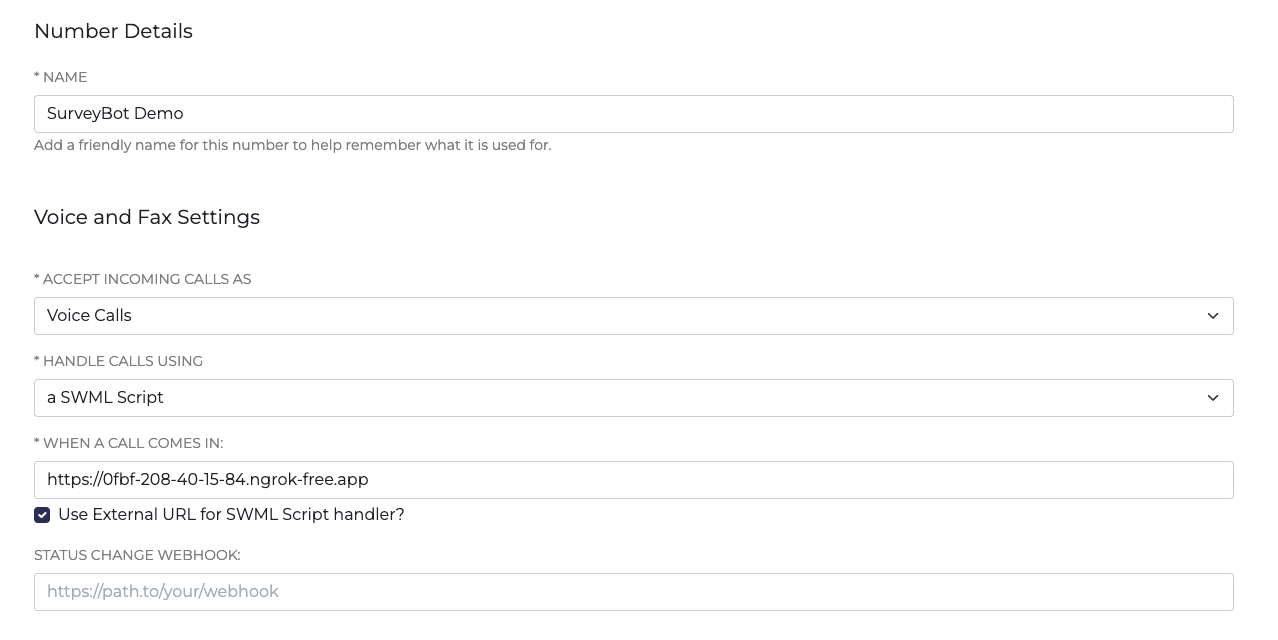
In your SignalWire Space, navigate to Phone Numbers and edit the number you’d like to use for this example. Set the call to be handled as ‘a SWML Script’ and paste in the Forwarding tunnel url from NGROK that was established earlier.
Then start the script.
> python3 main.py
You are now able to make a call to that number, and the AI voice assistant will ask the caller a series of questions from the database and record the answers.
Retrieving the survey results
Once a caller has completed the survey, the results can be retrieved from the database.
Access the database using the following command:
> sqlite3 survey.db
A record for the caller is created in the user table:
> SELECT * FROM user;

id first_name last_name age phone_number

-- ---------- --------- --- ------------

2 Harry Potter 40 +15551234567
The user’s answers are stored in the survey_answers table:
> SELECT * FROM survey_answers;

id user_id question_id question answer

-- ------- ----------- ----------------------------- ------------

4 2 1 What is your favorite color? red and gold

5 2 2 What is your favorite snack? Butterbeer

6 2 3 What is your favorite season? Winter
A JOIN statement can be used on both of these tables, to make them more readable as to which question is being asked and answered by the caller:
sqlite> SELECT survey_answers.id as poll_answer_id ,user.id as user_id, first_name, last_name, age, phone_number, question_id, question, answer from survey_answers JOIN user ON survey_answers.user_id=user.id;

poll_answer_id user_id first_name last_name age phone_number question_id question answer

-------------- ------- ---------- --------- --- ------------ ----------- ----------------------------- ------------

4 2 Harry Potter 40 +15551234567 1 What is your favorite color? red and gold

5 2 Harry Potter 40 +15551234567 2 What is your favorite snack? Butterbeer

6 2 Harry Potter 40 +15551234567 3 What is your favorite season? Winter
We want to see what you can build using SignalWire AI agent! Share what you’re working on or bring your questions to our Discord to connect with the team.
Frequently asked questions
What is a voice SurveyBot?
A voice SurveyBot is an AI voice agent that asks a caller a series of questions over a phone call and records the caller’s answers for later review.
How does a SurveyBot pull questions from a database during a call?
The bot can query a database for the next question, ask it, then store the response and repeat, retrieving questions one at a time instead of loading the entire survey into the initial prompt.
Why retrieve survey questions one at a time instead of all at once?
Pulling questions one at a time limits how much data is included in the initial prompt, keeps each subsequent prompt smaller, and reduces the chance the agent gets overwhelmed by too much context at once.
What do you need to run a SurveyBot with SignalWire AI Agent?
You need a SignalWire account, at least one phone number, a local web server (the example uses Python), a SQLite database, and ngrok to expose a public webhook URL that serves SWML.
How do you connect a SignalWire phone number to the SurveyBot?
Configure the phone number to be handled by a SWML Script, then paste the ngrok forwarding URL as the SWML webhook so inbound calls execute the SurveyBot flow.