Rime’s ultra-realistic Arcana TTS model and the high-performance Mist v2 voice are now available for use on SignalWire Voice AI Agents, giving developers access to expressive conversational voices and natural paralinguistic features. This article explains the characteristics of Arcana and Mist, how they differ in performance and expressivity, and how to build a SignalWire voice application using these models with SWML.
Rime’s Arcana and Mist TTS Models Are Live on SignalWire
Rime announced its groundbreaking new Arcana text-to-speech model – and it’s already live on SignalWire. Arcana joins Mist v2, giving developers using SignalWire Voice AI Agents access to some of the most natural-sounding TTS voices available today.
Why are these models such a big deal? Unlike many others in the space, Rime trains its models on a proprietary dataset of entirely everyday, conversational speech, all richly annotated with conversational context. This adds a uniquely naturalistic quality to the Arcana voices, and enables several features not found anywhere else - like <laugh> tags and even dynamically-generated custom voices.
To experience one of Rime’s Mist v2 voices in action, call 320 4MOVIES. Mist is Rime’s fastest model. This movie expert AI agent demonstrates how integrating Rime with SignalWire results in AI voice applications that deliver natural, humanlike interactions with imperceptible latency.
Ready to try out Arcana voices with a SignalWire Voice AI Agent? It’s as simple as this SignalWire Markup Language (SWML) script:
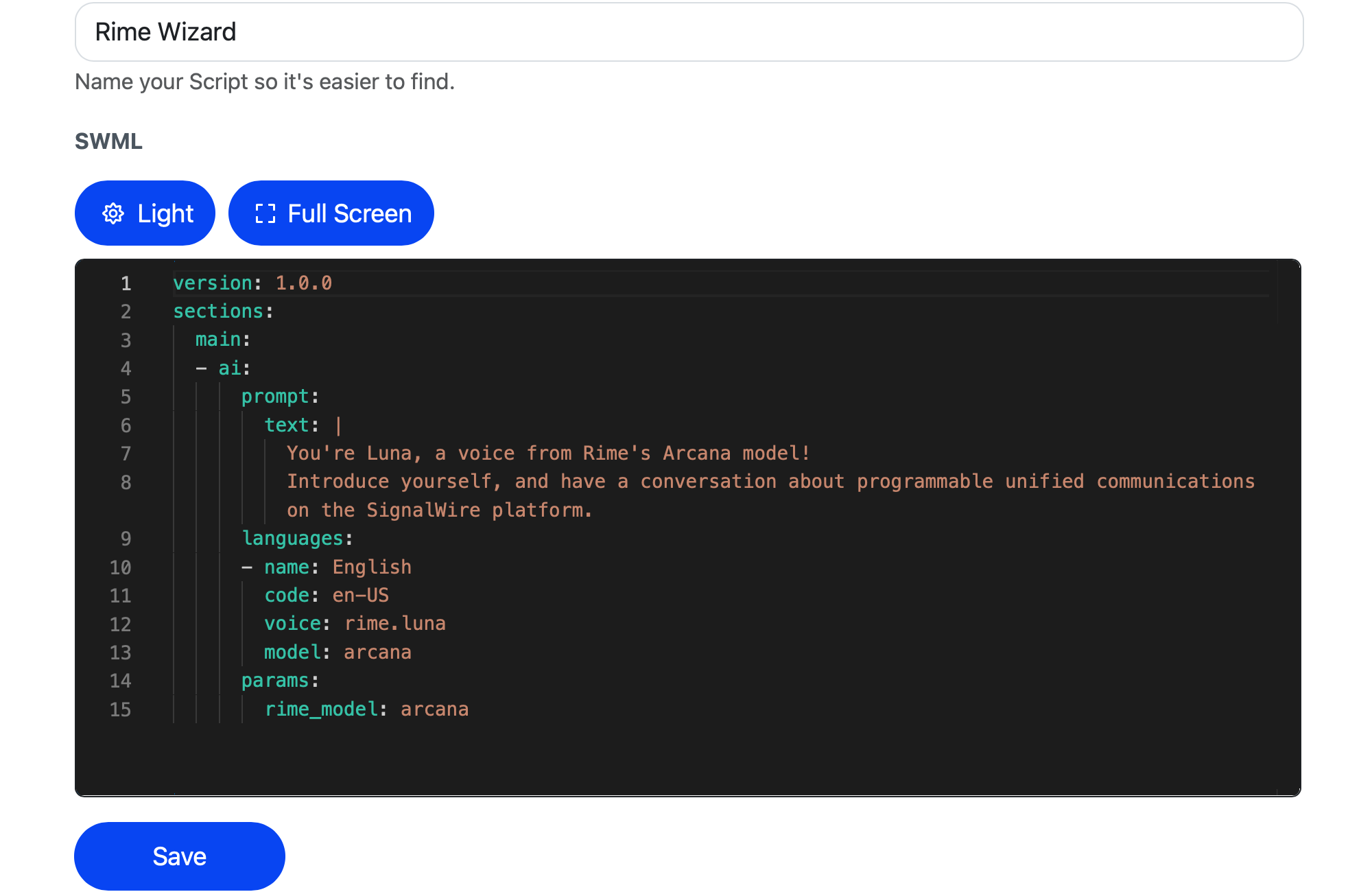
Yes, really - that’s it! Check out our full guide below for a step-by-step walkthrough, from creating an account to dialing your AI application over the PSTN.
Choose a model: Mist vs. Arcana
Wondering whether to start with Mist v2 or Arcana? At the time of publication, Mist v2 is the faster and more customizable model, trusted in production today for high-volume, business-critical applications.
With its authenticity and ability to generate new voices on the fly, Arcana is the better choice for creative applications where expressiveness and realism are top priorities. Arcana’s novel architecture gives it access to far more linguistic and semantic information than conventional models, enabling two new groundbreaking features:
Infinite voices
Arcana can generate new voices on the fly from a short description or fictional name. Imagine an application that generates a new agent personality and corresponding voice based on the conversation history. With Arcana and SWML, that is now possible.
Paralinguistic expressions
Arcana can also insert lifelike paralinguistic nuances (non-word expressive sounds like <laugh> or <sigh>) into speech, just by including a token like <laugh> in the inputted text. Try adding one of them as a filler in your prompt!
The Arcana and Mist v2 models share voice names, so you can upgrade to Arcana at any time by toggling the rime_model param of the SWML AI method.
Build a voice app with Rime on SignalWire
Rime’s Arcana and Mist voices are already live and ready for production use on the SignalWire platform. To see them in action, let’s create a simple SWML script that initiates an AI agent using an Arcana voice.
1. Create an account and add credit
If you don't have one yet, you'll need to create a SignalWire Space.
Be sure to add some funds to test with.
2. Add a new Resource
Find the Resources tab in the main sidebar menu of your Dashboard. From there, add a new Resource, and select SWML Script.
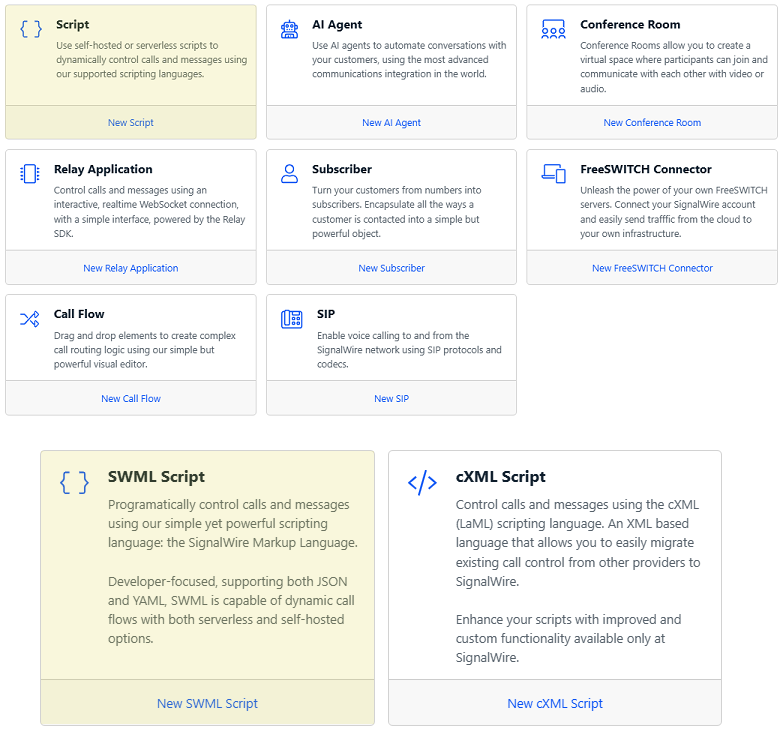
Don’t see the Resources tab? If your SignalWire Space was opened before January 2025, you’re on the legacy UI. Instead, create a SWML Script using the Relay / SWML tab.
3. Create a SWML Script
Name it something fun and recognizable. Ours is titled Rime Wizard.
Next, paste the following starter script into the text box, and hit Save.
version: 1.0.0
sections:
 main:
 - ai:
 prompt:
 text: |
 You're Luna, a voice from Rime's Arcana model!
 Introduce yourself, and have a conversation about programmable unified communications on the SignalWire platform.
 languages:
 - name: English
 code: en-US
 voice: rime.luna
 model: arcana
 params:
 rime_model: arcana
This simple YAML file is actually a complete application that SignalWire hosts and deploys the moment you hit save. The hard telecom and LLM integration happen behind the scenes, so all you have to worry about is calling the ai method, giving it a prompt, and assigning a TTS voice. In this case, we’re using Rime’s Maya voice, and specifying the Arcana model.
SWML is compact but mighty. This same SWML script can be expanded to do almost anything - call external APIs, use defined “tools” or functions, retrieve structured information from SignalWire’s Datasphere RAG stack, switch voices and contexts, programmatically modify its own source with the Prompt Object Model, and transfer to other Resources on SignalWire’s Call Fabric platform.
4. Buy and assign a phone number
Navigate to the Phone Numbers section of the Dashboard.
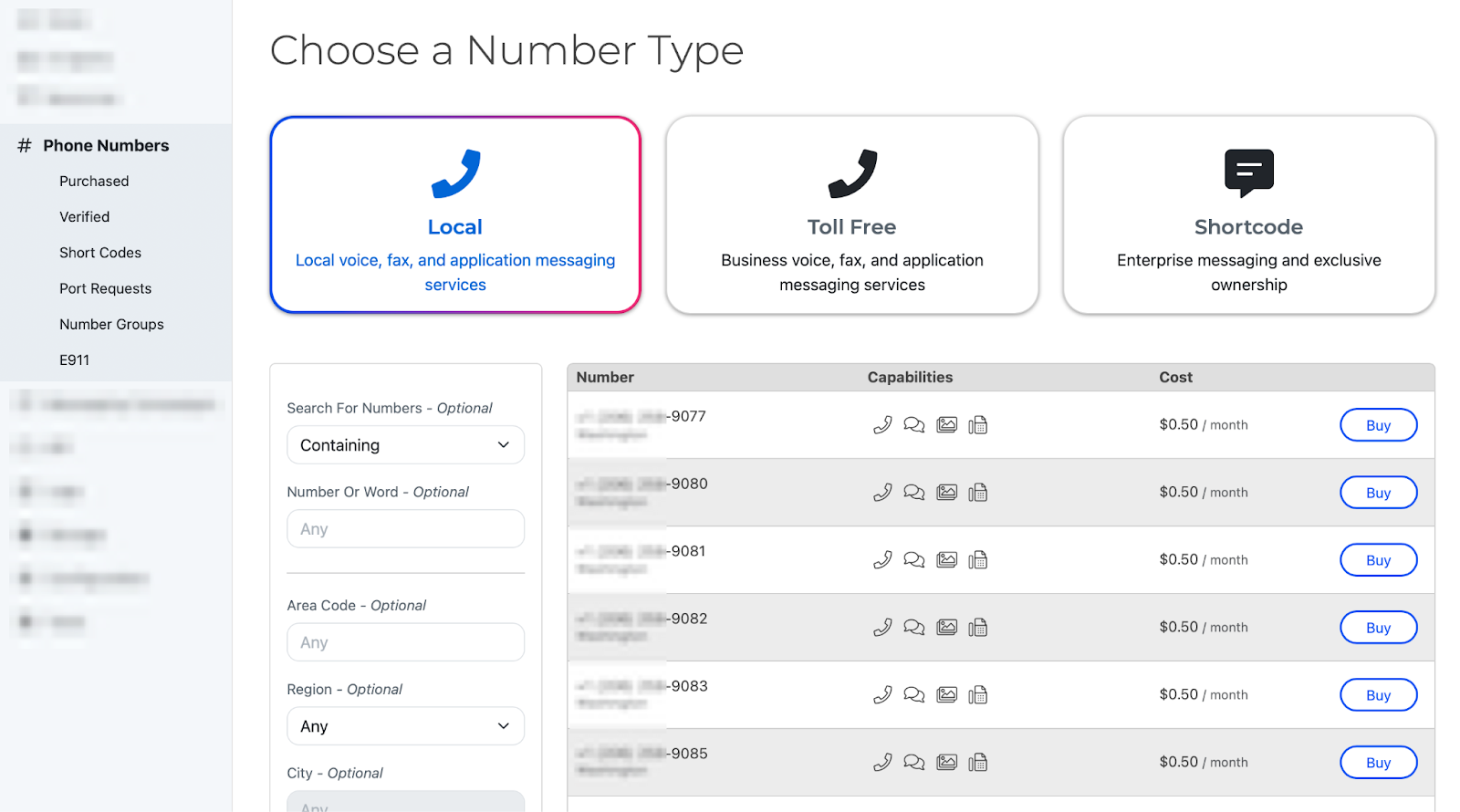
Purchase a phone number and assign it to the desired SWML script.
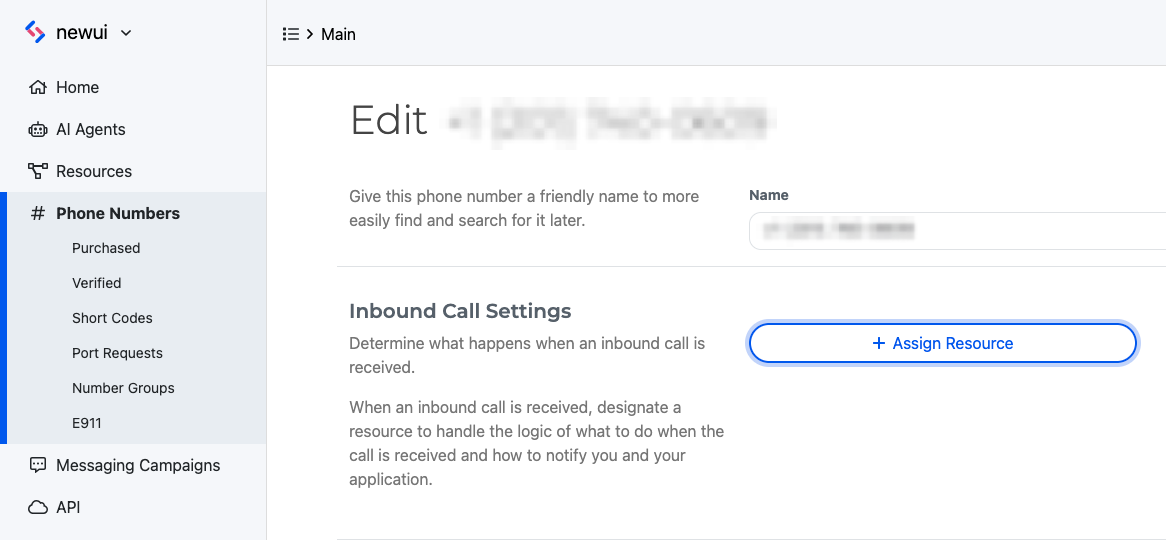
5. Give it a call!
Call the number you just assigned to chat with your new AI voice application on the phone.
Next steps
Filter and preview voices by tags in the Rime Dashboard
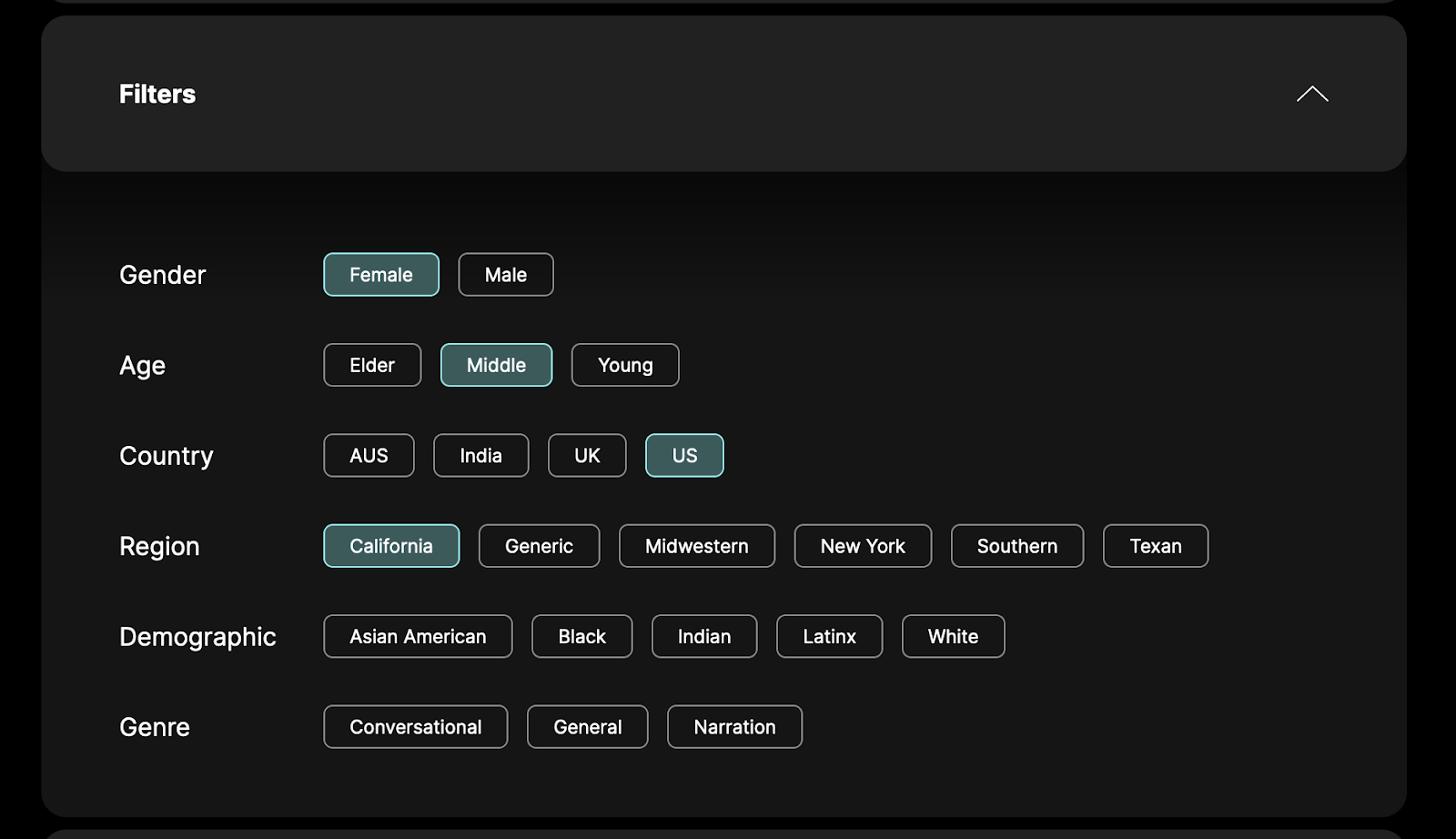
Explore our Full SWML documentation to learn more about what you can build and customize with SignalWire’s Programmable Unified Communications platform
Frequently asked questions
What are Rime’s Arcana and Mist TTS models on SignalWire?
Rime’s Arcana and Mist v2 are text-to-speech (TTS) models available on SignalWire that generate natural, expressive speech; Arcana prioritizes expressive realism while Mist v2 focuses on speed and production-scale performance.
What’s the difference between Arcana and Mist v2?
Mist v2 is optimized for high throughput and production-ready voice delivery, whereas Arcana delivers ultra-realistic, contextually expressive speech capable of generating novel voices and paralinguistic cues like laughter and sighs.
How do I use Rime TTS models with a SignalWire Voice AI Agent?
You select your TTS model in a SignalWire Markup Language (SWML) script by setting the appropriate model (e.g., arcana or mistv2) in the voice configuration, then create the script and assign it to a phone number to build and deploy your voice application.
Why might I choose Arcana over Mist v2?
Choose Arcana when your use case prioritizes natural, human-like inflection and expressive character in voice applications; choose Mist v2 when speed, simplicity, and high-volume throughput are critical