***
id: 9b5e2dd1-c53b-44fc-b210-ce32e99e5039
slug: /ai
title: SignalWire AI
sidebar-title: Overview
position: 0
subtitle: 'Programmable, integrated, realtime voice AI'
-------------------------------------------------------
SignalWire AI is built for **unlimited programmability and scale**.
Integrate AI and deploy a MVP with low-code/no-code drag-and-drop tools, then scale your application on SignalWire's cloud platform.
## Quickstart
Deploy a serverless AI Agent and call it over the PSTN in under 5 minutes.
### Create a free account
Register your SignalWire account.
### Import SWML script
Open the [RELAY / SWML](https://my.signalwire.com?page=relay) tab in your SignalWire Dashboard,
paste the following script, and hit Save.
This simple YAML/JSON document is a complete calling application!
```yaml title="swml.yaml"
version: 1.0.0
sections:
main:
- ai:
prompt:
text: You are a knowledgeable developer. Have an open-ended discussion with the caller about SignalWire and programmable communications.
```
### Assign a phone number
[Buy a phone number](https://my.signalwire.com?page=relay) using your \$5 promotional credit.
### Give it a call
Dial your newly configured AI Agent over the PSTN from your cell phone or a VoIP dialer.
## SWML
SWML (SignalWire Markup Language) is the most powerful and flexible way to use AI on the SignalWire platform.
SWML is a structured language for configuring and orchestrating real-time communication applications
using lightweight and readable JSON or YAML files.
These SWML Scripts can be deployed serverlessly in SignalWire's cloud, or from your server.
SWML's `ai` method integrates advanced AI Agents, which can interact with external APIs.
SWML AI method
## AI Agents
Configure AI Agents right in your SignalWire Space with a streamlined, no-code user interface.
Getting started guide
## Call Flow Builder
Add AI Agents built in your SignalWire Space directly to drag-and-drop call flows.
Guide to the AI Agent node
## Agents SDK
Build powerful custom voice AI agents with Python. The SignalWire Agents SDK provides complete programmatic control for sophisticated voice applications.
Build your first agent in 5 minutes
Progressive examples from simple to advanced
Ready-to-use agent templates
### Use cases
A basic AI-powered phone agent that can hold an open-ended conversation.
```python
from signalwire_agents import AgentBase
# Create an agent and assign a route
agent = AgentBase("My Assistant", route="/assistant")
# Add some basic capabilities
agent.add_skill("datetime") # Current date/time info
agent.add_skill("math") # Mathematical calculations
# Start the agent
agent.serve()
```
[Agents SDK docs](/docs/agents-sdk/python) | [Quickstart guide](/docs/agents-sdk/python/guides/quickstart)
```yaml
version: 1.0.0
sections:
main:
- ai:
post_prompt_url: https://example.com/my-post-prompt-url
params:
save_conversation: true
prompt:
text: |
You are a knowledgeable developer.
Have an open-ended discussion with the caller about SignalWire and programmable communications.
```
[SWML docs](/docs/swml) | [AI method reference](/docs/swml/reference/ai)
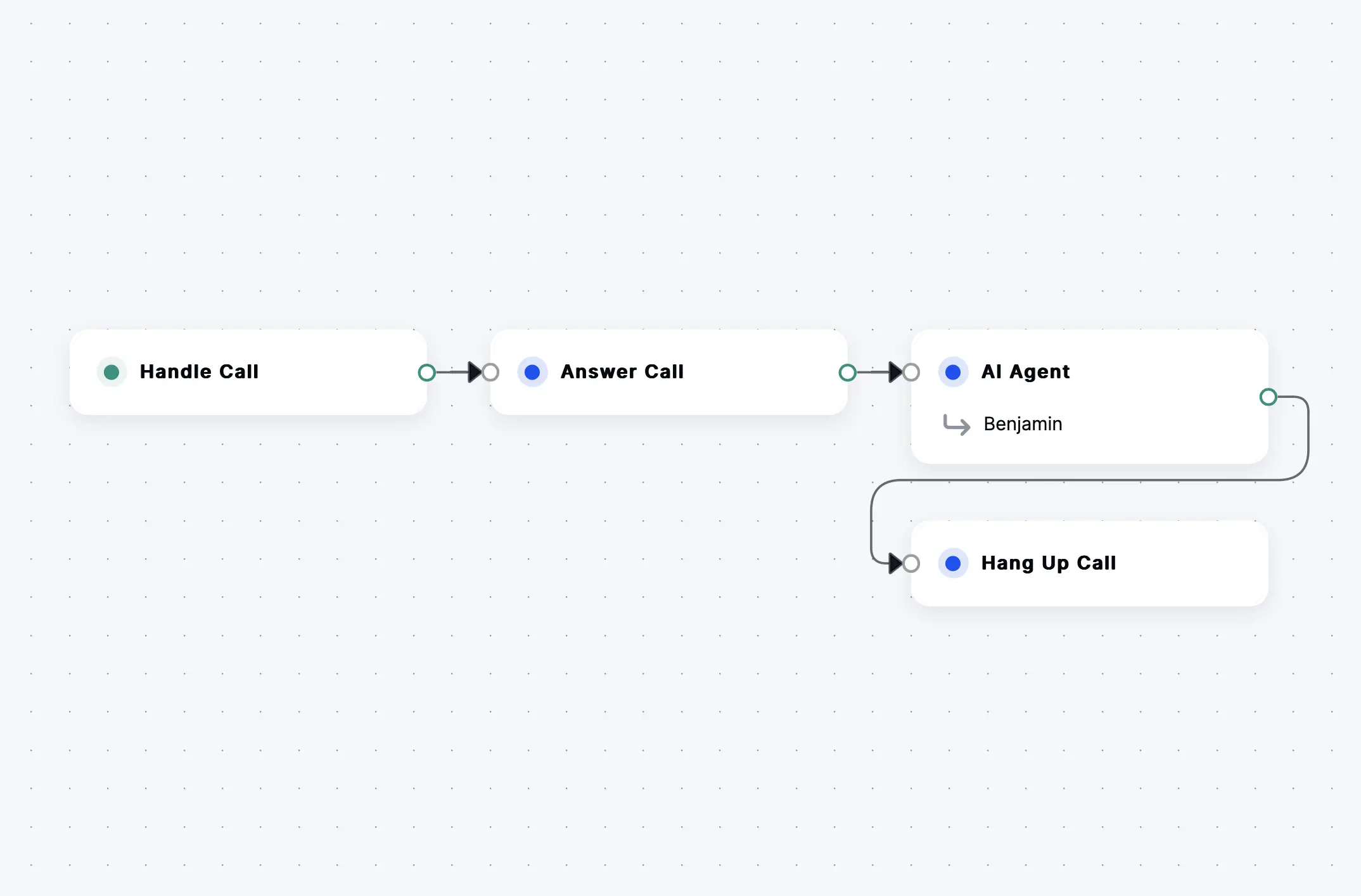 [Call Flow Builder docs](/docs/call-flow-builder)
An AI agent that answers frequently asked questions about your business.
```python
from signalwire_agents.prefabs import FAQBotAgent
agent = FAQBotAgent(
faqs=[
{
"question": "What are your hours?",
"answer": "We're open 9 AM to 5 PM, Monday to Friday."
},
{
"question": "Where are you located?",
"answer": "123 Main Street, Downtown."
}
]
)
agent.run()
```
[Agents SDK docs](/docs/agents-sdk/python) | [FAQ Bot prefab](/docs/agents-sdk/python/guides/faq-bot)
```yaml
version: 1.0.0
sections:
main:
- ai:
prompt:
text: |
You are a helpful FAQ bot. Answer questions about our business using the available functions.
SWAIG:
defaults:
web_hook_url: https://example.com/faq-webhook
functions:
- function: search_faq
description: Search frequently asked questions
parameters:
type: object
properties:
query:
type: string
description: The question to search for
```
[SWML docs](/docs/swml) | [SWAIG functions guide](/docs/swml/guides/swaig)
An agent that looks up customer accounts and transfers calls to human support when needed.
```python
from signalwire_agents import AgentBase, SwaigFunctionResult
agent = AgentBase(name="support")
agent.prompt_add_section("Role", "You are a helpful customer service agent.")
@agent.tool(description="Look up customer account")
def lookup_account(account_id: str) -> SwaigFunctionResult:
# Simulate database lookup
customer = {"name": "John Doe", "status": "active"}
return SwaigFunctionResult(f"Account: {customer['name']}, Status: {customer['status']}")
@agent.tool(description="Transfer to support")
def transfer_support() -> SwaigFunctionResult:
return SwaigFunctionResult("Connecting you to support.").connect("+15551234567")
agent.run()
```
[Agents SDK docs](/docs/agents-sdk/python) | [Custom functions guide](/docs/agents-sdk/python/guides/prompts-pom)
```yaml
version: 1.0.0
sections:
main:
- ai:
prompt:
text: |
You are a customer service agent. Help customers with their questions and account needs.
Use the available functions to look up information or transfer calls when needed.
SWAIG:
functions:
- function: lookup_account
description: Look up customer account information
parameters:
type: object
properties:
account_id:
type: string
description: Customer account ID
web_hook_url: https://example.com/account-lookup
- function: transfer_to_support
description: Transfer to human support agent
web_hook_url: https://example.com/transfer-support
```
[SWML docs](/docs/swml) | [SWAIG functions guide](/docs/swml/guides/swaig)
A virtual concierge that helps guests with amenity information and service bookings.
```python
from signalwire_agents.prefabs import ConciergeAgent
agent = ConciergeAgent(
venue_name="Grand Hotel",
services=["room service", "spa bookings", "restaurant reservations"],
amenities={
"pool": {"hours": "7 AM - 10 PM", "location": "2nd Floor"},
"gym": {"hours": "24 hours", "location": "3rd Floor"}
}
)
agent.run()
```
[Agents SDK docs](/docs/agents-sdk/python) | [Concierge prefab](/docs/agents-sdk/python/guides/concierge)
```yaml
version: 1.0.0
sections:
main:
- ai:
prompt:
text: |
You are a hotel concierge for Grand Hotel. Help guests with information about amenities,
services, and bookings. Use available functions to provide accurate information.
SWAIG:
functions:
- function: check_availability
description: Check availability for services
parameters:
type: object
properties:
service:
type: string
description: Service to check (spa, restaurant, etc.)
date:
type: string
description: Date for booking
web_hook_url: https://example.com/hotel-availability
- function: get_amenity_info
description: Get information about hotel amenities
parameters:
type: object
properties:
amenity:
type: string
description: Which amenity (pool, gym, spa, etc.)
web_hook_url: https://example.com/amenity-info
```
[SWML docs](/docs/swml) | [SWAIG functions guide](/docs/swml/guides/swaig)
An agent that checks availability, books appointments, and sends SMS confirmations.
```python
from signalwire_agents import AgentBase
from signalwire_agents.core.function_result import SwaigFunctionResult
from datetime import datetime
appointments = []
agent = AgentBase(name="scheduler", route="/scheduler")
agent.prompt_add_section("Role", "You help customers schedule appointments.")
agent.prompt_add_section("Guidelines", """
- Collect customer name, date, and preferred time
- Confirm all details before booking
- Send SMS confirmation when booking is complete
""")
agent.add_language("English", "en-US", "rime.spore")
@agent.tool(description="Check if a time slot is available")
def check_availability(date: str, time: str) -> SwaigFunctionResult:
for apt in appointments:
if apt["date"] == date and apt["time"] == time:
return SwaigFunctionResult(f"Sorry, {date} at {time} is not available.")
return SwaigFunctionResult(f"{date} at {time} is available.")
@agent.tool(description="Book an appointment")
def book_appointment(
name: str,
phone: str,
date: str,
time: str
) -> SwaigFunctionResult:
appointments.append({
"name": name,
"phone": phone,
"date": date,
"time": time,
"booked_at": datetime.now().isoformat()
})
return (
SwaigFunctionResult(f"Appointment booked for {name} on {date} at {time}.")
.send_sms(
to_number=phone,
from_number="+15559876543",
body=f"Your appointment is confirmed for {date} at {time}."
)
)
if __name__ == "__main__":
agent.run()
```
[Agents SDK docs](/docs/agents-sdk/python) | [InfoGatherer prefab](/docs/agents-sdk/python/guides/info-gatherer)
```yaml
version: 1.0.0
sections:
main:
- ai:
prompt:
text: |
You are an appointment scheduling agent. Help customers book appointments,
check availability, and send confirmations.
SWAIG:
functions:
- function: check_availability
description: Check if a time slot is available
parameters:
type: object
properties:
date:
type: string
description: Date for appointment
time:
type: string
description: Preferred time
web_hook_url: https://example.com/check-availability
- function: book_appointment
description: Book an appointment
parameters:
type: object
properties:
name:
type: string
description: Customer name
phone:
type: string
description: Customer phone number
date:
type: string
description: Appointment date
time:
type: string
description: Appointment time
web_hook_url: https://example.com/book-appointment
```
[SWML docs](/docs/swml) | [SWAIG functions guide](/docs/swml/guides/swaig)
An agent that conducts customer satisfaction surveys with different question types.
```python
from signalwire_agents.prefabs import SurveyAgent
agent = SurveyAgent(
survey_name="Customer Satisfaction Survey",
questions=[
{
"id": "satisfaction",
"text": "How satisfied were you with our service?",
"type": "rating",
"scale": 5
},
{
"id": "recommend",
"text": "Would you recommend us to others?",
"type": "yes_no"
},
{
"id": "comments",
"text": "Any additional comments?",
"type": "open_ended",
"required": False
}
]
)
if __name__ == "__main__":
agent.run()
```
[Agents SDK docs](/docs/agents-sdk/python) | [Survey prefab](/docs/agents-sdk/python/guides/survey)
```yaml
version: 1.0.0
sections:
main:
- ai:
prompt:
text: |
You are a survey agent. Conduct a customer satisfaction survey by asking
the provided questions and recording their responses.
SWAIG:
functions:
- function: record_response
description: Record survey response
parameters:
type: object
properties:
question_id:
type: string
description: ID of the question being answered
response:
type: string
description: The customer's response
web_hook_url: https://example.com/record-survey
- function: get_next_question
description: Get the next survey question
parameters:
type: object
properties:
current_id:
type: string
description: Current question ID
web_hook_url: https://example.com/next-question
```
[SWML docs](/docs/swml) | [SWAIG functions guide](/docs/swml/guides/swaig)
A virtual receptionist that greets callers and routes them to the right department.
```python
from signalwire_agents.prefabs import ReceptionistAgent
agent = ReceptionistAgent(
departments=[
{
"name": "sales",
"description": "Product inquiries, pricing, and purchasing",
"number": "+15551234567"
},
{
"name": "support",
"description": "Technical help and troubleshooting",
"number": "+15551234568"
},
{
"name": "billing",
"description": "Payment questions and account issues",
"number": "+15551234569"
}
]
)
if __name__ == "__main__":
agent.run()
```
[Agents SDK docs](/docs/agents-sdk/python) | [Receptionist prefab](/docs/agents-sdk/python/guides/receptionist)
```yaml
version: 1.0.0
sections:
main:
- ai:
prompt:
text: |
You are a receptionist. Greet callers and determine which department
they need based on their inquiry. Transfer them to the appropriate department.
SWAIG:
functions:
- function: route_to_department
description: Transfer caller to specific department
parameters:
type: object
properties:
department:
type: string
description: Target department (sales, support, billing)
web_hook_url: https://example.com/route-department
- function: get_department_info
description: Get information about available departments
parameters:
type: object
properties:
department:
type: string
description: Department name to lookup
web_hook_url: https://example.com/department-info
```
[SWML docs](/docs/swml) | [SWAIG functions guide](/docs/swml/guides/swaig)
An agent that collects information from potential customers and qualifies them for the sales team.
```python
from signalwire_agents.prefabs import InfoGathererAgent
agent = InfoGathererAgent(
questions=[
{"key_name": "name", "question_text": "What is your name?"},
{"key_name": "company", "question_text": "What company are you with?"},
{"key_name": "phone", "question_text": "What is your phone number?", "confirm": True},
{"key_name": "budget", "question_text": "What is your budget range for this project?"},
{"key_name": "timeline", "question_text": "What is your timeline for making a decision?"}
],
name="lead-qualifier"
)
agent.prompt_add_section(
"Role",
"You are qualifying leads for the sales team. Be friendly and professional."
)
if __name__ == "__main__":
agent.run()
```
[Agents SDK docs](/docs/agents-sdk/python) | [InfoGatherer prefab](/docs/agents-sdk/python/guides/info-gatherer)
```yaml
version: 1.0.0
sections:
main:
- ai:
prompt:
text: |
You are a lead qualification agent. Collect information from potential customers
and determine if they are qualified leads for our sales team.
SWAIG:
functions:
- function: collect_lead_info
description: Collect and qualify lead information
parameters:
type: object
properties:
name:
type: string
description: Contact name
company:
type: string
description: Company name
budget:
type: string
description: Project budget range
web_hook_url: https://example.com/lead-qualification
- function: schedule_followup
description: Schedule a follow-up call
parameters:
type: object
properties:
datetime:
type: string
description: When to schedule follow-up
web_hook_url: https://example.com/schedule-followup
```
[SWML docs](/docs/swml) | [SWAIG functions guide](/docs/swml/guides/swaig)
An agent that records calls and provides real-time transcription.
```python
from signalwire_agents import AgentBase
from signalwire_agents.core.function_result import SwaigFunctionResult
agent = AgentBase(name="transcription-agent")
agent.add_language("English", "en-US", "rime.spore")
agent.prompt_add_section("Role", "You are a helpful assistant. The call is being recorded for transcription.")
agent.set_params({"save_conversation": True})
@agent.tool(description="Start recording the call for transcription")
def start_recording() -> SwaigFunctionResult:
return (
SwaigFunctionResult("Recording has started.")
.record_call(
control_id="transcription",
stereo=True,
format="wav"
)
)
if __name__ == "__main__":
agent.run()
```
[Agents SDK docs](/docs/agents-sdk/python) | [Call recording guide](/docs/agents-sdk/python/guides/call-recording)
```yaml
version: 1.0.0
sections:
main:
- record_call:
stereo: true
format: "wav"
- ai:
prompt:
text: |
You are a transcription agent. Listen to the conversation and provide
real-time transcription of what is being said.
params:
save_conversation: true
attention_timeout: 30000
SWAIG:
functions:
- function: get_transcript
description: Get current conversation transcript
parameters:
type: object
properties:
format:
type: string
description: Output format (text, json, etc.)
web_hook_url: https://example.com/get-transcript
```
[SWML docs](/docs/swml) | [Call recording guide](/docs/agents-sdk/python/guides/call-recording)
From beginner to expert level
Complete reference guide
***
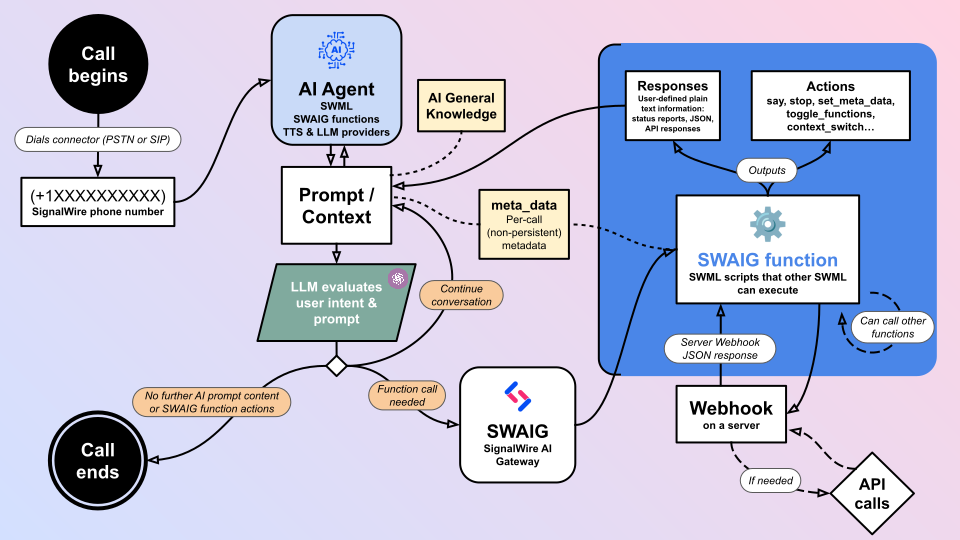
## How does it work?
Under the hood, the SignalWire AI Gateway (SWAIG) orchestrates the many supporting services
that make integrated realtime voice AI possible.
* AI Agent
* Prompt
* LLM
* SWAIG Functions
* TTS (Text-To-Speech) Providers
[Call Flow Builder docs](/docs/call-flow-builder)
An AI agent that answers frequently asked questions about your business.
```python
from signalwire_agents.prefabs import FAQBotAgent
agent = FAQBotAgent(
faqs=[
{
"question": "What are your hours?",
"answer": "We're open 9 AM to 5 PM, Monday to Friday."
},
{
"question": "Where are you located?",
"answer": "123 Main Street, Downtown."
}
]
)
agent.run()
```
[Agents SDK docs](/docs/agents-sdk/python) | [FAQ Bot prefab](/docs/agents-sdk/python/guides/faq-bot)
```yaml
version: 1.0.0
sections:
main:
- ai:
prompt:
text: |
You are a helpful FAQ bot. Answer questions about our business using the available functions.
SWAIG:
defaults:
web_hook_url: https://example.com/faq-webhook
functions:
- function: search_faq
description: Search frequently asked questions
parameters:
type: object
properties:
query:
type: string
description: The question to search for
```
[SWML docs](/docs/swml) | [SWAIG functions guide](/docs/swml/guides/swaig)
An agent that looks up customer accounts and transfers calls to human support when needed.
```python
from signalwire_agents import AgentBase, SwaigFunctionResult
agent = AgentBase(name="support")
agent.prompt_add_section("Role", "You are a helpful customer service agent.")
@agent.tool(description="Look up customer account")
def lookup_account(account_id: str) -> SwaigFunctionResult:
# Simulate database lookup
customer = {"name": "John Doe", "status": "active"}
return SwaigFunctionResult(f"Account: {customer['name']}, Status: {customer['status']}")
@agent.tool(description="Transfer to support")
def transfer_support() -> SwaigFunctionResult:
return SwaigFunctionResult("Connecting you to support.").connect("+15551234567")
agent.run()
```
[Agents SDK docs](/docs/agents-sdk/python) | [Custom functions guide](/docs/agents-sdk/python/guides/prompts-pom)
```yaml
version: 1.0.0
sections:
main:
- ai:
prompt:
text: |
You are a customer service agent. Help customers with their questions and account needs.
Use the available functions to look up information or transfer calls when needed.
SWAIG:
functions:
- function: lookup_account
description: Look up customer account information
parameters:
type: object
properties:
account_id:
type: string
description: Customer account ID
web_hook_url: https://example.com/account-lookup
- function: transfer_to_support
description: Transfer to human support agent
web_hook_url: https://example.com/transfer-support
```
[SWML docs](/docs/swml) | [SWAIG functions guide](/docs/swml/guides/swaig)
A virtual concierge that helps guests with amenity information and service bookings.
```python
from signalwire_agents.prefabs import ConciergeAgent
agent = ConciergeAgent(
venue_name="Grand Hotel",
services=["room service", "spa bookings", "restaurant reservations"],
amenities={
"pool": {"hours": "7 AM - 10 PM", "location": "2nd Floor"},
"gym": {"hours": "24 hours", "location": "3rd Floor"}
}
)
agent.run()
```
[Agents SDK docs](/docs/agents-sdk/python) | [Concierge prefab](/docs/agents-sdk/python/guides/concierge)
```yaml
version: 1.0.0
sections:
main:
- ai:
prompt:
text: |
You are a hotel concierge for Grand Hotel. Help guests with information about amenities,
services, and bookings. Use available functions to provide accurate information.
SWAIG:
functions:
- function: check_availability
description: Check availability for services
parameters:
type: object
properties:
service:
type: string
description: Service to check (spa, restaurant, etc.)
date:
type: string
description: Date for booking
web_hook_url: https://example.com/hotel-availability
- function: get_amenity_info
description: Get information about hotel amenities
parameters:
type: object
properties:
amenity:
type: string
description: Which amenity (pool, gym, spa, etc.)
web_hook_url: https://example.com/amenity-info
```
[SWML docs](/docs/swml) | [SWAIG functions guide](/docs/swml/guides/swaig)
An agent that checks availability, books appointments, and sends SMS confirmations.
```python
from signalwire_agents import AgentBase
from signalwire_agents.core.function_result import SwaigFunctionResult
from datetime import datetime
appointments = []
agent = AgentBase(name="scheduler", route="/scheduler")
agent.prompt_add_section("Role", "You help customers schedule appointments.")
agent.prompt_add_section("Guidelines", """
- Collect customer name, date, and preferred time
- Confirm all details before booking
- Send SMS confirmation when booking is complete
""")
agent.add_language("English", "en-US", "rime.spore")
@agent.tool(description="Check if a time slot is available")
def check_availability(date: str, time: str) -> SwaigFunctionResult:
for apt in appointments:
if apt["date"] == date and apt["time"] == time:
return SwaigFunctionResult(f"Sorry, {date} at {time} is not available.")
return SwaigFunctionResult(f"{date} at {time} is available.")
@agent.tool(description="Book an appointment")
def book_appointment(
name: str,
phone: str,
date: str,
time: str
) -> SwaigFunctionResult:
appointments.append({
"name": name,
"phone": phone,
"date": date,
"time": time,
"booked_at": datetime.now().isoformat()
})
return (
SwaigFunctionResult(f"Appointment booked for {name} on {date} at {time}.")
.send_sms(
to_number=phone,
from_number="+15559876543",
body=f"Your appointment is confirmed for {date} at {time}."
)
)
if __name__ == "__main__":
agent.run()
```
[Agents SDK docs](/docs/agents-sdk/python) | [InfoGatherer prefab](/docs/agents-sdk/python/guides/info-gatherer)
```yaml
version: 1.0.0
sections:
main:
- ai:
prompt:
text: |
You are an appointment scheduling agent. Help customers book appointments,
check availability, and send confirmations.
SWAIG:
functions:
- function: check_availability
description: Check if a time slot is available
parameters:
type: object
properties:
date:
type: string
description: Date for appointment
time:
type: string
description: Preferred time
web_hook_url: https://example.com/check-availability
- function: book_appointment
description: Book an appointment
parameters:
type: object
properties:
name:
type: string
description: Customer name
phone:
type: string
description: Customer phone number
date:
type: string
description: Appointment date
time:
type: string
description: Appointment time
web_hook_url: https://example.com/book-appointment
```
[SWML docs](/docs/swml) | [SWAIG functions guide](/docs/swml/guides/swaig)
An agent that conducts customer satisfaction surveys with different question types.
```python
from signalwire_agents.prefabs import SurveyAgent
agent = SurveyAgent(
survey_name="Customer Satisfaction Survey",
questions=[
{
"id": "satisfaction",
"text": "How satisfied were you with our service?",
"type": "rating",
"scale": 5
},
{
"id": "recommend",
"text": "Would you recommend us to others?",
"type": "yes_no"
},
{
"id": "comments",
"text": "Any additional comments?",
"type": "open_ended",
"required": False
}
]
)
if __name__ == "__main__":
agent.run()
```
[Agents SDK docs](/docs/agents-sdk/python) | [Survey prefab](/docs/agents-sdk/python/guides/survey)
```yaml
version: 1.0.0
sections:
main:
- ai:
prompt:
text: |
You are a survey agent. Conduct a customer satisfaction survey by asking
the provided questions and recording their responses.
SWAIG:
functions:
- function: record_response
description: Record survey response
parameters:
type: object
properties:
question_id:
type: string
description: ID of the question being answered
response:
type: string
description: The customer's response
web_hook_url: https://example.com/record-survey
- function: get_next_question
description: Get the next survey question
parameters:
type: object
properties:
current_id:
type: string
description: Current question ID
web_hook_url: https://example.com/next-question
```
[SWML docs](/docs/swml) | [SWAIG functions guide](/docs/swml/guides/swaig)
A virtual receptionist that greets callers and routes them to the right department.
```python
from signalwire_agents.prefabs import ReceptionistAgent
agent = ReceptionistAgent(
departments=[
{
"name": "sales",
"description": "Product inquiries, pricing, and purchasing",
"number": "+15551234567"
},
{
"name": "support",
"description": "Technical help and troubleshooting",
"number": "+15551234568"
},
{
"name": "billing",
"description": "Payment questions and account issues",
"number": "+15551234569"
}
]
)
if __name__ == "__main__":
agent.run()
```
[Agents SDK docs](/docs/agents-sdk/python) | [Receptionist prefab](/docs/agents-sdk/python/guides/receptionist)
```yaml
version: 1.0.0
sections:
main:
- ai:
prompt:
text: |
You are a receptionist. Greet callers and determine which department
they need based on their inquiry. Transfer them to the appropriate department.
SWAIG:
functions:
- function: route_to_department
description: Transfer caller to specific department
parameters:
type: object
properties:
department:
type: string
description: Target department (sales, support, billing)
web_hook_url: https://example.com/route-department
- function: get_department_info
description: Get information about available departments
parameters:
type: object
properties:
department:
type: string
description: Department name to lookup
web_hook_url: https://example.com/department-info
```
[SWML docs](/docs/swml) | [SWAIG functions guide](/docs/swml/guides/swaig)
An agent that collects information from potential customers and qualifies them for the sales team.
```python
from signalwire_agents.prefabs import InfoGathererAgent
agent = InfoGathererAgent(
questions=[
{"key_name": "name", "question_text": "What is your name?"},
{"key_name": "company", "question_text": "What company are you with?"},
{"key_name": "phone", "question_text": "What is your phone number?", "confirm": True},
{"key_name": "budget", "question_text": "What is your budget range for this project?"},
{"key_name": "timeline", "question_text": "What is your timeline for making a decision?"}
],
name="lead-qualifier"
)
agent.prompt_add_section(
"Role",
"You are qualifying leads for the sales team. Be friendly and professional."
)
if __name__ == "__main__":
agent.run()
```
[Agents SDK docs](/docs/agents-sdk/python) | [InfoGatherer prefab](/docs/agents-sdk/python/guides/info-gatherer)
```yaml
version: 1.0.0
sections:
main:
- ai:
prompt:
text: |
You are a lead qualification agent. Collect information from potential customers
and determine if they are qualified leads for our sales team.
SWAIG:
functions:
- function: collect_lead_info
description: Collect and qualify lead information
parameters:
type: object
properties:
name:
type: string
description: Contact name
company:
type: string
description: Company name
budget:
type: string
description: Project budget range
web_hook_url: https://example.com/lead-qualification
- function: schedule_followup
description: Schedule a follow-up call
parameters:
type: object
properties:
datetime:
type: string
description: When to schedule follow-up
web_hook_url: https://example.com/schedule-followup
```
[SWML docs](/docs/swml) | [SWAIG functions guide](/docs/swml/guides/swaig)
An agent that records calls and provides real-time transcription.
```python
from signalwire_agents import AgentBase
from signalwire_agents.core.function_result import SwaigFunctionResult
agent = AgentBase(name="transcription-agent")
agent.add_language("English", "en-US", "rime.spore")
agent.prompt_add_section("Role", "You are a helpful assistant. The call is being recorded for transcription.")
agent.set_params({"save_conversation": True})
@agent.tool(description="Start recording the call for transcription")
def start_recording() -> SwaigFunctionResult:
return (
SwaigFunctionResult("Recording has started.")
.record_call(
control_id="transcription",
stereo=True,
format="wav"
)
)
if __name__ == "__main__":
agent.run()
```
[Agents SDK docs](/docs/agents-sdk/python) | [Call recording guide](/docs/agents-sdk/python/guides/call-recording)
```yaml
version: 1.0.0
sections:
main:
- record_call:
stereo: true
format: "wav"
- ai:
prompt:
text: |
You are a transcription agent. Listen to the conversation and provide
real-time transcription of what is being said.
params:
save_conversation: true
attention_timeout: 30000
SWAIG:
functions:
- function: get_transcript
description: Get current conversation transcript
parameters:
type: object
properties:
format:
type: string
description: Output format (text, json, etc.)
web_hook_url: https://example.com/get-transcript
```
[SWML docs](/docs/swml) | [Call recording guide](/docs/agents-sdk/python/guides/call-recording)
From beginner to expert level
Complete reference guide
***
## How does it work?
Under the hood, the SignalWire AI Gateway (SWAIG) orchestrates the many supporting services
that make integrated realtime voice AI possible.
* AI Agent
* Prompt
* LLM
* SWAIG Functions
* TTS (Text-To-Speech) Providers
