***
id: 722eba80-b12d-4487-b8d8-cef6835c9d0f
title: Sending your first SMS
sidebar-title: Send SMS
slug: /guides/send-sms
position: 2
description: Learn how to send your first SMS using the Compatibility REST API.
x-custom:
tags:
* 'product:messaging'
* 'language:nodejs'
* 'language:python'
* 'language:php'
* 'sdk:compatibility'
***
Let's get you started by sending your first SMS. In this guide we are going to
use [Compatibility APIs](/docs/compatibility-api/rest): if you are
migrating from a different provider, these APIs will likely be very similar.
## Your API Credentials
To send messages, make phone calls, and programmatically control video rooms,
you need API credentials. Find these in your [SignalWire Space](https://signalwire.com/signin), within the "API" tab on the left sidebar.
If this is the first time you are using API credentials, you will need to create
an API token.
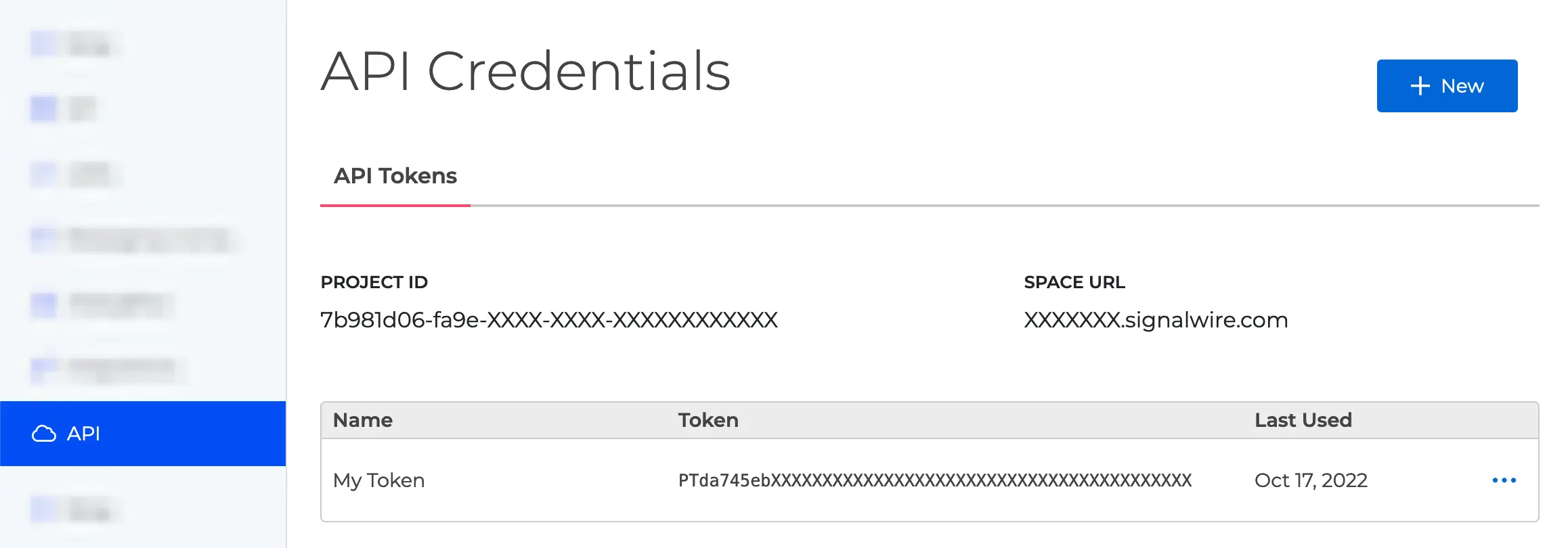
In the "API" section you will find all the information you'll need. In particular:
* Your Project ID (e.g., `7b981d06-fa9e-XXXX-XXXX-XXXXXXXXXXXX`)
* Your Space URL (e.g., `yourname.signalwire.com`)
* Your API Token (e.g., `PTda745ebXXXXXXXXXXXXXXXXXXXXXX`)
The API Token is confidential: keep it private.
## Obtaining a number
[Log in](https://signalwire.com/signin) to your SignalWire Space. From the Phone
Numbers section, you can [buy a new phone number](/docs/platform/phone-numbers) if
you don't have one already. You will need at least one number to send and
receive messages.
Make sure the number you are buying supports SMS messaging, and you're good.
You can also
[port an existing phone number](/docs/platform/porting-into-signalwire)
from another provider.
## Sending a message
Let's see how to send your first message. You have a few different options: you
can trigger an HTTP request yourself (using cURL or the dedicated functions in
your preferred programming language), or you can use [one of our SDKs](/docs/compatibility-api/sdks). We'll show examples for both methods.
### Installation
````bash title="cURL"
> Refer to https://everything.curl.dev/install
```bash title="Node.js"
```bash
npm install @signalwire/compatibility-api
````
````bash title="Python"
```bash
pip install signalwire
````
````bash title="PHP"
```bash
composer require signalwire-community/signalwire
````
Once your environment is set up, you can proceed with your first API call.
### Sending
To send a message, you can use the [Create a Message](/docs/compatibility-api/rest/messages/create-message) endpoint from our
[Compatibility APIs](/docs/compatibility-api).
If you are sending messages to the US from a 10DLC number, you *must* register
your traffic with the Campaign Registry. Otherwise, the carriers will not
deliver your messages. Please see [**Campaign Registry - Everything You Need To Know**](/docs/platform/messaging/campaign-registry) for more information.
Let's see how to send a message with a REST API call:
```bash title="cURL"
curl "https://$SPACE_URL/api/laml/2010-04-01/Accounts/$PROJECT_ID/Messages" \
-X POST \
-u "$PROJECT_ID:$API_TOKEN" \
--data-urlencode "From=$FROM_NUMBER" \
--data-urlencode "To=$TO_NUMBER" \
--data-urlencode 'Body=Hello'
```
```js title="JavaScript"
const { RestClient } = require("@signalwire/compatibility-api");
const client = RestClient(PROJECT_ID, API_TOKEN, { signalwireSpaceUrl: SPACE_URL });
client.messages
.create({ from: FROM_NUMBER, to: TO_NUMBER, body: "Hello" })
.then((message) => console.log(message.sid))
.done();
```
```python
from signalwire.rest import Client as signalwire_client
client = signalwire_client(PROJECT_ID, API_TOKEN, signalwire_space_url = SPACE_URL)
message = client.messages.create(
from_=FROM_NUMBER,
to=TO_NUMBER,
body='Hello'
)
print(message.sid)
```
```php
$SPACE_URL));
$message = $client->messages
->create($TO_NUMBER, // to
array("from" => $FROM_NUMBER, "body" => "Hello")
);
print($message->sid);
?>
```
Make sure to replace all placeholders with your own values.
This example used the [Compatibility API](/docs/compatibility-api), and in
particular the [Compatibility REST API](/docs/compatibility-api/rest), to
send a message.