***
id: 2fff8644-a4bf-4888-b31d-0c4f9a60d719
title: Make a Clubhouse like application
description: Learn how to make a Clubhouse clone using the SignalWire Video API.
slug: /js/guides/clubhouse-like-application
x-custom:
ported\_from\_readme: true
repo: '[https://github.com/signalwire/browser-audioconf-example](https://github.com/signalwire/browser-audioconf-example)'
tags:
* 'language:javascript'
* 'language:nodejs'
* 'sdk:relaybrowser'
* 'product:video'
sidebar\_custom\_props:
platform: javascript
github: '[https://github.com/signalwire/browser-audioconf-example](https://github.com/signalwire/browser-audioconf-example)'
max-toc-depth: 3
***
Our Video APIs can do more than video! In this guide, we will build an audio-only application inspired by the popular Clubhouse. Here is what we are going to build:
## Overview
We are going to build an audio-only application inspired by the popular Clubhouse. Our application will run on the browser and will be composed by a frontend written in React, and a small server in Node.js. We will use the Browser SDK to provide high-quality communication functionality to our application.
Before starting, a few resources:
* `` — this repository contains the implementation of our application. The `master` branch contains the full implementation, while the `livewire` branch contains just the UI.
* [The Browser SDK Technical Reference](/docs/browser-sdk) — find here all technical details about the Browser SDK.
## Getting Started
Clone the repository with the following command:
```bash
git clone -b livewire https://github.com/signalwire/browser-audioconf-example.git
```
We will work from the "livewire" branch, which contains some basic UI to get started.
To start the project:
```bash
npm install
npm run start # starts both backend and frontend
```
Your server will listen at ``, while the frontend will be available at ``.
## Server
We need to build a small server to obtain Room Tokens from SignalWire, and to get the list of active rooms. In essence, the server will do the following:
* listen on a `/get_token` endpoint for POST requests from the browser. Our server will obtain a Room Token for the requested user name and room name, and will send it back to the browser.
* send events on a WebSocket, to provide the clients with an updated list of rooms and participants whenever a change happens.
We will write the server in Node.js. Node.js is not a requirement, but it allows us to use the handy SignalWire Realtime SDK.
### Obtaining your SignalWire API Token
First, we need to obtain some authentication information from SignalWire.
Login to your Space [here](https://signalwire.com/signin),
and from the left menu go to the "API" page.
Once you have navigated to the API page, click on "Create Token".
Give it a name so that you can identify it later,
and make sure that the "Video" scope is enabled.
Then hit "Save".
After the token is created, you will see it listed in the table.
Here are the three pieces of information that you need to copy:
* Project ID
* Space URL
* Token
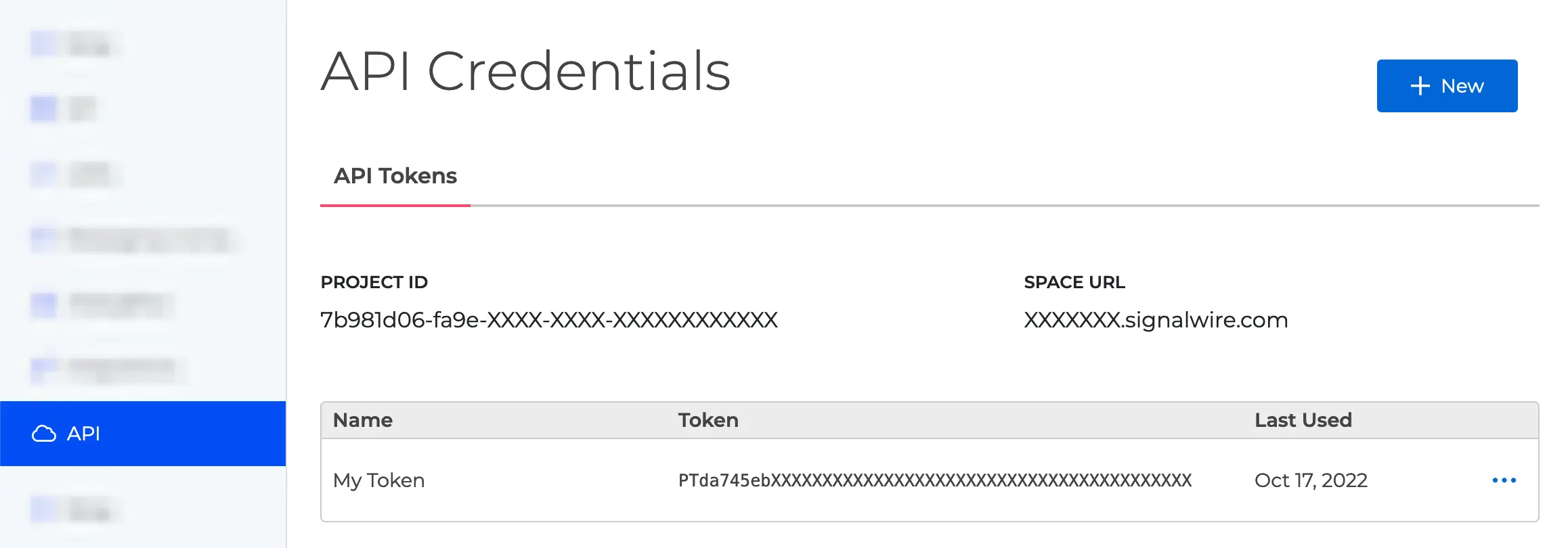
You need to put these values in the `.env` file inside the `backend` folder:
```
PROJECT_ID=...
API_KEY=...
SPACE=...
```
We are now ready to make requests to the SignalWire REST APIs.
It is important that the API tokens are kept confidential. They can be used to make API requests on your behalf. Take extreme care to make sure that the tokens don't get pushed to GitHub. Make sure that the tokens aren't publicly accessible, for example they must not be exposed in frontend code. For Node.js backends, you can use [dotenv files](https://www.npmjs.com/package/dotenv) or similar mechanisms to safely store confidential constants.
### Endpoint: /get\_token
The code of the server is located in the file [backend/src/index.js](https://github.com/signalwire/browser-audioconf-example/blob/master/backend/src/index.js).
We are now going to create a `/get_token` endpoint to be used by the client to obtain a Room Token for a given room and username. The core instructions in the `/get_token` endpoint look like this:
```javascript
// Endpoint to request token for a room
app.post("/get_token", async (req, res) => {
const { user_name, room_name } = req.body;
const response = await axios.post(
apiurl + "/room_tokens",
{
user_name,
room_name: room_name,
permissions: normalPermissions,
},
{
auth,
}
);
const token = response.data?.token;
return res.json({ token });
});
```
What we are doing is to listen on POST requests on our `/get_token` endpoint, for a message which contains a JSON-encoded payload such as `{"user_name": "...", "room_name": "..."}`. We use the user name and room name to request a Room Token from SignalWire by making a POST request on the `/room_tokens` endpoint. Note that in this code example, `apiurl` is a SignalWire URL such as `https://.signalwire.com/api/video`. Finally, we send the token back to the client that initiated the request.
The **API token** gives full access to SignalWire APIs. Whoever owns the API token can for example delete any room, mute or unmute any participant, and so on without limitations. You must only use the API token **in your server** to communicate with SignalWire.
The **Room Token** is a limited-scope token that can be used by clients to access SignalWire APIs without knowing the API token. Clients must ask for a Room Token to your own server, which in turn will obtain it from SignalWire servers and pass it back to the client. Room Tokens are associated to a given \<*user*, *room*> pair, so you can think of them as a personal key to access a given room, by a given user. Your server decides the permissions for each individual Room Token, for example whether they are allowed to mute other users.
### WebSocket: rooms\_updated
The implementation for this feature is also located in [backend/src/index.js](https://github.com/signalwire/browser-audioconf-example/blob/master/backend/src/index.js).
We use [Socket.IO](https://socket.io) to create a WebSocket over which to send a list of rooms and, for each room, the list of participants inside. We want to send the updates whenever there is a change.
First, we write a function to obtain the list of rooms and participants using the REST APIs:
```javascript
async function getRoomsAndParticipants() {
// Get all most recent room sessions
let rooms = await axios.get(`${apiurl}/room_sessions`, { auth });
rooms = rooms.data.data; // In real applications, check the "next" field.
// Filter to get only the in-progress room sessions
rooms = rooms.filter((r) => r.status === "in-progress");
// Augment each room session object with the list of participants in it
rooms = await Promise.all(
rooms.map(async (r) => ({
...r,
members: (
await axios.get(`${apiurl}/room_sessions/${r.id}/members`, { auth })
).data.data,
}))
);
return rooms;
}
```
In this case we use two different SignalWire endpoints: the first, `/room_sessions`, gives us a list of room sessions. This however does not include information about the participants, so we use the endpoint `/room_sessions/:id/members` to get a list of members for the given room session id. We pack everything in an array, and we return it asynchronously.
We use the `getRoomsAndParticipants` function whenever we detect an update using the SignalWire Realtime SDK. The Realtime SDK allows listening to events from rooms, sessions, and members. Here is how we do it:
```javascript
// We create a SignalWire Realtime SDK client.
const realtimeClient = await createClient({
project: auth.username,
token: auth.password,
});
// Function that sends a `rooms_updated` events over Socket.IO.
const emitRoomsUpdated = async () =>
io.emit("rooms_updated", await getRoomsAndParticipants());
// When a new Socket.IO client connects, send them the list of rooms
io.on("connection", (socket) => emitRoomsUpdated());
// When something changes in the list of rooms or members, trigger a new
// event.
realtimeClient.video.on("room.started", async (room) => {
emitRoomsUpdated();
room.on("member.joined", () => emitRoomsUpdated());
room.on("member.left", () => emitRoomsUpdated());
});
realtimeClient.video.on("room.ended", () => emitRoomsUpdated());
await realtimeClient.connect();
```
We use Socket.IO to emit a `rooms_updated` event that the clients will listen to and update their user interface.
## Frontend
### File structure
We implement the frontend as a React application. We have structured the UI around three pages, and we are mainly interested in two component files:
We will start by writing the logic in [Server.js](https://github.com/signalwire/browser-audioconf-example/blob/master/frontend/src/components/Server.js).
### Server.js
#### getToken
First, we implement the getToken function. This function performs a POST request to our `/get_token` endpoint specifying a room name and a user name, and returns a Room Token.
```javascript
export async function getToken(user, room) {
const response = await axios.post(`${url}/get_token`, {
user_name: user,
room_name: room,
});
return response.data.token;
}
```
This is all we needed for what concerns the communication with the server. Indeed, refreshing the list of rooms is handles in RoomListPage.js, like this:
```javascript
const socket = socketIOClient(Server.url);
socket.on("rooms_updated", (rooms) => {
setRooms(rooms);
setIsLoading(false);
});
```
The above code connects the WebSocket and, whenever it receives a `rooms_updated` events, refreshes the list of rooms in the UI.
We can now connect to a room using the SignalWire JavaScript SDK.
### Audio.js
In [frontend/src/components/**Audio.js**](https://github.com/signalwire/browser-audioconf-example/blob/master/frontend/src/components/Audio.js) we have the logic to connect with SignalWire by using the SignalWire JavaScript SDK. In particular, we have a function declared as follows:
```javascript
async function Audio({
room,
user,
onParticipantsUpdated = () => { },
onParticipantTalking = () => { },
onMutedUnmuted = () => { },
})
```
Here, `room` and `user` are strings that indicate the respective names. The parameter `onParticipantsUpdated` is a function that we must call whenever the list of participants changes, and receives the list of participants. The UI will handle it. Similarly, we must call `onParticipantTalking` when a given participant starts or stops talking, and `onMutedUnmuted` when we get muted or unmuted. The React UI in the application uses these callbacks to update the interface.
We will proceed in steps:
1. We will create a RoomSession object with a Room Token.
2. We will connect events to detect whenever the list of participants has been updated.
3. We will connect events to detect whenever we get muted or unmuted.
4. We will connect events to detect when a participant is talking.
5. We will join the room session.
#### Step 1: creating a RoomSession object
Make sure that the package `@signalwire/js` is installed, and is at version v3.5.0 or higher.
First, let's import both the SignalWire SDK and our Server file:
```javascript
import * as SignalWire from "@signalwire/js";
import * as Server from "./Server";
```
We use the Server component to get a token:
```javascript
const token = await Server.getToken(user, room);
```
Then, we create a RoomSession object specifying the token and some settings:
```javascript
const roomSession = new SignalWire.Video.RoomSession({
token: token,
audio: true,
video: false,
});
```
Here, we have specified that we only want to use audio functionality.
#### Step 2: participants-related events
Before actually joining the room session, we are going to connect some events. Here, we connect all events that indicate a variation in the list of members. In the event handlers, we call `onParticipantsUpdated` to let the UI know the updated list of members.
```javascript
// Internal list of members
let members = [];
roomSession.on("room.joined", async (e) => {
console.log("Event: room.joined");
const currMembers = await roomSession.getMembers();
members = [...currMembers.members];
onParticipantsUpdated(members);
});
roomSession.on("member.joined", (e) => {
console.log("Event: member.joined");
members = [...members, e.member];
onParticipantsUpdated(members);
});
roomSession.on("member.updated", (e) => {
console.log("Event: member.updated");
const memberIndex = members.findIndex((x) => x.id === e.member.id);
if (memberIndex < 0) return;
members[memberIndex] = {
...members[memberIndex],
...e.member,
};
onParticipantsUpdated([...members]);
});
roomSession.on("member.left", (e) => {
console.log("Event: member.left");
members = members.filter((m) => m.id !== e.member.id);
onParticipantsUpdated([...members]);
});
```
#### Step 3: muted/unmuted events
We need to detect when we get muted or unmuted. This may happen for example if an administrator mutes us. If we have been muted or unmuted, we call `onMutedUnmuted`.
```javascript
roomSession.on("member.updated", (e) => {
// Have we been muted/unmuted? If so, trigger an event.
if (e.member.id === roomSession.memberId) {
if (e.member.updated.includes("audio_muted")) {
onMutedUnmuted(e.member.audio_muted);
}
}
});
```
#### Step 4: talking-related events
We need to detect when a user starts or stops speaking, so that the UI can update accordingly. Whenever we detect such event, we call `onParticipantTalking` passing the id of the participant and whether they are currently talking.
```javascript
roomSession.on("member.talking", (e) => {
console.log("Event: member.talking");
onParticipantTalking(e.member.id, e.member.talking);
});
```
#### Step 5: join the room session
Now that all events are connected, we can join the room!
```javascript
await roomSession.join();
console.log("Joined!");
return roomSession;
```
We return the RoomSession object so that its methods (e.g., audioMute) can be used from the outside.
Find the full code at [frontend/src/components/**Audio.js**](https://github.com/signalwire/browser-audioconf-example/blob/master/frontend/src/components/Audio.js).
### Muting the microphone
Right now, the button to mute the microphone does not work. We can make it work by connecting it in [frontend/src/pages/**RoomPage.js**](https://github.com/signalwire/browser-audioconf-example/blob/master/frontend/src/pages/RoomPage.js). In that file, there is a function named `toggleMute`, which is called whenever a user clicks on the mute button. In addition, inside RoomPage we have a reference to the RoomObject returned by Audio.js: it is stored as `roomSession.current`.
We can then mute or unmute the user as follows:
```javascript
function toggleMute() {
if (!roomSession.current) return;
// The RoomSession object returned by the Audio function is
// stored in `roomSession.current`.
if (muted) {
// We need to unmute
roomSession.current.audioUnmute(); // <-- add this
} else {
// We need to mute
roomSession.current.audioMute(); // <-- add this
}
setMuted(!muted);
}
```
## Wrap up
We have built a Clubhouse-like application with the SignalWire JavaScript SDK.
You can find the full code for this application in the master branch of our GitHub repository [here](https://github.com/signalwire/browser-audioconf-example).
## Sign Up Here
If you would like to test this example out, [create a SignalWire account and Space](https://m.signalwire.com/signups/new?s=1).
Please feel free to reach out to us on our [Community Discord](https://discord.com/invite/F2WNYTNjuF) or create a Support ticket if you need guidance!
## As Seen on LIVEWire
If you want to see a live code breakdown, explanation, and demonstration of this guide at work, [click here](https://www.youtube.com/watch?v=gEpzM_wzMrU\&t=321s) or check it out below to watch it on YouTube! While you're there, feel free to take a look at our [YouTube Channel](https://www.youtube.com/channel/UCerXdtujij53AL9IOBFj4SA) to see other LIVEWire code and application breakdowns!